On this page
- Key takeaways
- Why accessory bundles feel like upselling
- Before you build: the 45-minute requirements call
- Step 1: Start from the day-one job, not the accessory list
- Step 2: Check compatibility before you bundle anything
- Step 3: Pick the bundle type for each job
- Step 4: Choose the tool for electronics accessory bundles on Shopify
- Step 5: Set up build-your-own bundles so wrong choices can't happen
- Step 6: Price it so the saving is real
- Step 7: Write the bundle page so the value is obvious
- Step 8: Plan for stock outs and returns
- Step 9: Test before launch
- Step 10: Hand it over properly
- When not to bundle at all
- Mistakes we see in accessory bundle projects
- Measure what matters: attach rate, not just order value
- A worked example: one camera store, three bundles
- FAQ
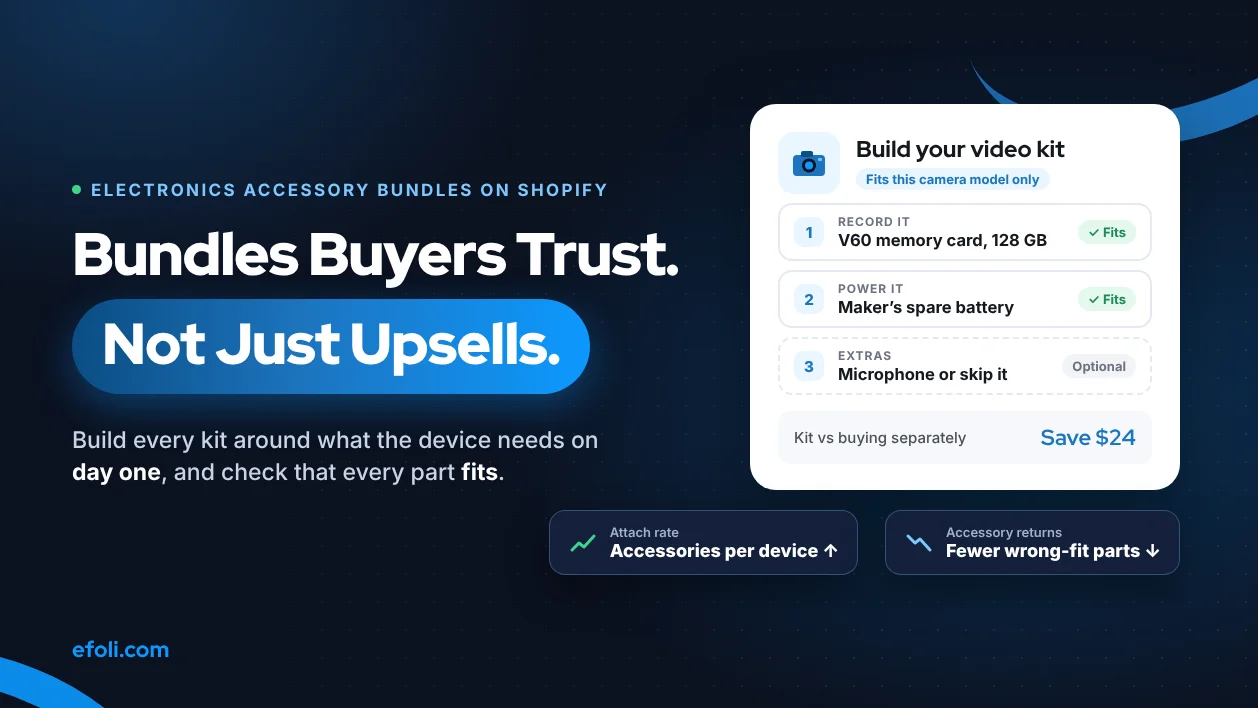
A good electronics accessory bundle gives the buyer everything the device needs on day one, checks that every part is compatible, and lets them skip what they already own. Build fixed kits with Shopify's free Bundles app, use an app such as Push Bundle when buyers need to choose their own accessories, and keep custom code for compatibility rules across a large catalog.
This playbook is for Shopify agencies, developers and in-house teams building electronics accessory bundles for cameras, phones, laptops, drones, audio and gaming stores. It goes from planning to QA and handoff. Push Bundle is part of the eFoli app family, so we've also said where the free native app is enough.
Last checked: 12 November 2026, against the sources linked in this post.
Who this is for: Shopify agencies, developers and in-house teams building accessory bundles for camera, phone, laptop, drone, audio or gaming stores.
Disclosure: Push Bundle and DiscountRay are part of the eFoli app family. The post says where the free native Bundles app is enough.
Key takeaways
Buyers distrust accessory bundles when they look like a way to clear stock. Build them around what the device needs to work on day one, not around margin.
Compatibility is the whole job. A card that's too slow for 4K video, or a charger with too little power, turns a bundle into a return.
Shopify's free Bundles app handles fixed kits and multipacks, with up to 30 components and 100 variants per bundle. It doesn't support mix-and-match (Shopify Help Center).
Use an app when buyers need to pick their own accessories, build a kit step by step or get tiered savings. Push Bundle's Growth plan ($14 a month) covers build-a-box, mix-and-match and cross-sell bundles.
Measure attach rate and the return rate of bundled accessories, not just average order value.

Why accessory bundles feel like upselling
Every electronics shopper has bought a "starter kit" with a cheap bag, a slow memory card and a cleaning cloth they never used. So when they see a bundle, their first thought isn't "useful". It's "Yeah, but I can get a better card cheaper elsewhere".
That objection is the brief. A bundle earns its place when it answers three questions faster than the buyer can answer them alone:
Will this work with my device? Not "universal". This exact model.
Do I need it on day one? A spare battery for a camera, yes. A lens pen, probably not.
Am I actually saving money or time? A saving in dollars, or a saving in research and returns.
If the bundle can't answer all three, it's an upsell with a discount sticker. Buyers notice, and the ones who buy anyway are the ones who return the parts they didn't want.
Before you build: the 45-minute requirements call
Most bundle projects go wrong in the first meeting, when the brief is "we want bundles to raise AOV". That brief produces the starter kit nobody trusts. Book 45 minutes with the merchant and the person who answers customer questions, and come out with answers to these:
Question | Why it matters |
|---|---|
Which 5 to 10 devices sell most? | Bundles for the long tail rarely pay back the setup time |
What do customers ask in chat before buying? | The questions are your bundle list, word for word |
Which accessories come back most often, and why? | A returned accessory is a compatibility or expectation problem |
Where does compatibility data live today? | A spreadsheet, the supplier feed, or someone's memory |
Who adds new models, and how often? | Bundles need updating on every launch |
Do you sell in a physical store? | Bundles must work on POS at the same price |
How do discounts stack in your big sales? | Bundle savings on top of Black Friday codes can wipe out margin |
What does the returns policy say about kits? | Partial returns need a rule before launch |
The chat question is the most useful one. If support answers "Is this card fast enough for 4K on the X-T5?" ten times a week, that's not a support problem. It's a missing bundle, and the customer has just written your bundle title for you.
Ask for a list of the last 50 accessory returns with the reason codes. It takes the merchant ten minutes to export and it will show you which accessories should never go into a bundle.
Step 1: Start from the day-one job, not the accessory list
Before you open any app, sit with the merchant and list what a buyer needs to use each hero product properly on the first day. Don't start from what's in the warehouse.
Device | Day-one job | Accessories that do the job | Usually leave out |
|---|---|---|---|
Mirrorless camera | Shoot and record video straight away | Memory card of the right speed class, spare battery | Cleaning kit, generic bag |
Smartphone | Protect it and charge it fast | Case for the exact model, screen protector, charger with the right power | Pop sockets, cables they already own |
Laptop | Connect it to the desk setup | USB-C hub with the ports they need, sleeve | Software subscriptions |
Drone | Fly for longer than one battery | Extra batteries, charging hub, memory card | Decorative skins |
Games console | Play with a friend | Second controller, charging dock | Novelty accessories |
The "Usually leave out" column matters as much as the middle one. Each item you remove makes the bundle easier to trust.
This step usually turns 15 candidate bundles into 4 good ones. That's a better result than it sounds. Four bundles that buyers trust beat fifteen they scroll past.
Step 2: Check compatibility before you bundle anything
In electronics, compatibility isn't a detail. It's the reason the bundle exists. These are the checks that catch most problems:
Memory cards. Speed matters as well as capacity. The SD Association's Video Speed Class symbols (V6 to V90) show a card's minimum write speed for video, and V60 and V90 cards need a UHS-II or faster device. Match the class to the camera's highest video mode.
Chargers. Match the charger's power output to what the device can draw. A charger that's too weak is slow. Mixing up connectors leads to returns.
Cases and screen protectors. Match the exact model, including Pro, Plus and Max versions. "Fits iPhone" isn't good enough.
Mounts and adapters. Check thread sizes, lens mounts and port types.
Batteries. Use the manufacturer's part number, not "compatible with".
Store this data properly. The cleanest pattern is a metafield on each accessory listing the devices it fits, and a metafield on each device listing its key specs (card slot type, charging power, mount). Then the bundle rule, the product page and support all read from one source.
If the catalog has more than a few hundred devices and accessories, compatibility needs its own data project. Budget for it separately from the bundle build, and agree who keeps it up to date when a new model launches.

Step 3: Pick the bundle type for each job
Not every accessory set should be the same kind of bundle. Match the type to how much the buyer needs to choose.
Bundle type | When to use it | Electronics example |
|---|---|---|
Fixed kit | Every buyer needs the same parts | Drone + 2 extra batteries + charging hub |
Good, better, best | Buyers differ in how much they'll use the device | Camera with a 64 GB card; with 128 GB and a spare battery; with both plus a microphone |
Build your own | Buyers want to choose from a set of compatible options | "Pick a case, a protector and a charger for your phone model" |
Cross-sell add-on | The main product sells alone, accessories are optional | "Add a USB-C hub and save 10%" |
Multipack | Buyers need several of the same item | Pack of 3 batteries, pack of 4 cables |
A good rule: the more a buyer's setup varies, the more choice the bundle needs. Fixed kits work for drones, where nearly everyone needs more batteries. Phones need build-your-own, because people already own different chargers.
If you're planning tiers, our Push Bundle team's post on good, better, best bundle pricing shows how to set three price points that don't cannibalise each other.
Step 4: Choose the tool for electronics accessory bundles on Shopify
Here's how the three main options compare for accessory bundles.
Need | Shopify Bundles (free) | Push Bundle | Custom build |
|---|---|---|---|
Fixed kits and multipacks | Yes | Yes | Yes |
Mix and match or build your own | No | Yes, Growth plan | Yes |
Step-by-step kit builder | No | Yes, Growth plan | Yes |
Volume and tiered discounts | No | Yes, free plan | Yes |
Cross-sell bundles | No | Yes, Growth plan | Yes |
Selling in store on POS | Yes | Yes | Depends on the build |
Compatibility filtering by device | No | Limited to the products you put in each bundle | Yes |
Cost | Free | Free or $14 a month | Project fee plus upkeep |
Sources: Shopify Help Center: Shopify Bundles and the Push Bundle App Store listing, checked 12 November 2026.
Some limits of the native app worth knowing before you promise anything to a merchant (Shopify Help Center):
Bundles can't contain other bundles.
Bundles don't work with subscriptions or other purchase options.
A bundle has its own SKU. If a component's SKU changes, the bundle has to be deleted and made again.
Bundles can't be used in exchanges.
Import, export and bulk editing aren't supported.
For most electronics stores, the practical split is: native Shopify Bundles for two or three fixed kits, Push Bundle for build-your-own and cross-sell bundles, and custom work only when compatibility has to filter the options automatically across many models.

Step 5: Set up build-your-own bundles so wrong choices can't happen
The easiest compatibility rule is the one the buyer never has to think about. Instead of one giant "accessories for any phone" builder, build one per model family, so every option on screen fits.
A typical setup in Push Bundle's multi-step builder:
Step 1: Protection. Cases and screen protectors for this model only. Minimum 1.
Step 2: Power. Chargers and cables that suit the model. Optional.
Step 3: Extras. Car mount, stand, earbuds. Optional, maximum 2.
Push Bundle's Growth plan lets you set minimum and maximum quantities and variant limits for each step, and box-specific discounts. Use the minimum to make the bundle make sense (no "bundle" with zero items), and the maximum to stop a buyer filling a builder with ten cases.
Name the steps by the buyer's job, not your category names. "Protect it" reads better than "Cases & Covers (Category 14)".

Step 6: Price it so the saving is real
Electronics buyers compare prices more than most. A bundle saving that doesn't survive a quick search does damage beyond that one sale.
Show the saving in money. "Save $24" is clearer than "Save 12%" for a $200 kit.
Compare against your own prices. The "you save" figure should be the difference from buying the same items separately in your store today.
Don't inflate the "worth". If the bag is never sold alone, it has no honest standalone price.
Check the margin per component. A discount on a low-margin card plus a high-margin case can still lose money. Price the bundle as a whole.
Decide how bundle discounts stack with codes and sales. Write it down before Black Friday, not during it.
For tiered savings, such as "buy 2 accessories, save 10%; buy 3, save 15%", Push Bundle's free plan includes volume bundle discounts. If the store also needs separate trade or business prices, DiscountRay handles B2B pricing by customer group or company.
Step 7: Write the bundle page so the value is obvious
Electronics copy tends to list specs. Specs are the evidence, not the reason to buy. For every item in a bundle, finish the sentence "...which means...":
"V60 card" becomes "Records the camera's highest 4K setting without the card being the reason a clip stops".
"Second battery" becomes "Swap at lunch and keep shooting through the afternoon".
"65 W USB-C charger" becomes "Charges the laptop and the phone from one plug in your bag".
Keep three more things on the page:
A "fits" line at the top: "For the Sony A7 IV only". It removes the biggest doubt before it forms.
A "you might already own" note, for example "Already have a fast card? Choose the kit without one." It sounds like it loses a sale. It actually stops a return and builds trust for the next purchase.
The saving in money, next to the separate prices, so buyers don't have to do the sum.
For accessory-led stores, a related list of Shopify apps for phone accessory stores on the DiscountRay blog covers the other tools these stores tend to use.
Step 8: Plan for stock outs and returns
Bundles fail in the warehouse more often than on the product page. Agree these rules with the merchant before launch.
When one component is out of stock. With Shopify Bundles, available bundle quantity is limited by the component with the lowest stock. In a build-your-own bundle, the out-of-stock option should be marked, not hidden, so buyers know why it's missing. Our post on what happens when a bundle product is out of stock covers the options in detail.
Partial returns. If a buyer returns only the card from a camera kit, what do they get back? The full card price, or the discounted share? Put the answer in the returns policy.
Warranty. Accessories often have different warranty terms from the device. Say so on the bundle page.
Pick and pack. Make sure every component appears on the packing slip, so the warehouse doesn't send a kit without its battery.
Step 9: Test before launch
Run every test on a phone and a desktop, and as a logged-in and a guest customer.
# | Test | Pass when |
|---|---|---|
1 | Add the fixed kit to cart | All components appear with the right prices |
2 | Build a bundle with the minimum items | The bundle adds to cart and the discount applies |
3 | Try to build with fewer than the minimum | The builder stops you with a clear message |
4 | Try to go over the maximum | The builder stops you |
5 | Choose an out-of-stock option | It's marked and can't be added |
6 | Apply a discount code on top | The stacking rule you agreed is what happens |
7 | Change quantity in the cart | The bundle stays valid or shows a clear message |
8 | Check out with an express wallet | The bundle price holds |
9 | Ring up the bundle on POS, if it's sold in store | The same price and components appear |
10 | Look at the order in admin | Every component is listed for the warehouse |
11 | Return one component | The refund matches the policy |
12 | Open the product page on a slow connection | The builder loads and is usable |
If the bundle sells in a physical store too, our guide to selling Shopify bundles on POS explains how bundles behave at the counter.
Step 10: Hand it over properly
A bundle that only the agency understands will break the first time the merchant adds a new phone model. Hand over:
A one-page list of every bundle: what's in it, who it's for and which tool runs it.
The compatibility data source and who updates it when a new model launches.
The pricing and stacking rules, written as plain sentences.
The test script above, so the merchant's team can rerun it before each sale.
A short screen recording of creating a new build-your-own bundle.
When not to bundle at all
Some accessories sell better on their own. Skip the bundle when:
Buyers already own the item. Most phone buyers have a cable. A cable in every phone bundle mostly adds cost and returns.
The choice is personal. Headphones, keyboards and bags depend on taste. Offer them as optional add-ons, not as part of a kit.
Compatibility can't be checked. If you can't say for certain that a part fits, don't put it in a bundle. Sell it separately with a clear fit note.
The device is a replacement purchase. Someone upgrading a laptop often keeps their old hub and sleeve. Show accessories after the device is in the cart, not as a forced kit.
The saving would be tiny. A $2 saving on a $600 kit looks like a trick. Either make the saving meaningful or present the set as a time-saver with no discount at all.
A bundle that solves nothing is worse than no bundle, because it teaches buyers to ignore the next one.
Mistakes we see in accessory bundle projects
One "starter kit" for every model. It guarantees that some parts won't fit some buyers.
Bundling slow stock. Buyers can tell when a bundle exists to clear old cases. It hurts trust in the bundles that are good.
Hiding the separate prices. If buyers can't see what they save, they assume they don't.
No owner for compatibility data. The bundle is right on launch day and wrong the day a new model arrives.
Discounts that stack by accident. A bundle saving plus a sitewide code plus a loyalty reward can sell a kit below cost.
Testing only on desktop. Most bundle builders get used on phones, where a long step-by-step builder needs the most care.
Forgetting the counter. If the store also sells in person, staff need the same bundles on POS, or customers get a different price in the shop.
Measure what matters: attach rate, not just order value
Average order value goes up with almost any bundle, including bad ones. The more useful number is attach rate: how many accessory units sell with each device. Wikipedia's definition describes it as secondary units sold as a result of selling a primary product, often shown as a percentage of primary units.
A simple way to track it each month:
Metric | How to work it out | What a good change looks like |
|---|---|---|
Attach rate | Accessory units sold with a device, divided by devices sold | Goes up after launch |
Bundle share | Device orders that include a bundle, divided by all device orders | Steady or rising |
Accessory return rate | Returned bundled accessories, divided by bundled accessories sold | Goes down, or stays low |
Support questions about fit | "Will this work with my...?" messages each week | Goes down |
If attach rate rises and accessory returns rise with it, the bundle is selling things people don't want. Remove the item that comes back most.
A worked example: one camera store, three bundles
This is a made-up but typical case. A small camera shop on Shopify sells mirrorless cameras, lenses and accessories, mostly online, with one physical store.
Before the project, every camera page had the same "Starter kit" with a bag, a 32 GB card and a cleaning cloth. Buyers asked in chat whether the card was fast enough for 4K, and many returned it.
The agency rebuilt it in three parts:
A fixed kit per camera body in Shopify's free Bundles app: the camera, a card in the right video speed class for that model, and a spare battery with the maker's part number. The bag and cloth were dropped.
A build-your-own video bundle in Push Bundle: step 1 picks a microphone that fits the camera's input, step 2 picks a card, step 3 adds optional extras. Each camera family got its own builder, so every option fits.
A cross-sell add-on on lens pages: "Add a UV filter in this lens's thread size."
The shop now tracks attach rate and card returns each month, and reviews the bundles whenever a new body launches.
Just as useful is what the agency chose not to build. It didn't create a single "accessories for every camera" builder, because one wrong option would undo the trust the new kits were meant to earn. It didn't add a discount to the cross-sell filter, because the shop already priced filters competitively and a tiny saving would have looked like a gimmick. And it didn't build custom compatibility code, because the shop sells about a dozen camera bodies, a number that a metafield and one person's half hour per launch can handle. If the catalog grows to hundreds of models, that decision gets revisited.
FAQ
What is a good accessory bundle for electronics?
Can Shopify create accessory bundles without an app?
How do I stop customers choosing accessories that don't fit?
What's the difference between attach rate and average order value?
Do accessory bundles work in a physical store?
Should an agency build custom bundle logic for an electronics store?
How many accessory bundles should a store launch with?

Anika Anamta Mehnaz
This article is written by Anika Anamta Mehnaz, a Content Writer and Content Marketing Strategist specializing in Shopify, eCommerce, and SaaS. With over four years of content writing experience, she creates SEO and AI search-optimized content that helps Shopify merchants make better business decisions through practical, research-backed insights. Her work covers Shopify apps, product variants, bundles, discounts, B2B commerce, and conversion-focused strategies. Outside of work, Anika enjoys watching anime, reading John Grisham novels, and discovering new ideas in digital marketing and e-commerce. If you enjoy discussing Shopify, content marketing, or online growth, feel free to connect with her. Twitter: https://x.com/mehnaz2201 Medium: https://medium.com/@mehnaz_78932
Keep reading
View all articles →
OrderRules or Native Shopify Inventory: What Actually Limits Bakery Orders?
November 12, 2026 • 17 min read

A Sofa, 200 Fabric Choices and No Price: When Furniture Needs a Quote on Shopify
November 12, 2026 • 18 min read
The Skincare Routine Is the Product: Shopify Agencies That Understand Beauty Bundling
November 11, 2026 • 18 min read