Build Fashion Promotions on Shopify That Don't Turn Stacked Discounts Into a Surprise
A playbook for fashion promotions on Shopify: how discounts combine, a combination matrix, margin floors, sale-item exclusions, test baskets and a handoff rulebook.
On this page
- Key takeaways
- How Shopify decides what stacks
- Step 1: Write the requirements before touching the admin
- List every offer that could touch an order
- Build a combination matrix
- Set a margin floor per category
- Agree on who approves new offers
- Step 2: Do the margin math on real baskets
- Step 3: Configure the rules
- Native Shopify settings
- Where an app helps
- Outfit bundles
- Step 4: Look for the edge cases
- Mixed markdowns within one product
- Returns after an order discount
- Exchanges and price changes
- Manual discounts
- Social and external checkouts
- Multiple currencies
- Loyalty and gift card stacks
- Step 5: Check the pricing rules in each market
- Step 6: Test baskets, not discounts
- Step 7: Hand over a rulebook, not just a store
- Worked example: a winter sale for a fashion brand
- What this means for agencies
- Common mistakes to avoid
- The short version
- FAQ
Short answer: Before a fashion sale goes live, write down every offer that could touch one order: markdowns, automatic discounts, codes, bundle prices, free shipping and loyalty rewards. Then decide which of them are allowed to combine. Shopify applies product discounts first, then order discounts on the reduced subtotal, then shipping discounts. Two percentage order discounts are each worked out on the same subtotal, so 20% and 10% add up to 30%. Discount codes don't skip items that are already marked down unless you exclude those items. Set a margin floor for each category, turn on only the combinations you have priced, keep sale items out of code discounts when they should be, and test real baskets before launch. Then hand the brand team a short rulebook so the next promotion doesn't undo the work.
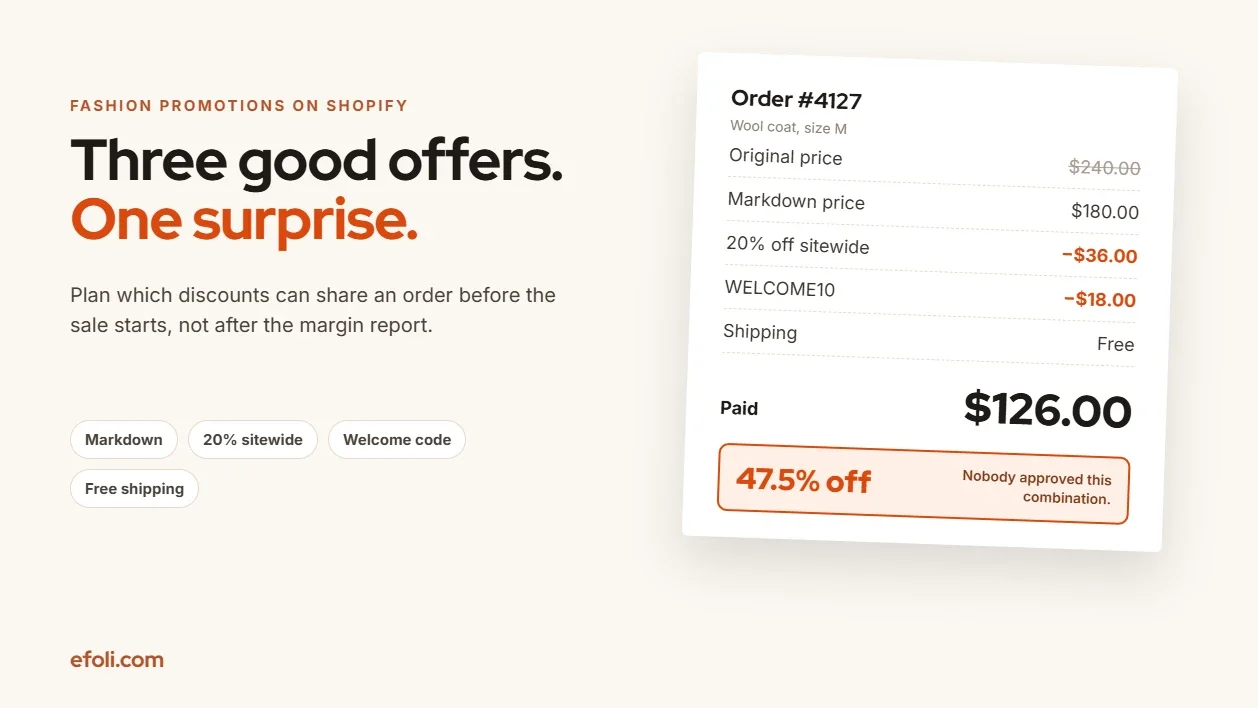
A customer buys a wool coat during a winter sale. The coat was $240 and has been marked down to $180. A sitewide "20% off everything" automatic discount is running. She has a 10% welcome code from signing up last week, and the order qualifies for free shipping. Each offer was signed off by a different person, and each made sense on its own.
Together they took $114 off the coat's original price, which is 47.5%. Nobody planned that, and nobody noticed until the weekly margin report came in.
This is the most common promotion problem in fashion ecommerce. It isn't one bad discount. It's several reasonable discounts that were never looked at side by side. This playbook is for Shopify agencies and in-house ecommerce teams that set up fashion promotions. It covers how Shopify decides what stacks, how to set requirements, how to configure the rules, which edge cases to look for, how to test, and what to hand over to the brand team afterwards.
Key takeaways
A stacking problem is usually a planning problem. List every offer that can touch an order before you configure any of them.
Shopify applies product discounts, then order discounts, then shipping discounts. Two percentage order discounts are each calculated on the same subtotal.
Discount codes apply to the current selling price, including items that are already on sale. If sale items should be excluded, you have to exclude them.
Set a margin floor per category, then turn on only the combinations that stay above it.
Order discounts are spread across the items in the order, which affects what each return refunds.
In the EU and UK, the rules on advertised reductions are stricter than many US teams expect.
Test baskets, not discounts. Every combination you allow should be tested with a real cart before launch.
How Shopify decides what stacks
Most stacking surprises come from not knowing the rules, so start there. Shopify's help center explains how discount combinations work, and a few points matter most for fashion stores.
There are three classes of discount. Product discounts apply to specific items or collections. Order discounts apply to the cart subtotal. Shipping discounts change the shipping cost.
Combinations are opt-in, per discount. When you create a discount, you choose which classes it can combine with. If two discounts can't combine, Shopify gives the customer the one that saves them more.
The order of application is fixed. Product discounts come first. Order discounts then apply to the subtotal after product discounts. Shipping discounts come last.
Percentage order discounts don't compound. Shopify's combination examples show that when two percentage order discounts apply, each is calculated on the same subtotal. A 10% and a 15% order discount on $350 take off $87.50 in total. When a percentage and a fixed-amount order discount apply together, the percentage comes off first, then the fixed amount.
There are limits. A store can have up to 25 active automatic discounts, including discounts created by apps. A customer can use up to five product or order discount codes and one shipping discount code on the same order.
Some rules depend on your plan and channel. Several product discounts on the same line item need Shopify Plus. Combinations work on the online store, the Storefront API and Shopify POS, but not on external checkouts such as social channels. Custom discounts that staff add by hand, for example a POS cart discount or a draft order discount, always apply, whatever the combination settings say.
Step 1: Write the requirements before touching the admin
The first deliverable isn't a discount. It's a one-page promotion plan that the brand, the finance lead and the agency all agree on.
List every offer that could touch an order
For a typical fashion sale, that list includes:
Markdowns: items with a lower price and a compare-at price.
Automatic discounts: "20% off outerwear" or "spend $150, save $25".
Codes: welcome codes, influencer codes, customer service codes, loyalty rewards.
Bundle prices: "complete the look" sets or multi-buy offers.
Shipping offers: free shipping over a threshold.
Staff and manual discounts: POS and draft order discounts.
Build a combination matrix
Put every offer in the rows and again in the columns, and decide for each pair whether they can combine. Here is a simple version for a winter sale:
Offer | Markdown | 20% off sitewide | Welcome code 10% | Outfit bundle | Free shipping |
|---|---|---|---|---|---|
Markdown | n/a | No | No | No | Yes |
20% off sitewide | No | n/a | No | No | Yes |
Welcome code 10% | No | No | n/a | Yes | Yes |
Outfit bundle | No | No | Yes | n/a | Yes |
Free shipping | Yes | Yes | Yes | Yes | n/a |

The matrix does two jobs. It makes the decisions visible to people who don't use the Shopify admin. And it becomes the checklist for setup and testing, because every "yes" needs a combination setting and a test basket.
Set a margin floor per category
A blanket "no more than 40% off" doesn't work in fashion, because margins vary so much by category. Basics might run on thin margins, while outerwear and accessories can take deeper cuts. Ask finance for a floor for each category, expressed as the lowest gross margin the business will accept on an order line after every discount.
Then check each "yes" in the matrix against the floor. If the welcome code plus an outfit bundle takes accessories below the floor, that combination becomes a "no" for accessories, or the bundle price changes.
Agree on who approves new offers
Most stacking problems arrive mid-promotion. A marketing manager adds a code for an influencer, or customer service creates a goodwill code, and nobody checks it against the matrix. Name one person who approves any new discount during the promotion and who updates the matrix when something changes.
Step 2: Do the margin math on real baskets
Margin math only means something with real prices. Here's the coat from the introduction, with illustrative costs.
Line | Amount |
|---|---|
Original price | $240 |
Markdown price (compare-at $240) | $180 |
20% sitewide order discount | −$36 |
10% welcome code (order discount, on the same $180) | −$18 |
Price paid | $126 |
Product cost | $72 |
Shipping cost to the brand | $8 |
Payment fees (about 3%) | $3.78 |
Gross margin on the line | $42.22 |
At full price, the same coat would have made about $153 after the same costs. During the sale it made $42. That may still be acceptable, but it should be a decision rather than a surprise.
Three things change the picture in fashion:
Returns. Fashion return rates are high, and a discounted order that comes back still costs shipping and handling. Ask the brand for its return rate by category and apply it to the margin.
Markdown history. If the coat has been on sale for most of the season, the "original price" is less meaningful, both for margin planning and for the pricing rules covered later.
The full basket. A shopper who adds a full-price scarf to reach a threshold changes the economics. Model at least three baskets: a single sale item, a mixed basket and a threshold-chasing basket.
For a deeper look at the arithmetic, Anika's guide to calculating profit margins after Shopify discounts walks through the formulas, and the Push Bundle team covers bundle profit margins for set pricing.
Step 3: Configure the rules
With the matrix agreed and the math checked, configuration is mostly a matter of ticking the right boxes and knowing where the native tools stop.
Native Shopify settings
Set combinations on every discount. In each discount's settings, choose which classes it can combine with. Work from the matrix, not from memory. A discount created before the promotion may have combination settings nobody remembers.
Keep sale items out of codes when they should be. Shopify doesn't automatically exclude items with a compare-at price from discount codes. The usual native approach is an automated collection based on compare-at price, for example "compare-at price is empty", and then limiting the code to that collection. Test it carefully: automated collection conditions work at product level, so a product where only some variants are on sale may not behave as expected.
Use customer eligibility for welcome codes. Restricting a welcome code to a segment of new customers, and limiting it to one use per customer, stops it from becoming a general discount.
Schedule everything. Give every discount a start and end date. An open-ended code is a future stacking problem.
Watch the automatic discount limit. With 25 active automatic discounts per store, including app discounts, a busy promotion calendar can fill up. Retire finished offers rather than leaving them active but irrelevant.
Check Rollouts if you use them. Shopify's Rollouts feature lets you test changes to a share of traffic. Anika's guide to discounts in Shopify Rollouts explains how discount tests behave, and Shopify notes that treatment and control groups in an experiment may receive different sets of discounts.
Where an app helps
Native discounts handle simple codes and automatic offers well. Fashion promotions often need more structure:
Tiered and volume offers, such as "buy 2, save 10%; buy 3, save 15%", across a collection.
Customer-specific pricing, for VIP or loyalty tiers.
Combination control in one place, so the team can see which offers interact.
DiscountRay is a Shopify all-in-one discount app that covers tiered and volume pricing, BOGO offers, pricing by customer group, tag or segment, and discount combination controls. The free Starter plan includes quantity discounts, tiered pricing and unlimited automatic discounts. The Growth plan, at $14 a month with a 14-day trial at the time of writing, adds bulk and personalized codes and scheduling. Anika's post on discount thresholds is a useful companion when you're setting spend tiers.
Outfit bundles
"Complete the look" bundles are popular in fashion and need their own row in the matrix. Push Bundle is a Shopify bundle app that supports cross-sell bundles with fixed, percentage or set-price discounts, and mix-and-match bundles on its Growth plan, which is $14 a month with a 14-day trial at the time of writing. Its listing also mentions discount stacking controls. Decide whether a bundle price can combine with a sitewide offer, then test it, because a bundle discount plus a sitewide percentage is one of the most common unplanned stacks.
The Push Bundle team's guide to complete-the-look bundles covers how to build outfit sets, and its post on BFCM bundle pricing helps you price sets for a sale period.
Step 4: Look for the edge cases
Once the main rules are set, the edge cases are where most of the remaining risk sits. These are the ones that come up most often in fashion stores.
Mixed markdowns within one product
A dress has five sizes. Two sizes are marked down because they're overstocked, and three aren't. If your sale-item exclusion depends on an automated collection, the whole product may be in or out, not individual variants. Decide what should happen, then test a basket with a marked-down size and a full-price size.
Returns after an order discount
Order discounts aren't kept as a single amount on the order. Shopify spreads them across the items. If a customer used "$30 off orders over $150" on three items and returns one, the refund for that item reflects its share of the discount, not its full price. If the remaining items now fall below $150, Shopify doesn't take the rest of the discount back.
Customer service needs to know this before the sale, not after the first complaint. Write a short answer they can use, and decide whether the brand wants to honour the original offer on partial returns.
Exchanges and price changes
A customer exchanges a coat for a different size after the sale ends. Does the new item carry the sale price? Agree the policy in advance and make sure the returns process matches it.
Manual discounts
Staff discounts, POS cart discounts, and draft order discounts always apply, regardless of combination settings. If store staff can add a discount on top of a sale price, that's a stacking route the matrix doesn't control. Give staff a written rule.
Social and external checkouts
Discount combinations don't apply to external checkouts such as social channels. If the brand sells through those channels during the promotion, check how offers will behave there and tell customers if they differ.
Multiple currencies
If you sell in several markets, fixed-amount discounts may be converted and rounded. A "$25 off" offer might look different in euros or pounds. Check each market's checkout, not only the default currency.
Loyalty and gift card stacks
Loyalty apps often create discount codes at checkout. Those codes follow the same combination rules as any other code, so set their combination settings to match the matrix. Gift cards are a payment method rather than a discount, so they don't count toward the combination limits, but they do affect how refunds are paid back.
Step 5: Check the pricing rules in each market
Stacking isn't only a margin issue. How you advertise reductions is regulated, and the rules differ by market. This section isn't legal advice. Use it to decide which questions to send to the brand's legal contact.
United States. The FTC's long-standing Guides Against Deceptive Pricing warn against "former price" comparisons with prices that weren't genuinely offered. If a coat has been "$240, now $180" for most of the season, the $240 reference is harder to justify. State laws can add their own requirements.
European Union. Under the EU Price Indication Directive, as amended by the Omnibus Directive, any announced price reduction has to show the prior price, which is generally the lowest price applied in the 30 days before the reduction. A store that raises prices before a sale and then advertises a reduction from the higher price is exposed. Check the Directive text and the national rules for each country you sell to.
United Kingdom. The Digital Markets, Competition and Consumers Act 2024 brought new consumer protection powers into force on 6 April 2025, including the ability for the CMA to impose fines of up to 10% of global turnover, and a ban on drip pricing. A law firm summary from Cooley covers the main changes.
The practical step for the agency: make sure the "was" price shown on the storefront, through the compare-at price, matches what the brand can justify in each market. If it doesn't, change the compare-at price for that market or remove the comparison.
Step 6: Test baskets, not discounts
Testing one discount at a time tells you that each discount works. It doesn't tell you what happens when three of them meet. Build a short test plan from the matrix. Each "yes" gets at least one basket, and each "no" gets a basket that proves the block works.
# | Basket | Offers in play | Expected result |
|---|---|---|---|
1 | One marked-down coat | Markdown, sitewide 20%, welcome code | Only the markdown applies; codes are rejected or don't apply to the coat |
2 | Full-price knitwear | Sitewide 20%, welcome code | Best single discount applies (they don't combine) |
3 | Outfit bundle | Bundle price, welcome code | Both apply; margin stays above floor |
4 | Mixed basket over threshold | Markdown, full-price item, free shipping | Markdown on sale item, free shipping on order |
5 | Dress, one size on sale | Sale size, full-price size, welcome code | Code applies only to the full-price size |
6 | Three items, one returned | $30 off over $150 | Refund reflects the returned item's share of the discount |
7 | EU market checkout | Markdown with compare-at | Compare-at price matches the 30-day lowest price |
8 | POS sale | Markdown, staff discount | Staff follow the written rule |

Run the baskets on a duplicate theme or a development store with the same discounts, then again on the live store once the promotion is scheduled but before it starts. Take a screenshot of each checkout total. If finance asks later how an order ended up at a certain price, those screenshots are the answer.
The DiscountRay team's guide to discount stacking on Shopify has more examples of how specific combinations calculate.
Step 7: Hand over a rulebook, not just a store
When the agency's work ends, the brand team will run the next promotion. A short rulebook means they don't have to rebuild the logic from scratch.
The promotion rulebook covers:
The combination matrix, kept up to date, with the date of the last change.
Margin floors by category, and who owns them.
The approval rule for any new discount during a promotion.
How sale items are excluded from codes, including the collection used and its known limitation.
The test basket list, to run before every promotion.
The customer service script for partial returns, exchanges and "my code didn't work" questions.
The pricing note for each market: how compare-at prices are set and checked.
The clean-up step: expiring finished codes and automatic discounts after each promotion.
After the sale, review four numbers:
Average effective discount per order, compared with the plan.
Orders that went below the margin floor, and which combination caused them.
Discount codes used outside their intended audience, such as a welcome code used by returning customers.
Return rate on discounted orders compared with full-price orders.
Anika's guide to post-BFCM discount strategy is a useful next read for planning what happens after a big sale, and eFoli's BFCM discount strategy covers the broader planning.
Worked example: a winter sale for a fashion brand
Here's how a fictional brand, Harbour & Thread, might plan its winter sale using this playbook. The numbers are illustrative.
The offers:
Markdowns of 25% on selected outerwear.
20% off sitewide for three days.
A 10% welcome code for new subscribers.
"Complete the look" outfit bundles at a set price.
Free shipping on orders over $100.
The decisions:
Markdowns don't combine with any percentage discount. The outerwear markdown was already deep, and the margin math showed that adding 20% took several coats below the floor. The sitewide 20% is limited to a collection of full-price products.
The welcome code doesn't combine with the sitewide offer. During the three-day event, a new subscriber gets the better of the two. Outside it, the welcome code works on full-price items.
Outfit bundles can combine with the welcome code, but not with the sitewide offer. The bundle price already includes a saving, and the margin floor allowed one more 10% but not 20%.
Free shipping combines with everything. It was priced into the plan from the start.
The setup:
An automated collection, "Full price", based on an empty compare-at price, used to limit the sitewide discount and the welcome code.
Three products with mixed variant markdowns moved out of the sale so the collection works cleanly.
All discounts scheduled with end dates and checked against the matrix.
The tests:
Eight test baskets, including a returned item from a threshold order. The test showed that a returned bundle item refunded its share of the bundle discount, which customer service hadn't expected. A short script was added to the rulebook.
The result: no order went below the margin floor, and the post-sale review found one influencer code used outside its audience. The code was limited to one use per customer for the next promotion.
What this means for agencies
Promotion setup is often treated as a quick task: create the codes, schedule the automatic discounts, done. For fashion brands with markdowns, bundles and loyalty rewards, it's closer to a small project:
Promotion workshop: list offers, build the matrix, agree margin floors.
Margin modelling: at least three baskets per category.
Configuration: native settings, apps, sale-item exclusions.
Market check: reference prices and compare-at prices per market.
Basket testing: every "yes" and every "no" in the matrix.
Handoff: rulebook, customer service script, post-sale review.
Scoping it this way protects the agency too. When someone asks why an order got 47% off, there's a matrix and a test log that show what was agreed.
Common mistakes to avoid
Approving offers one at a time. Each offer looks fine alone. Only the matrix shows what happens when they meet.
Forgetting that codes apply to sale prices. If sale items should be excluded, exclude them.
Assuming percentage discounts compound. Two percentage order discounts are each calculated on the same subtotal, so 20% and 10% are 30%, not 28%.
Leaving old codes active. Every open-ended code is a future stack.
Ignoring manual discounts. POS and draft order discounts apply whatever the settings say.
Copying US reference pricing to EU and UK pages. The rules on advertised reductions are different.
Testing discounts instead of baskets. A discount that works alone can still break the plan in combination.
The short version
Fashion promotions go wrong when good offers meet without a plan. List every offer, build a combination matrix, set a margin floor for each category, and turn on only the combinations you've priced. Keep sale items out of codes where they should be, check reference prices for each market, test real baskets, and hand the brand a rulebook so the next sale starts from the same rules. Then the only surprise in the margin report is a pleasant one.
FAQ
Can you stack discounts on Shopify?
Do Shopify discount codes apply to sale items?
How does Shopify calculate two percentage discounts?
What happens to discounts when a customer returns one item?
How many automatic discounts can a Shopify store have?
Do I need an app to control discount stacking?

Anika Anamta Mehnaz
This article is written by Anika Anamta Mehnaz, a Content Writer and Content Marketing Strategist specializing in Shopify, eCommerce, and SaaS. With over four years of content writing experience, she creates SEO and AI search-optimized content that helps Shopify merchants make better business decisions through practical, research-backed insights. Her work covers Shopify apps, product variants, bundles, discounts, B2B commerce, and conversion-focused strategies. Outside of work, Anika enjoys watching anime, reading John Grisham novels, and discovering new ideas in digital marketing and e-commerce. If you enjoy discussing Shopify, content marketing, or online growth, feel free to connect with her. Twitter: https://x.com/mehnaz2201 Medium: https://medium.com/@mehnaz_78932
Keep reading
View all articles →
Build Vitamin Kits Around Choices, Not a Wall of Product Variants
November 23, 2026 • 18 min read
How to Build Retail and Wholesale Pricing Without Splitting the Store
November 23, 2026 • 17 min read
The Restaurant Orders by the Case. Your Website Sells by the Jar.
November 23, 2026 • 17 min read