Build Vitamin Kits Around Choices, Not a Wall of Product Variants
Twelve supplements and a five-slot pack make 792 possible kits. Here is how to build a vitamin pack builder on Shopify around choices and guardrails instead of a wall of variants.
On this page
- Key takeaways
- Why vitamin kits break when they are built as variants
- The playbook: six steps to a vitamin pack builder that feels guided
- Step 1: Decide what the pack actually is
- Step 2: Turn the catalog into steps
- Step 3: Build guardrails for overlapping nutrients
- Step 4: Choose the build method that fits your catalog
- Step 5: Price the pack so swaps don't feel random
- Step 6: Show the label before the cart, and keep claims honest
- What the finished builder looks like
- Fulfilment details that save support tickets
- Common mistakes we see in vitamin pack builders
- Agency notes: scoping a vitamin builder project
- A 15-point QA checklist before launch
- Wrapping up
- FAQ
Short answer: A vitamin pack builder on Shopify works best when the shopper makes a few guided choices, one step at a time, inside one bundle product, instead of picking from hundreds of pre-made variants. Twelve supplements and a five-slot pack already make 792 possible kits, which is more than most catalogs can sensibly manage as variants. Build the pack in steps (a base, a goal, optional extras), cap the steps where nutrients overlap, price the pack as a pack, show the label information for every capsule before checkout, and keep health claims within what US rules allow. Dose limits in this guide come from NIH fact sheets and are general information for adults, not medical advice.
Key takeaways
A choose-your-own vitamin kit is a set of decisions, not a product with options. Model it as steps.
Variant-based kits run into Shopify's 2,048 variant and three-option limits quickly, and they hide what is actually in the box.
Overlapping nutrients are the real risk. A shopper who picks a multivitamin, a vitamin D capsule and an immunity blend may double up without noticing.
Guardrails belong in the builder: step limits, "pick one" rules and plain notes, not a warning buried in the FAQ.
Price the pack so swapping one capsule for another does not change the price in confusing ways.
Supplement claims in the US are tightly scoped. Structure and function claims need the FDA disclaimer, and the FTC expects solid evidence for any health claim.
Why vitamin kits break when they are built as variants
Picture Morrow Wellness, a fictional supplement brand we will use throughout this guide. Morrow sells twelve products: a daily multivitamin, vitamin D3, magnesium glycinate, omega-3, iron, B-complex, zinc, vitamin C, probiotic, ashwagandha, melatonin and a collagen capsule. Customers keep emailing the same request: "Can I just get a monthly pack with the four or five I actually take?"
The obvious answer is a "Daily Pack" product with variants. It falls apart in about ten minutes.
If a shopper can pick any five of twelve products, there are 792 different packs. Allow four or six as well and the number climbs past 2,000. Shopify lets a product have up to 2,048 variants and three options, so a variant model is either impossible or so large nobody can maintain it. Every price change has to be pushed through hundreds of rows. Every new product doubles the problem.
The shopper experience is worse than the admin work. A dropdown that says "Multi + D3 + Magnesium + Omega + Zinc" tells a person nothing about the dose in each capsule, which ones overlap, or what happens if they swap zinc for vitamin C. They either give up or buy five separate bottles, which is what the pack was meant to replace.
Shopify's own Bundles app does not solve this either. It handles fixed bundles and multipacks, where the merchant decides the contents. A vitamin pack is the opposite: the shopper decides, within rules you set. That is a mix-and-match or build-a-box job.
The playbook: six steps to a vitamin pack builder that feels guided
The goal is a builder that feels like a short conversation with a knowledgeable shop assistant. Each step asks one question, shows a handful of sensible answers and quietly stops the shopper from building something that makes no sense.
Step 1: Decide what the pack actually is
Before touching an app, write down three things.
The pack format. Is it a monthly box of full bottles, a strip of daily sachets, or a box of 30 compartment packs? This changes everything downstream. Full bottles are simple to fulfil and keep each product's own label intact. Daily sachets are lovely for the customer but mean repacking, which brings its own labelling and manufacturing obligations. Most Shopify brands start with bottles and move to sachets later.
The size. Morrow settled on "choose four or five products for a 30-day pack". Fewer than four and the shopper is better off buying single bottles. More than five and the pack becomes expensive and the overlap risk goes up.
Who it is for. Morrow's pack is for healthy adults. It is not sold for children, and the product pages say pregnant or breastfeeding customers and anyone on medication should check with a pharmacist or doctor first. Writing this down early shapes which products are even allowed in the builder.
Step 2: Turn the catalog into steps
The trick is to stop thinking "twelve products" and start thinking "three or four questions". Morrow grouped its range like this:
Step | Question to the shopper | Products in the step | Rule |
|---|---|---|---|
1. Your base | Do you want a daily multivitamin as your base? | Multivitamin, or "No base" | Pick one or skip |
2. Your main goal | What do you most want support with? | Energy (B-complex, iron), Sleep (magnesium, melatonin), Immunity (vitamin C, zinc), Joints and skin (omega-3, collagen) | Pick one goal, then one or two products in it |
3. Everyday extras | Anything you already take daily? | Vitamin D3, omega-3, probiotic | Pick up to two |
4. Botanicals | Would you like an adaptogen? | Ashwagandha, or "None" | Optional, max one |
Each step shows three or four choices, never twelve. The shopper builds a sensible pack without needing to know what "glycinate" means, and the merchant controls the mix.

How Morrow's catalog maps to four guided steps, with a limit on each step.
Step 3: Build guardrails for overlapping nutrients
This is the part most bundle guides skip, and it is the part that matters most for supplements.
A multivitamin often contains vitamin D, zinc, iron (in some formulas) and B vitamins. If a shopper then adds a separate vitamin D capsule, a zinc capsule and an iron tablet, they may be taking much more than they meant to. Not necessarily dangerous at typical doses, but it is exactly the situation a responsible brand should design around.
The NIH Office of Dietary Supplements publishes Tolerable Upper Intake Levels (ULs), the maximum daily intake unlikely to cause harm for most healthy people. For adults, the figures below are the ones that most often come up in a vitamin pack:
Nutrient | Adult UL (all sources unless noted) | Where it hides in a pack | Builder rule Morrow uses |
|---|---|---|---|
Vitamin D | 100 mcg (4,000 IU) a day | Multivitamin, D3 capsule, some immunity blends | If the base includes D, the D3 capsule shows the combined amount |
Iron | 45 mg a day | Some multivitamins, iron tablet | Iron and an iron-containing multi can't both be picked |
Zinc | 40 mg a day | Multivitamin, zinc capsule, immunity blends | Zinc limited to one product per pack |
Magnesium (supplements only) | 350 mg a day from supplements | Sleep blends, magnesium capsule | One magnesium product per pack |
Vitamin A (preformed) | 3,000 mcg RAE a day | Some multivitamins, skin blends | Flag on any second product containing preformed A |
These are general adult figures from NIH, not personal advice. Some people need more or less, and some ULs only apply to supplements. The point is not to turn the builder into a clinic. It is to stop obvious doubling.
There are three practical ways to do that in a builder:
Put overlapping products in the same step with a "pick one" limit. If iron tablets and the iron-containing multivitamin sit in the same step, the shopper can only choose one. This is the simplest guardrail and the hardest to get around.
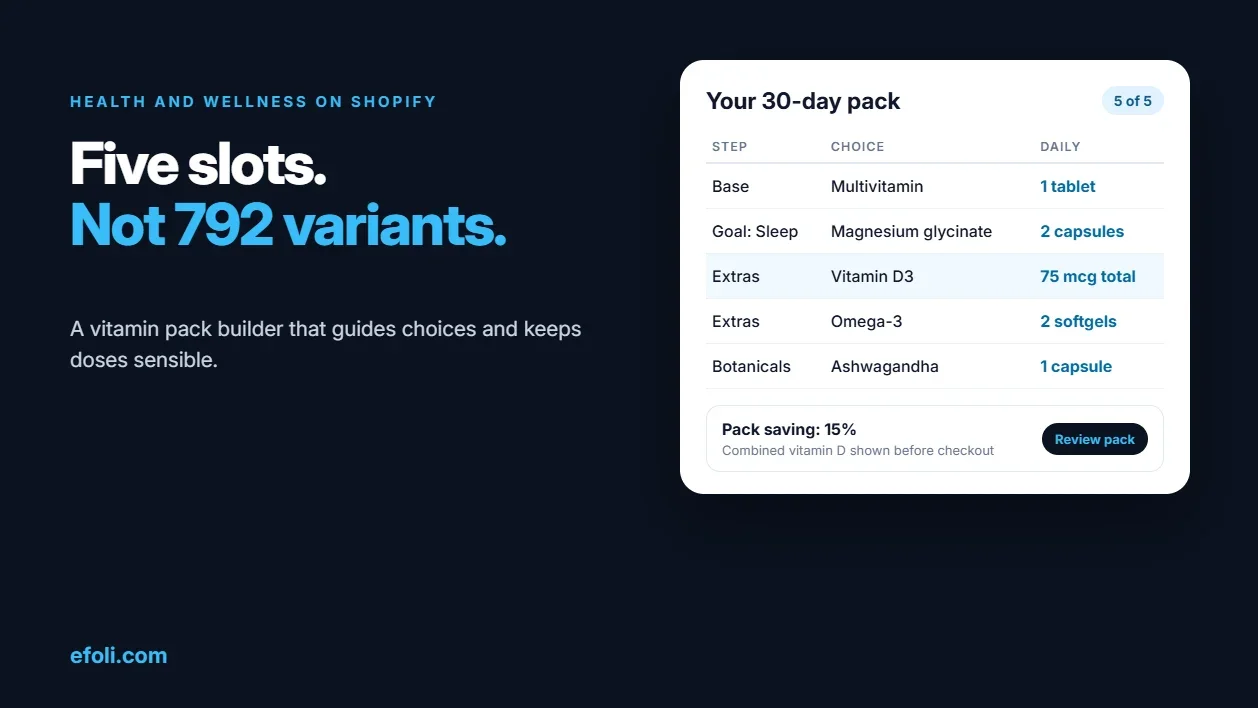
Use a short note at the moment of choice. A line under the D3 capsule that says "Your multivitamin already has 25 mcg of D3. This capsule adds 50 mcg, for 75 mcg a day in total" is more useful than any pop-up.
Consider keeping some products out of the builder entirely. Melatonin and iron tablets are the usual candidates. Many brands sell them only as single bottles with their own guidance, because they are where "just add one more" causes the most questions. Morrow keeps both in for now, behind the "pick one" rule and the notes above, and reviews that choice every quarter.

Where nutrients overlap in a five-slot pack, and the builder rule that stops obvious doubling.
Step 4: Choose the build method that fits your catalog
You have three realistic ways to build this on Shopify.
Method | What it handles well | Where it struggles | Best for |
|---|---|---|---|
Variants on one product | Very small, fixed menus (2 or 3 preset packs) | Explodes past a few combinations; no per-step rules; stock is not linked to the real bottles | Brands offering three or four curated packs only |
Shopify Bundles app | Fixed bundles and multipacks with linked inventory | No mix-and-match, so the shopper can't choose contents | "Sleep Kit" or "Starter Trio" with set contents |
A build-a-box or mix-and-match bundle app | Shopper chooses within steps, with min and max per step, one cart line and stock taken from each real product | Needs careful step design and testing | True choose-your-own vitamin packs |
Custom code | Anything, including quiz logic and dosing calculators | Costs and maintenance; every change needs a developer | Brands with a full personalisation engine |
Morrow chose a build-a-box app because the steps and limits were the whole point. PushBundle, a Shopify build-a-box bundle app, lets you create a multi-step builder, set how many products a shopper can pick in each step and in the pack overall, and add the finished pack to the cart as one bundle line while stock comes off each real bottle. Its Growth plan, which includes the build-a-box and mix-and-match builders, is $14 a month with a 14-day trial.

PushBundle's build-a-box setup, with pack sizes and total selection limits. Source: PushBundle App Store listing.
If you are comparing bundle approaches for a different health category, the sports nutrition bundles guide covers protein stacks, where the issue is flavour and serving size rather than overlapping micronutrients.
Step 5: Price the pack so swaps don't feel random
Pricing is where good builders quietly lose trust. If a shopper swaps magnesium for vitamin C and the pack price jumps by $9, they assume something is wrong.
There are three common pricing models:
Model | How it works | Pros | Watch out for |
|---|---|---|---|
Fixed pack price | Any 5 products for $59 | Simple and easy to advertise | Shoppers pile into the most expensive items; margin swings |
Sum of items minus a percentage | Items at normal price, 15% off as a pack | Fair and transparent; margin stays proportional | Price changes with every swap |
Tiered by pack size | 4 products: 10% off. 5 products: 15% off | Rewards the bigger pack | Needs clear messaging in the builder |
Morrow uses the third model. A four-product pack gets 10% off and a five-product pack gets 15% off, shown as a running total in the builder. The shopper sees "Add one more product to save 15%" instead of being surprised at checkout.

A tiered pack price keeps swaps predictable and rewards a fifth product.
You can do the pack-size discount inside the bundle app. If you also want to reward customers who buy several packs at once, for a household, say, DiscountRay, a Shopify tiered discount app, can show a quantity discount table on the pack product. Its free Starter plan covers quantity tiers and a discount table. Check how the two discounts combine before launch, so a household order does not end up with two stacked discounts you didn't plan for. Anika's guide to Shopify tiered discounts for customer retention explains how to set tiers that reward repeat buyers without training them to wait for a sale.
Subscriptions. Most vitamin packs are bought monthly, so customers will ask for a subscription. A mix-and-match bundle can be sold on subscription, but it needs a subscription app that uses Shopify's selling plans, and you need to test what happens at renewal: whether the bundle price carries over, and whether the customer can swap one product without cancelling. The eFoli guide to checking subscription bundle compatibility walks through those renewal tests in detail, so we won't repeat them here.
Step 6: Show the label before the cart, and keep claims honest
People buying supplements read labels. A builder that shows only a product photo and a name is asking them to buy blind.
For each product in the builder, show:
The full Supplement Facts panel, or a clear link to it.
The dose per capsule and capsules per day.
Allergens and dietary notes (vegan capsule, contains fish, contains soy).
Any warning that appears on the bottle.
That last point is not optional for some products. US rules require iron-containing supplements in solid form (tablets and capsules) to carry a specific warning that accidental overdose of iron-containing products is a leading cause of fatal poisoning in children under 6. If iron is in your builder, the same warning should be visible in the builder, not only on the bottle that arrives later.
Claims. In the US, dietary supplements can carry structure and function claims, such as "supports restful sleep", but not disease claims, such as "treats insomnia". A product label with a structure and function claim needs the FDA disclaimer ("This statement has not been evaluated by the Food and Drug Administration. This product is not intended to diagnose, treat, cure, or prevent any disease."), and the manufacturer must notify the FDA within 30 days of first marketing the claim.
Builder copy counts as marketing. Step names like "Your main goal: Sleep" are fine. Step names like "Beat anxiety" are not. The FTC's Health Products Compliance Guidance says health-related claims need competent and reliable scientific evidence, and it generally looks for good-quality human clinical studies for that. A safe habit: if the claim isn't on the approved product label, it doesn't go in the builder.
If you teach customers about ingredients in content, the EmbedUp piece on supplement educational content shows how brands sell from educational articles without drifting into claims.
What the finished builder looks like
Here is Morrow's builder from the shopper's side, start to finish.
Landing. "Build your 30-day pack. Pick four or five, save up to 15%." One sentence on who the pack is for, one link to "Not sure? Talk to us."
Base. Multivitamin or no multivitamin. If they pick the multi, a small panel shows its key amounts (D3 25 mcg, zinc 8 mg, no iron).
Main goal. Four goal tiles. Choosing "Sleep" opens magnesium glycinate and melatonin, each with its dose and a short note on when to take it.
Everyday extras. D3, omega-3, probiotic. Up to two. The D3 card shows "You'll get 75 mcg a day with your multivitamin."
Botanicals. Ashwagandha or none, with a short note that it isn't suitable for everyone and a link to the product page.
Review. A summary of every capsule, the daily total for the overlapping nutrients, the pack price with the tier saving, and a subscribe or one-time choice.
The review step does a lot of quiet work. It is where a shopper notices they have picked two things they don't need, and where a support team gets fewer "what is actually in my pack?" emails.
Fulfilment details that save support tickets
Builders are a front-end job, but most of the problems show up in the warehouse.
Pick lists. Make sure the order shows every product in the pack as its own line or property, so the picker isn't guessing from a bundle name. A bundle app that adds the pack as one cart line but deducts stock from each bottle keeps inventory honest; check that your packing slip template lists the components too.
Stock. If one product in a step sells out, the builder should hide it or mark it unavailable, not let the shopper complete a pack you can't ship. The PushBundle team's guide to what to do when a bundle product goes out of stock, written by Anika, covers substitution policies and messaging.
Expiry dates. Supplements have best-before dates. A subscription pack that ships monthly should never send a bottle that expires before the customer finishes it. Pick by first-expiry-first-out and check the shortest date in the pack, not the longest.
Returns. Opened supplements usually can't be resold. Decide your policy for opened and unopened packs before launch, and say it in the builder footer. Anika's post on Shopify bundle returns explains how partial returns on bundles affect refunds and stock.
Common mistakes we see in vitamin pack builders
Too many choices per step. Twelve tiles in one step is a catalog, not a builder. Keep each step to four or fewer choices, plus a "skip" option where it makes sense.
Quiz first, products never. Long quizzes feel personal, but many shoppers drop off before seeing a single product. A short builder with optional "help me choose" text often converts better than a 15-question quiz. If you do use a quiz, let people jump straight to the builder.
Hiding the dose. A pretty card with a product name and no amounts makes overlap impossible to spot.
Discounts that fight each other. A pack discount, a subscription discount and a sitewide code can all land on the same order. Decide which combinations are allowed.
Medical language in the step names. "Fight infections" or "Fix your gut" turns ordinary products into unapproved drug claims.
No route for people who shouldn't build their own. Pregnant customers, people on medication and anyone under 18 should see a clear path to advice, not a builder.
Agency notes: scoping a vitamin builder project
If you are an agency quoting this work, these are the questions that change the estimate:
How many products will be in the builder now, and in a year?
Bottles or sachets? Sachets usually mean a contract packer and new labels.
Which nutrients overlap across the range, and who signs off the guardrail rules? (It should be someone with regulatory or pharmacy experience, not the developer.)
One-time packs only, or subscriptions? Which subscription app?
Does the brand sell outside the US? Rules on supplement claims, upper levels and labelling differ by country.
Who writes and approves the builder copy?
A builder like Morrow's is usually a setup and configuration project, plus a day or two of QA, when it runs on an existing bundle app. A custom quiz-and-dosing engine is a much larger build with ongoing maintenance.
A 15-point QA checklist before launch
Run these tests on a staging theme or a duplicated product before the builder goes live.
# | Test | Pass when |
|---|---|---|
1 | Build a four-product pack | Price shows the 4-pack tier |
2 | Build a five-product pack | Price shows the 5-pack tier and the saving |
3 | Try to add a sixth product | Builder stops at five with a clear message |
4 | Pick iron and the iron-containing multi | Builder allows only one |
5 | Pick multi plus D3 | Combined vitamin D shown on the card or review |
6 | Sell out one product | It shows as unavailable and can't be added |
7 | Add pack to cart | One bundle line with all components listed |
8 | Place a test order | Stock comes off each real bottle |
9 | Check the packing slip | Every component is listed for the picker |
10 | Subscribe to the pack | First order and renewal use the right price |
11 | Swap a product before renewal | Swap works without cancelling |
12 | Apply a sitewide code | Combines only as you intended |
13 | Check every product card | Facts panel, dose and warnings visible |
14 | Read every step name aloud | No disease or cure language |
15 | Test on a phone | Steps, totals and notes are readable without zooming |

The 15 launch tests Morrow runs before any change to the builder goes live.
Wrapping up
A vitamin pack builder is not a product with options. It is a small guided decision, and the best ones feel like talking to someone who knows the range. Group the catalog into steps, put overlapping nutrients behind "pick one" limits, price by pack size so swaps feel fair, and show the label for every capsule before the cart. Keep the claims to what the label already says. Do that and the pack stops being a support headache and starts doing what customers asked for in the first place: one box with the four or five things they actually take.
If you sell vitamins as single products today and want to compare tools first, Anika's roundup of Shopify apps for selling vitamins and supplements is a good starting point.
Morrow Wellness is a fictional brand used for illustration. Nutrient figures are general adult values from NIH Office of Dietary Supplements fact sheets and are not medical advice. This guide summarises US rules and is not legal advice.
FAQ
How do I create a build-your-own vitamin pack on Shopify?
Why not use product variants for custom vitamin packs?
How do I stop customers doubling up on the same vitamin?
Can a mix-and-match vitamin pack be sold as a subscription?
What claims can I make in a supplement builder?
Do I need warnings in the builder for iron supplements?

Anika Anamta Mehnaz
This article is written by Anika Anamta Mehnaz, a Content Writer and Content Marketing Strategist specializing in Shopify, eCommerce, and SaaS. With over four years of content writing experience, she creates SEO and AI search-optimized content that helps Shopify merchants make better business decisions through practical, research-backed insights. Her work covers Shopify apps, product variants, bundles, discounts, B2B commerce, and conversion-focused strategies. Outside of work, Anika enjoys watching anime, reading John Grisham novels, and discovering new ideas in digital marketing and e-commerce. If you enjoy discussing Shopify, content marketing, or online growth, feel free to connect with her. Twitter: https://x.com/mehnaz2201 Medium: https://medium.com/@mehnaz_78932
Keep reading
View all articles →
How to Build Retail and Wholesale Pricing Without Splitting the Store
November 23, 2026 • 17 min read
The Restaurant Orders by the Case. Your Website Sells by the Jar.
November 23, 2026 • 17 min read
They Know the Part Number. Why Are They Searching the Entire Catalogue?
November 23, 2026 • 17 min read