Shopify Subscriptions, Bundle Apps and Custom Code: Check Compatibility First
Most subscription bundle problems appear on order two. Compare native Shopify, PushBundle, subscription apps with bundles and custom code, and run a renewal test first.
On this page
- Key takeaways
- Requirements: write the renewal before the first order
- The bundle Fenwick Daily wanted
- The renewal questions
- Design the kit around run-out rates
- Must-haves and nice-to-haves
- Native options: what Shopify gives you
- Shopify Bundles
- Shopify Subscriptions
- When native is enough
- App fit: three ways to combine bundles and subscriptions
- Option A: a bundle app that supports subscriptions
- Option B: a subscription app with its own bundle builder
- Option C: one app for one-time bundles, a pre-packed SKU for subscriptions
- Questions to ask before installing anything
- Custom code: when nothing off the shelf fits
- When custom makes sense
- What it costs
- After checkout: the subscriber's experience
- The compatibility test: prove it before launch
- Set up a test store or a hidden product
- Run the renewal test plan
- Check discount behaviour carefully
- Plan for price changes and app changes
- Price changes
- Changing subscription apps
- How to choose: seven rules
- Worked example: Fenwick Daily
- The starting point
- The decision
- What happened
- Mistakes to avoid
- In Short...
- FAQ
Short answer: Subscription bundles on Shopify fail most often at the join between two apps, not inside either one. Shopify's own Bundles app isn't compatible with subscriptions or other purchase options, so a "subscribe to this bundle" offer needs a different route. You can use a subscription app that has its own bundle builder, a bundle app that supports subscriptions through selling plans, or custom development. Before choosing, write down how the bundle should behave on the first order and on every renewal, then prove it with a test order that renews. Price, discounts, swaps, stock and customer edits all need to work on order two, not just order one.
Personal-care brands are built for replenishment. Toothpaste, razor blades, deodorant refills and body wash run out on a fairly predictable schedule. A bundle of three or four of those products, delivered every month or two, is an obvious offer.
The problem is that bundles and subscriptions are usually handled by different apps, and each one assumes it controls the product. When a brand plugs the two together without checking, the first order often looks perfect. Then the renewal arrives at full price, or without one of the items, or with a discount that has disappeared.
This guide compares native Shopify, PushBundle, subscription apps with built-in bundles, and custom code for replenishment bundles. It uses a fictional personal-care brand, Fenwick Daily, to show how to decide and, more importantly, how to check compatibility before launch.
Key takeaways
Shopify Bundles isn't compatible with subscriptions or other purchase options. Plan another route for subscription bundles.
Write down how the bundle must behave on renewal before comparing apps.
PushBundle supports mix-and-match bundles as subscriptions on its Growth plan, when a subscription app manages the selling plans.
Some subscription apps have their own bundle builders. That can be simpler if subscriptions are the main business.
Discounts on subscriptions can apply only to the first payment by default. Check renewals.
Prove compatibility with a test order that actually renews, then test skips, swaps and cancellations.
Requirements: write the renewal before the first order
The bundle Fenwick Daily wanted
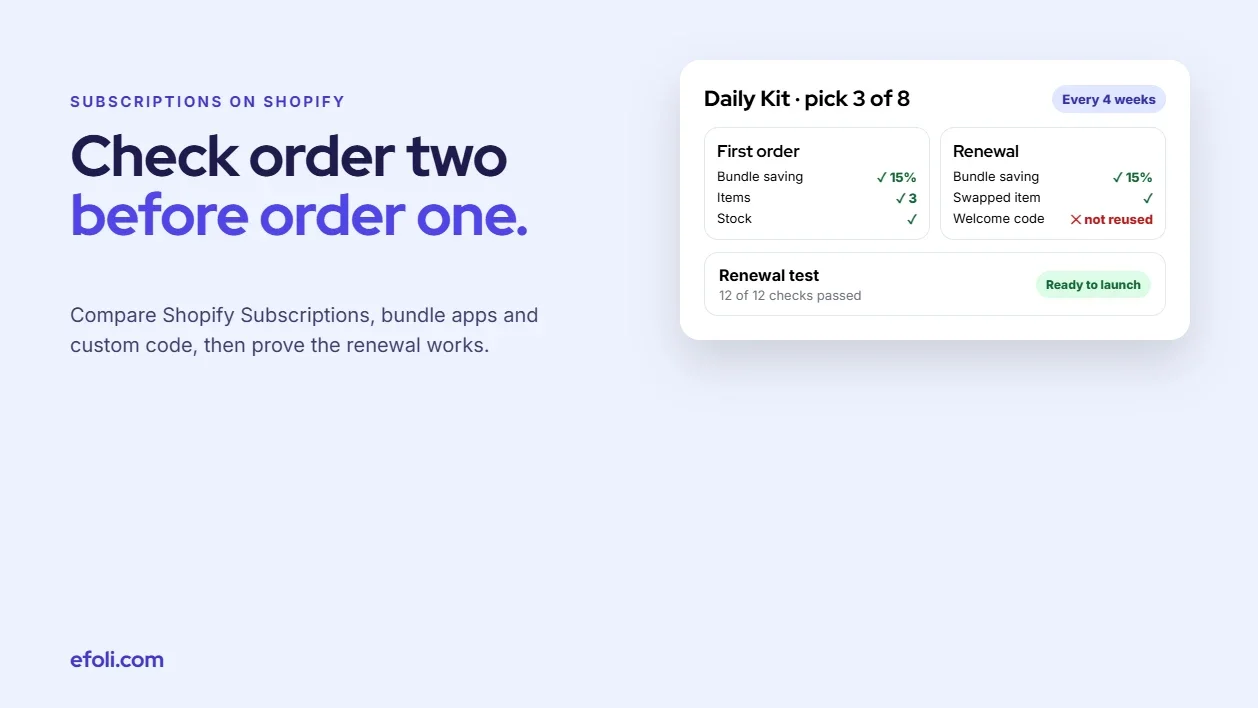
Fenwick Daily sells oral care and shaving products. The founder wanted a "Daily Kit": pick any three products from a list of eight, subscribe every 4 or 8 weeks, and save 15% compared with buying them separately. One-time buyers could also buy the kit, at a smaller saving.
That's a clear offer. But it hides at least a dozen questions about how renewals should work.
The renewal questions

Question | Why it matters |
|---|---|
Does the bundle price apply to every renewal? | Some setups apply the saving only to the first order |
Can subscribers swap items between renewals? | Swaps change the bundle contents and maybe the price |
Can they change the number of items? | A three-item kit becoming four needs a price rule |
Can they skip, pause or cancel? | Customers expect it, and it reduces cancellations |
What happens when an item is out of stock at renewal? | Skip the item, swap it or delay the order |
How is stock deducted? | Per component, so warehouse stock stays accurate |
Do discounts stack with the bundle price? | A welcome code on top of a 15% bundle may break margin |
Does a price change affect existing subscribers? | Price rises need notice and a clear rule |
Which payment gateways are used? | Subscriptions only work with supported gateways |
Can staff edit a subscription for a customer? | Support teams need to fix things quickly |
Is POS involved? | Some bundle subscriptions don't work in POS |
How are renewals shown in reports? | Finance wants bundle revenue separated |
Fenwick Daily's answers became the test plan later. If an app couldn't do one of the must-haves, it was ruled out before anyone installed it.
Design the kit around run-out rates
Personal-care products don't all run out together. A tube of toothpaste might last a month, a pack of razor blades two, and a deodorant refill somewhere in between, depending on the person. A kit that ships everything on one schedule will leave some subscribers with a drawer full of blades and no toothpaste.
There are three ways to handle this:
Pick products with similar rates for the kit. Most of Fenwick Daily's eight eligible products were roughly monthly items. The exception, razor blades, caused the brand's first post-launch change.
Let subscribers adjust quantities. Two toothpastes and one deodorant, for example. This needs a bundle setup that keeps the saving when quantities change.
Offer different frequencies. Every 4 or 8 weeks covers most people. Make it easy to change from the customer account.
Whichever you choose, write it on the product page. "Most people use one of each a month" is more helpful than "monthly delivery."
Must-haves and nice-to-haves
For Fenwick Daily:
Must-haves: pick three of eight, 15% saving on every renewal, 4- or 8-week frequency, skip and cancel in the customer account, stock deducted per product.
Nice-to-haves: swap items between renewals, upgrade to four items, a separate one-time price, a first-order gift.
Native options: what Shopify gives you
Shopify Bundles
Shopify Bundles creates fixed bundles and multipacks. It's free and tidy for "these three products together." But Shopify's bundle considerations are clear that bundles aren't compatible with purchase options, which include subscriptions, pre-orders and try before you buy. The same page says bundles aren't compatible with the Shopify Subscriptions app, and that the Bundles app doesn't do mix and match.
So for Fenwick Daily, Shopify Bundles was out for the subscription kit. It could still be used for a one-time fixed gift set.
Shopify Subscriptions
The Shopify Subscriptions app is free and covers the basics: weekly, monthly or yearly delivery, automatic billing, and customer controls to skip, pause, cancel or change details from their account. Subscription products can have a fixed amount, percentage, buy X get Y or fixed price discount.
Shopify's subscription considerations page includes several points that matter for bundles:
Bundles aren't compatible with Shopify Subscriptions.
For recurring payments, discounts from apps built on Shopify Functions are reused, and the app sets how many payments they apply to. By default, they apply only to the first payment.
Gift cards apply only to the first payment.
Supported payment providers are Shopify Payments, PayPal Express, Authorize.net, Adyen and Stripe.
Renewals are billed the day after the due date, at 10:00 store time.
The order editing API doesn't support subscriptions.
If Fenwick Daily only wanted to subscribe to single products, Shopify Subscriptions would be the obvious choice. For a pick-three kit, it needs a bundle partner, and Shopify's own bundle tool won't do.
When native is enough
Subscriptions to single products, with a simple discount.
A fixed gift set sold one time only.
A small catalogue where a "kit" can be a single product with one SKU, packed in the warehouse.
That last option is underrated. If the kit never changes, a pre-packed kit with its own SKU works with any subscription app. It loses mix and match, but it removes most of the compatibility risk.
App fit: three ways to combine bundles and subscriptions
Option A: a bundle app that supports subscriptions
PushBundle supports mix-and-match bundles as subscriptions. Shoppers choose one-time or subscribe on the bundle, and the bundle price applies to the first order and every renewal. This works when a subscription app manages the selling plans on the products, and the bundle editor flags products in the bundle that aren't on a selling plan. Mix-and-match subscriptions are on PushBundle's Growth plan ($14/month). Mix-and-match bundles can include up to 128 products.
Touhid's guide on how to sell mix-and-match bundles as subscriptions walks through the setup step by step.
There are a few limits to know about. Mix-and-match subscriptions aren't available in POS yet, although other PushBundle bundles work in POS on every plan. And because the selling plans come from a subscription app, the customer's subscription management experience is that app's, not PushBundle's. Confirm with PushBundle's support that your chosen subscription app has been tested with bundle subscriptions before launch.
PushBundle also handles one-time volume offers and quantity tiers, so a one-time "Daily Kit" and a "buy more, save more" offer can sit in the same app. You can set up a subscribe-and-save mix-and-match kit and the one-time version side by side.

Fits when: the brand already uses a subscription app it likes, needs mix and match, and wants bundle pricing to hold on renewal.
Option B: a subscription app with its own bundle builder
Some subscription apps include a bundle or build-a-box feature. Recharge's bundles documentation describes build-your-own-box and fixed bundles that can be sold one time, as a subscription, or both. Skio's help centre notes that it isn't compatible with Shopify Bundles and points merchants to its own build-a-box feature instead.
This route keeps the bundle and the subscription in one system. That usually means renewals, swaps and the customer portal are designed together. The trade-off is that the bundle builder is only as flexible as that app makes it, and one-time bundles may need a separate setup.
Fits when: subscriptions are the main business, the brand is happy to commit to that subscription platform, and one-time bundles are a smaller part of sales.
Option C: one app for one-time bundles, a pre-packed SKU for subscriptions
Some brands split the problem. One-time bundles, gift sets and mix and match use a bundle app. The subscription kit is a fixed, pre-packed product with its own SKU, sold through any subscription app.
Fits when: the subscription kit rarely changes, the brand wants the simplest renewal behaviour, and mix and match matters mostly for one-time buyers.
Questions to ask before installing anything
Send these to each app's support team and keep the answers in the project notes:
Does your bundle work with subscriptions, and which subscription apps have you tested it with?
Does the bundle saving apply to every renewal, and where is it stored?
Can subscribers swap items or change quantities, and does the price update correctly?
How is stock deducted for each item on renewal?
What happens on renewal if an item is out of stock?
Does the bundle subscription work in POS, Shop or a headless storefront, if you use them?
What does the customer see in their account or portal?
Can staff edit a bundle subscription for a customer?
Clear, specific answers are a good sign. Vague ones are a reason to test even harder.
Custom code: when nothing off the shelf fits
A custom build can combine bundles and subscriptions exactly as the brand wants. It usually involves Shopify's selling plan and subscription contract APIs, a bundle or cart transform layer, and a customer portal for swaps and skips.
When custom makes sense
The brand has unusual renewal logic, such as rotating products every third order.
Subscriptions are a large share of revenue, and the brand has developers on staff or a long-term agency.
No app supports a must-have, and the must-have is worth a lot.
What it costs
Custom subscription bundles aren't a project with an end date. Billing, failed payments, customer edits, stock, taxes and reporting all need maintaining. Shopify updates its APIs on a regular schedule, so someone has to keep the build current. For most personal-care brands with a straightforward kit, an app combination is cheaper and safer.
After checkout: the subscriber's experience
Compatibility isn't only about orders. It's also about what the subscriber sees and can do between renewals. Check:
Where they manage the subscription. With Shopify Subscriptions, customers manage their subscriptions in their customer account. Other subscription apps may use their own portal. Make sure the bundle contents are shown clearly, not as a single line with a cryptic name.
Reminder emails. A short note a few days before renewal, with a link to skip or swap, prevents surprise charges and complaints.
What the order confirmation says. The renewal email should list each item in the kit, not just "Daily Kit x 1."
How support edits a subscription. Support staff need to change items, dates and addresses without breaking the bundle price.
Failed payments. Agree how many retries happen and what the customer sees. A failed payment on a kit is no different from any other subscription, but it needs the same care.
The compatibility test: prove it before launch
The brief for this kind of project should always say: prove recurring-bundle compatibility first. Here's how.
Set up a test store or a hidden product
Use a development store or a hidden product in the live store. Set the subscription frequency to the shortest available interval so you can see a renewal quickly, or use the subscription app's tools to trigger a renewal for testing if it has them.
Run the renewal test plan

Test | First order | Renewal |
|---|---|---|
Bundle price | Correct saving | Same saving applied |
Items | Chosen items on the order | Same items, or swapped items if edited |
Stock | Each item deducted | Each item deducted again |
Discount code | Applies as planned | Applies or not, as planned |
Gift card | Used on first payment | Not used, as expected |
Skip | N/A | Next renewal moves |
Swap an item | N/A | New item on the next order, correct price |
Out-of-stock item | Can't be chosen | Renewal behaves as agreed |
Cancel | N/A | No further orders |
Customer account | Subscription visible | Edits work from the account |
Payment gateway | Charged | Renewal charged |
Packing slip | Bundle items listed clearly | Same |
Fenwick Daily ran every test with the two shortlisted setups. One combination failed the swap test: swapped items arrived at full price on renewal. The other passed. That one test saved a launch.
Check discount behaviour carefully
This is where most surprises come from. Because Shopify reuses discounts from Functions-based apps on renewals for a number of payments the app decides, and the default is the first payment only, a "15% off" set in a discount app may not carry to order two. Decide where the subscription saving lives:
In the bundle price. The saving is part of the bundle and applies to every renewal.
In the subscription app's discount. The selling plan discount applies to renewals as configured.
In a separate discount app. Check how many payments it applies to.
If Fenwick Daily also wanted a tiered offer for one-time buyers, such as "buy two kits, save more," DiscountRay could handle it with quantity tiers and a pricing table. You can add one-time tiered kit pricing, but keep it off the subscription kit unless you've tested how it behaves on renewal. Anika's guide to Shopify tiered discounts for customer retention covers how tiers can support repeat buying without eroding margin.
Plan for price changes and app changes
Two things will happen in the life of almost every subscription kit: the price will go up, and someone will suggest changing apps. Plan for both now.
Price changes
Product costs change. When they do, decide whether existing subscribers keep their price, move to the new price on a set date, or move after a notice period. Check how your subscription setup applies a new price to existing subscriptions, because some apps update renewals automatically and others keep the price from the original order. Whatever you choose, tell subscribers before the change, not on the receipt.
Changing subscription apps
Moving subscribers from one app to another is a migration, not a setting. Payment methods, billing dates, discounts and bundle contents all need to move correctly, and customers may need to take action. If a new bundle setup requires a different subscription app, weigh the cost of that migration against the benefit. For Fenwick Daily, keeping the existing subscription app was one of the main reasons for the route they chose.
How to choose: seven rules
Rule 1: If the kit never changes, pre-pack it. A fixed SKU works with any subscription app and removes most of the risk.
Rule 2: If subscribers need to choose, check where the choice lives. Either a bundle app with subscription support, or a subscription app with a bundle builder.
Rule 3: If the brand already has a subscription app, start with a bundle app that works with it. Moving subscribers to a new platform is a project in itself.
Rule 4: If subscriptions are the core business and you're choosing a platform anyway, compare subscription apps with built-in bundles.
Rule 5: Keep the saving in one place. Bundle price or subscription discount, not both, unless you've tested it.
Rule 6: Only go custom for logic no app supports, and budget for maintenance.
Rule 7: No launch without a passing renewal test.
Worked example: Fenwick Daily
Fenwick Daily is a composite example, not a real brand.
The starting point
Fenwick Daily already used a subscription app for single products, with about 1,200 active subscribers. They'd tried selling a kit with Shopify Bundles and found it couldn't be subscribed to. Their developer suggested a custom build.
The decision
The team compared three routes against the must-haves:
Route | Pick 3 of 8 | Saving on every renewal | Swaps | Keeps existing subscribers | Effort |
|---|---|---|---|---|---|
Pre-packed kit SKU | No | Yes | No | Yes | Low |
Bundle app with subscription support | Yes | Yes, in the bundle price | Tested per app | Yes | Low to medium |
Custom build | Yes | Yes | Yes | Yes | High |
They chose a bundle app with subscription support for the pick-three kit, because it kept their existing subscription app and subscribers. They also added a pre-packed "Starter Kit" SKU for gifting.
What happened
The renewal tests caught one issue before launch: a welcome discount code stacked on the bundle saving. The team limited the code to single products. After launch, the support team's most common question was how to swap an item, so they added a short guide to the account page. They also moved razor blades out of the kit and into their own subscription, after early subscribers said blades were piling up. The kit itself didn't change much. What changed was that every renewal now matched what the customer expected to receive and pay.
This is one example, and results depend on the apps, the products and the customers. The point is that the decision was made from the renewal requirements, and the launch was protected by a renewal test.
Mistakes to avoid
Testing only the first order. Renewals are where most problems appear.
Putting the saving in two places. A bundle price and a subscription discount can stack, or cancel each other out.
Assuming every subscription app works with every bundle app. Check the bundle app's requirements, such as selling plans, and confirm the subscription app supports them.
Ignoring support. If customers can't swap or skip easily, they'll cancel. Test the customer account, not just the order.
Migrating subscribers without a plan. Moving subscriptions between apps affects payment methods and billing dates. Treat it as its own project.
For related reading, see Anika's guide to the subscription box business on Shopify and her post on the coffee sampler subscription on Shopify, which covers rotating samplers sold on a schedule.
In Short...
A subscription bundle has two lives: the first order and every order after it. Most compatibility problems hide in the second. Write down how renewals should behave, pick the route that meets the must-haves, keep the saving in one place and run a real renewal test before launch. If the kit never changes, a pre-packed SKU might be all you need.
FAQ
Can you sell bundles as subscriptions on Shopify?
Does Shopify Subscriptions work with bundles?
Why does my subscription bundle discount disappear on renewal?
Can subscribers swap products in a subscription bundle?
Do I need custom code for subscription bundles?
How do I test a subscription bundle before launch?

Anika Anamta Mehnaz
This article is written by Anika Anamta Mehnaz, a Content Writer and Content Marketing Strategist specializing in Shopify, eCommerce, and SaaS. With over four years of content writing experience, she creates SEO and AI search-optimized content that helps Shopify merchants make better business decisions through practical, research-backed insights. Her work covers Shopify apps, product variants, bundles, discounts, B2B commerce, and conversion-focused strategies. Outside of work, Anika enjoys watching anime, reading John Grisham novels, and discovering new ideas in digital marketing and e-commerce. If you enjoy discussing Shopify, content marketing, or online growth, feel free to connect with her. Twitter: https://x.com/mehnaz2201 Medium: https://medium.com/@mehnaz_78932
Keep reading
View all articles →
Same Headphones, Three Reseller Tiers: Why One Price Makes No Sense
November 20, 2026 • 17 min read
MultiVariants vs Custom Quick-Order Forms for Repeat Distributor Orders
November 20, 2026 • 17 min read
Design a Specialty Food Sampler That the Merchant Can Actually Fulfil
November 20, 2026 • 17 min read