They Know the Part Number. Why Are They Searching the Entire Catalogue?
The maintenance planner has the part number from the old box. Your Shopify search returns 214 fittings. Here is where part number search breaks for industrial buyers, and how to fix it.
On this page
- Key takeaways
- A planner, a broken fitting and 214 results
- How industrial buyers actually look for parts
- How Shopify's built-in search handles part numbers
- Where part number search breaks, and why
- Fix 1: Format SKUs for how search works
- Fix 2: Store old and cross-reference numbers where search can see them
- Fix 3: Show the whole family with SKUs on one page
- Fix 4: Make pack quantities impossible to misread
- Fix 5: Give buyers a route when the part isn't listed
- Fix 6: Use search data to find the gaps
- Customers' own part numbers
- When the built-in search isn't enough
- Agency notes: scoping a part-number search project
- What it costs the distributor
- Before and after: Sam's Thursday
- The merchant checklist
- Where to start
- FAQ
Short answer: Industrial buyers who already know a part number get lost on Shopify stores when the number they type doesn't match the store's SKU format, when the part has been superseded or is known by an OEM or competitor number, or when the part is listed as one variant among hundreds. Shopify's built-in search does match full SKUs and barcodes, and the start of a SKU, but it won't find a number from the middle of a code unless it's a separate segment, and it doesn't apply typo tolerance to SKUs. To fix it, format SKUs so each meaningful part is a hyphen-separated segment, store old and cross-reference numbers where search can see them, show variant tables with SKUs and pack sizes on product pages, and give buyers a quote route when the part isn't listed.
Key takeaways
Maintenance and purchasing buyers search by part number first, not by category.
Shopify's online store search matches a full SKU or barcode, and the first 3 to 15 characters of a SKU. Middle or end characters only match as a complete segment.
Superseded numbers, OEM numbers and competitor numbers are the most common reason searches return nothing.
Product tags are searchable. Metafields aren't in the list of searchable properties for the built-in search.
Pack quantities cause as many errors as search: "1" can mean one fitting or one bag of ten.
When the part isn't listed, a quote request with the number and a photo keeps the order with you.
A planner, a broken fitting and 214 results
Corrin Fluid Power is a fictional distributor of hydraulic hoses and fittings. It moved to Shopify two years ago and lists about 6,000 SKUs.
Sam is a maintenance planner at a food factory. A hydraulic line on a packaging machine is leaking at a fitting. The maintenance team has the old fitting, a little worn but readable: "CFP 0612 JIC-ST". They need three by Thursday.
Sam goes to Corrin's site and types "0612 JIC" into the search box. 214 results: every JIC fitting in the catalog, sorted in an order that makes sense to search but not to Sam. Sam tries "CFP0612". Nothing. Tries "0612". A handful of unrelated hose products whose descriptions mention "0612" in a size table.
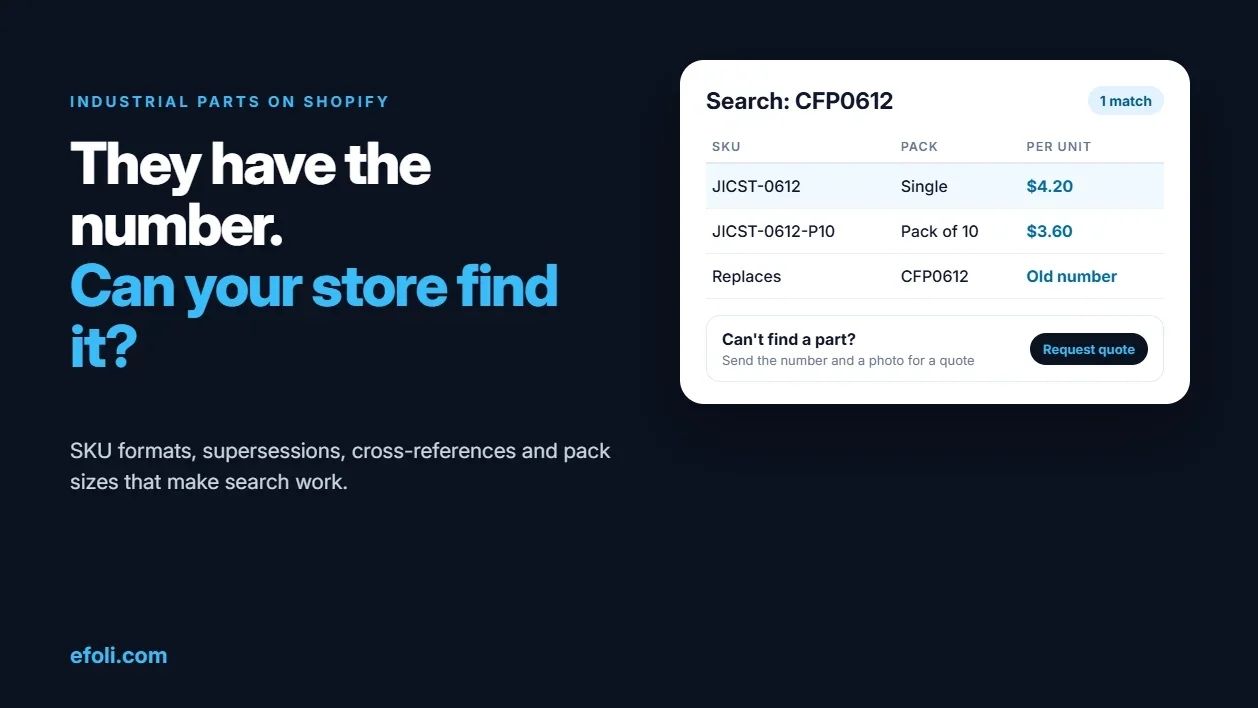
The fitting Sam wants is listed. Its SKU is "JICST0612" because Corrin changed its numbering when it moved to Shopify. The number on the old part doesn't appear anywhere in the product.
Sam phones a competitor whose counter staff recognise the old number. Corrin loses an order it could have filled from stock.

Five ways a part number search fails on an industrial Shopify store.
How industrial buyers actually look for parts
Industrial and MRO (maintenance, repair and operations) buyers behave differently from consumers:
They start with a number. It's on the old part, the machine's parts list, a maintenance record or the last invoice.
The number isn't always yours. It might be the original equipment manufacturer's number, a competitor's number, an old number of yours or the factory's own internal stock code.
They're in a hurry. A machine is down, or will be soon. Browsing categories is a last resort.
They need certainty. Ordering the wrong thread or pressure rating can mean another week of downtime.
They buy in the units on the label. If the old box said "pack of 10", they think in packs.
A store built around browsing and product discovery serves them badly, however good it looks.
How Shopify's built-in search handles part numbers
It helps to know exactly what Shopify's online store search does with SKUs, because it decides how you should format them. The details below come from Shopify's Help Center and apply to the built-in search. If your store uses a third-party search app, that app controls the results instead.
Searchable fields. For products, the online store search looks at the title, description (body), product type, tags, variant titles, vendor, variant SKUs and variant barcodes. Metafields aren't in that list.
Full codes match. A customer can find a product by entering its full SKU or barcode.
The start of a code matches. A partial search matches the first 3 to 15 characters of a SKU, or the first 3 to 10 characters of a barcode, counting from the first character, with or without hyphens. So "JICST", "JICST-06" or "JICST06" can all find "JICST-0612".
The middle or end of a code doesn't, unless it's a segment. Characters from the middle or end of a code don't match, unless they form a complete segment separated by hyphens, slashes or spaces. Searching "0612" won't find "JICST0612", but it can find "JICST-0612". That's a big deal for part numbers, as you'll see below.
No typo tolerance on SKUs. Typo tolerance applies to fields such as title, description, tags and vendor. It doesn't list SKUs or barcodes, so a buyer who types one wrong character in a SKU gets no help.
Descriptions have a limit. Only the first 10,000 characters of a description, including HTML, are searchable. If cross-reference tables sit at the bottom of a long description, they may not be found.

How Shopify's built-in search matches full SKUs, starting characters and hyphen-separated segments.
Where part number search breaks, and why
What the buyer types | What's in the store | Result | Why |
|---|---|---|---|
Old number "CFP0612" | New SKU "JICST0612" | Nothing | Old number isn't stored anywhere searchable |
OEM number "7Z-4412" | Not recorded | Nothing | Cross-reference not stored |
"0612" | SKU "JICST0612" | Nothing useful | Middle characters, no segment |
"JICST-0612" with a typo | "JICST-0612" | Nothing | No typo tolerance on SKUs |
"JIC fitting 3/8" | 214 JIC fittings | Too many results | Generic words; size buried in variants |
SKU found, quantity "3" | Sold in packs of 10 | Orders 30 fittings | Pack size not clear |
Each row is a lost or wrong order, and none of them is fixed by a prettier search box.
Fix 1: Format SKUs for how search works
You can't change how Shopify's search matches codes, but you can change your codes.
Use hyphens between meaningful parts. "JICST-0612" lets a buyer find the part by its start ("JICST"), and also by "0612" as a complete segment. "JICST0612" only matches from the start, which is exactly why Sam's search for "0612" failed.
Put the most-searched part first. If buyers usually know the family ("JICST") rather than the size, start with the family. If they usually know a size code, consider whether it should lead.
Keep one consistent format. Mixed formats across ranges ("JIC-ST-0612", "JICST-0612", "JICST0612") mean buyers can't guess.
Avoid leading zeros that buyers drop. If buyers routinely type "612" when your code says "0612", either drop the zero or make sure the version without it appears somewhere searchable, such as a tag.
Barcodes for scanned reorders. If your customers scan barcodes on shelf labels, store the barcode on each variant. If a part has more than one barcode, for example the unit and the box, Syeda's post on Shopify multiple barcodes on the MultiVariants blog explains the options.
Changing SKUs is a big job in a live business, and it affects your warehouse, ERP and integrations. If you can't change them, the fixes below matter even more.
Fix 2: Store old and cross-reference numbers where search can see them
Most "nothing found" searches in industrial stores are numbers that aren't yours: old numbers, OEM numbers and competitor numbers. You need to store them somewhere the built-in search reads.
Based on Shopify's list of searchable fields, the practical places are:
Tags. Tags are searchable. Add superseded and cross-reference numbers as tags, such as "CFP0612" and "7Z-4412". Keep a naming habit, so they're easy to manage in bulk.
The first part of the description. A short "Also known as" line near the top of the description, listing old and cross-reference numbers, is both searchable and helpful to the buyer who lands on the page.
Search terms in Search & Discovery. The Search & Discovery app lets you assign specific search terms to products to feature them in results. This is useful for your most common old numbers.
Metafields are excellent for storing structured data such as thread type, pressure rating and cross-references for display, but they aren't in the built-in search's list of searchable properties. If you keep cross-references in metafields, also copy the numbers into tags or the description, or use a search app that indexes metafields.
Number type | Example | Where to store it | Show it on the page? |
|---|---|---|---|
Current SKU | JICST-0612 | Variant SKU | Yes |
Superseded number | CFP0612 | Tag and "Also known as" line | Yes, with "replaces" |
OEM number | 7Z-4412 | Tag and "Also known as" line | Yes, with "fits" or "equivalent to", if accurate |
Competitor number | Check before using | Tag only, if you use it at all | Carefully, and only if the equivalence is confirmed |
Customer's own code | FAC-HYD-0098 | Not on the public product | Use per account, in order notes or lists |

Where to store each kind of part number so Shopify search can find it.
A word of caution on cross-references. Only list an equivalent number if you've confirmed the parts are genuinely interchangeable for the application. A wrong cross-reference is worse than none, because the buyer trusts it.
Fix 3: Show the whole family with SKUs on one page
Industrial parts usually come in families: one fitting style in many sizes, threads and materials. Listing each as a separate product floods search results. Listing them as variants in a dropdown hides the SKUs.
The better pattern is one product per family, with every variant shown in a table: SKU, size, thread, material, pack quantity, price and a quantity box. A buyer who lands on the family page from search can scan the SKUs and find their exact part in seconds.
Two limits to plan around: Shopify allows up to 2,048 variants and three options per product. Most fitting families fit comfortably. Very large families sometimes need splitting by material or series. Anika's post on Shopify variant limits explains the options when a family outgrows one product.
MultiVariants, a Shopify bulk order form app, shows a product's variants as a list with quantity inputs and bulk add to cart on its free Starter plan, and adds grid and matrix layouts on Standard ($12.99 a month). Minimums, maximums and quantity increments are on Professional ($29.99 a month), which helps when parts must be ordered in multiples.

Pack quantity options on one product page, so buyers order singles or packs without guessing. Source: MultiVariants App Store listing.
Fix 4: Make pack quantities impossible to misread
"Quantity: 3" is ambiguous when a fitting is sold in packs of 10. Sam might mean three fittings. The store might read three packs.
Put the pack size in the variant title and SKU. "JICST-0612, pack of 10" or a SKU suffix such as "-P10".
Show the unit count in the table. A column for "Units per pack" next to the price.
Show the price per unit as well as per pack. Buyers compare per-unit prices with their last supplier.
Use quantity increments if you sell in fixed multiples. If a part only ships in tens, order in tens.
Offer singles where it makes sense. Maintenance buyers often need two or three, not ten. If you can sell singles at a slightly higher unit price, many will gladly pay it.
Fix 5: Give buyers a route when the part isn't listed
Even with perfect data, some searches will fail. The part is obsolete, it's a special, or the buyer only has a photo of a worn label. If the only option is "no results", they'll phone a competitor.
Add a clear route on the no-results page and on relevant product pages: "Can't find your part? Send us the number and a photo and we'll quote within the day." The request should capture the number as written, a photo, the quantity, the date needed and the machine or application if known.
QuotWay, a Shopify quote request app, adds a quote request to product pages and turns accepted quotes into Shopify draft orders the buyer can pay through checkout. The free Lite plan covers ten quotes a month. File attachments and custom fields, which you need for photos and part details, are on Starter at $29 a month, and Professional ($79 a month) adds approval steps, partial acceptance and split orders, which helps when a buyer's request mixes stocked and non-stocked parts.

A quote route for unlisted parts, with approval steps before the proposal goes out. Source: QuotWay App Store listing.
For custom-made parts from drawings rather than replacement parts, the eFoli post on industrial parts quotes covers specifications, drawings and tolerances.
Fix 6: Use search data to find the gaps
Your search logs are a list of the numbers your buyers expect you to know. The Search & Discovery app's search preview and reports show top searches, and your analytics can show searches with no results.
Once a month:
Export the top searches with no results or no clicks.
Sort them into old numbers, OEM numbers, typos, and parts you don't sell.
Add the old and OEM numbers as tags or search terms on the right products.
Decide whether the parts you don't sell are worth stocking, or worth quoting.
Within a few months, the most common failures disappear, because they're the same few hundred numbers searched again and again.
Customers' own part numbers
Larger buyers often have their own stock codes. Sam's factory calls the same fitting "FAC-HYD-0098" in its maintenance system. Purchase orders arrive with that code, not yours.
You don't want customer codes on public product pages, where they mean nothing to anyone else. But you do want them close to hand:
Keep a cross-reference per account. A simple spreadsheet or a note on the company record that maps the customer's codes to your SKUs is enough to start.
Build a "your usual parts" list for regular accounts. A collection or saved list with the parts that account buys, showing your SKU and, where possible, their code alongside, makes reorders quick and reduces errors.
Ask for your SKU on POs, but don't rely on it. Some procurement systems can store a supplier part number next to their own. Offer to send your SKUs in a format they can import.
This is where a quote or draft order is useful too. When a PO arrives with only the customer's codes, your team can build the order as a draft with the right SKUs and send it for confirmation, rather than guessing.
When the built-in search isn't enough
The fixes above go a long way with Shopify's built-in search. Some industrial stores still outgrow it, usually when:
Cross-references run to tens of thousands of numbers that would make tags unmanageable.
Buyers need to filter by technical attributes such as thread, pressure rating or material before they search.
The store needs fuzzy matching on part numbers, or matching on characters from the middle of codes.
Cross-reference data lives in metafields or an external database that must stay the source of truth.
In those cases, a third-party search app that indexes metafields and supports custom matching rules may be worth it. Remember that it replaces the built-in behaviour described in this post, so test the same failed searches against it before you switch. Filters by attribute are also available through the Search & Discovery app, which can make large families easier to narrow without changing the search engine.
Agency notes: scoping a part-number search project
If you're an agency asked to "fix search" for an industrial client, these questions shape the work:
How many SKUs, and how many product families?
What format are SKUs in, and can they change? Who else depends on them (ERP, warehouse, EDI)?
Where do old, OEM and competitor numbers live today, if anywhere?
What are last month's top searches with no results?
Is the store using the built-in search or an app?
How are pack quantities shown, and how often are wrong quantities ordered?
Often the most valuable deliverable is a cleaned cross-reference file and a tagging process the client can maintain, not new code.
What it costs the distributor
Cost | How it shows up |
|---|---|
Lost urgent orders | Buyer can't find the part and phones a competitor |
Counter and phone time | Staff look up old numbers that the website could have matched |
Wrong parts shipped | Pack-quantity or cross-reference confusion; returns and downtime |
Lost account trust | A buyer who fails twice stops trying the website |
Hidden demand | Searches for parts you don't stock never reach purchasing |
The last one is easy to overlook. Every failed search for a part you don't carry is a buyer telling you what to stock.
Before and after: Sam's Thursday
After Corrin made the changes, including reformatting the JIC range to hyphenated SKUs, Sam types "CFP0612" into the search box. The JIC straight fitting family comes up first, because "CFP0612" is now a tag on it. On the product page, the variant table shows "JICST-0612, replaces CFP0612", sold singly or in packs of 10, with the per-unit price for each. Sam enters 3 in the singles row and adds it to the cart. Delivery is shown for Wednesday.
A month later, Sam needs a fitting that's been discontinued. The no-results page offers "Send us the number and a photo." Sam uploads a photo of the label. Corrin's counter team quotes an equivalent within two hours, with a note on why it's equivalent, and Sam pays through checkout.
The merchant checklist

A 15-point checklist for industrial stores whose buyers search by part number.
SKUs and data
SKUs use one consistent format with hyphen-separated segments.
The most-searched part of the code comes first.
Barcodes are stored on variants where buyers scan.
Pack size is in the variant title or SKU.
Old and cross-reference numbers
Superseded numbers are stored as tags and in an "Also known as" line.
OEM numbers are stored the same way, only where equivalence is confirmed.
Cross-references aren't kept only in metafields if you use the built-in search.
The most common old numbers have search terms assigned in Search & Discovery.
Product pages
Part families are one product with a variant table showing SKUs.
The table shows units per pack and price per unit.
Quantity increments match how parts ship.
When search fails
The no-results page offers a quote request with photo upload.
Quote requests capture the number as written, quantity, date needed and application.
Ongoing
Search terms with no results are reviewed monthly.
Parts searched often but not stocked are reviewed by purchasing.
Where to start
Pull last month's searches with no results. In most industrial stores, a small number of old and OEM numbers account for most of them. Add them as tags on the right products this week. It's the cheapest fix with the fastest payback, and it doesn't require changing a single SKU. Ask your counter or phone team for the old numbers they look up most often, too. They usually know the top twenty by heart, and every one of them is a search that currently fails online while the same buyer could have ordered without picking up the phone.
Then look at your top 20 families and check the variant tables: SKUs visible, pack sizes clear, per-unit prices shown. Buyers who reorder the same parts every month will feel the difference immediately. For those repeat orders, the eFoli post on distributor quick order forms compares ways to make reordering even faster. And if your parts are automotive, where the buyer starts with a vehicle rather than a number, the eFoli guide to Shopify agencies for auto parts covers fitment data.
Corrin Fluid Power, Sam and the part numbers are fictional. Search behaviour is based on Shopify's Help Center for the built-in online store search as of November 2026; third-party search apps behave differently.
FAQ
Can customers search by SKU on Shopify?
Why does my Shopify store return no results for a part number?
Are metafields searchable in Shopify's built-in search?
How should I format SKUs for industrial parts on Shopify?
How do I stop customers ordering the wrong pack quantity?
What should happen when a buyer can't find a part?

Anika Anamta Mehnaz
This article is written by Anika Anamta Mehnaz, a Content Writer and Content Marketing Strategist specializing in Shopify, eCommerce, and SaaS. With over four years of content writing experience, she creates SEO and AI search-optimized content that helps Shopify merchants make better business decisions through practical, research-backed insights. Her work covers Shopify apps, product variants, bundles, discounts, B2B commerce, and conversion-focused strategies. Outside of work, Anika enjoys watching anime, reading John Grisham novels, and discovering new ideas in digital marketing and e-commerce. If you enjoy discussing Shopify, content marketing, or online growth, feel free to connect with her. Twitter: https://x.com/mehnaz2201 Medium: https://medium.com/@mehnaz_78932