On this page
- Key takeaways
- The question behind the question
- Who your trade buyers are, and where they start
- The four options on Shopify
- Option 1: B2B on your main Shopify store
- Option 2: A separate wholesale store
- Option 3: A custom or third-party portal
- Option 4: Embedded ordering where buyers already are
- Comparing the four options
- Hybrid setups are normal
- A scoring method you can use in an hour
- The decision path
- What Brindle chose
- Distributor relationships: the part that isn't technical
- A 30-day pilot before you build anything big
- The product data every option needs
- What each option means for your team
- Three-year cost questions to ask
- When a portal really is the answer
- Common mistakes
- Agency notes: scoping the decision, not just the build
- Further reading
- FAQ
Short answer: A distributor portal suits brands whose trade buyers are happy to log in to a dedicated ordering site and need account-specific prices, terms and order history in one place. Embedded Shopify ordering suits brands whose buyers start somewhere else: a distributor's site, a partner's training portal, a product catalog page or the brand's own non-Shopify website. On Shopify you have four realistic options: B2B on your main store, a separate wholesale store that works as a portal, a custom or third-party portal, or Shopify products embedded on other pages with a tool like EmbedUp. Most brands end up with a mix. Pick the option for each buyer group based on where they start, how complex their pricing is and who owns the relationship.
Key takeaways
"Do we need a portal?" is the wrong first question. Ask where each type of trade buyer starts their order.
Shopify B2B now works on the Basic, Grow, Advanced and Plus plans, so a "portal" can simply be your existing store with company accounts.
A separate wholesale store keeps retail and trade apart but doubles some admin.
Custom portals give the most control and cost the most to build and maintain.
Embedding ordering on pages buyers already use removes the "log in somewhere else" step, but isn't a replacement for account pricing and terms.
Run a 30-day pilot with one buyer group before rebuilding anything.
The question behind the question
Brindle Garden Supply is a fictional brand making professional garden tools. It sells three ways: direct to about 300 independent garden centres and landscapers, through 12 regional distributors who supply smaller shops, and online to consumers on its Shopify store.
Trade orders arrive by email, phone and a PDF order form. The operations manager wants "a proper B2B portal". The sales director worries the distributors will see it as Brindle going around them. The marketing lead points out that landscapers already spend their time on Brindle's product guides and training videos, which live on a separate content site, not on Shopify.
Everyone is talking about "the portal". Nobody has asked the simpler question: where does each kind of buyer start their order today, and where would they like to?
Who your trade buyers are, and where they start
Before comparing options, map your buyer groups. Brindle's looks like this:
Buyer group | How many | Where they start an order today | What they need most |
|---|---|---|---|
Garden centres (direct) | 220 | Email or phone to sales rep | Their own prices, case quantities, seasonal pre-orders |
Landscapers (direct) | 80 | Brindle's training and product guide pages | Quick reorder of consumables, trade price, delivery to site |
Regional distributors | 12 | Their own ERP; email a PO to Brindle | Large orders, distributor pricing, terms, invoices |
Shops supplied by distributors | ~600 | The distributor's website or rep | Product information; they buy from the distributor, not Brindle |
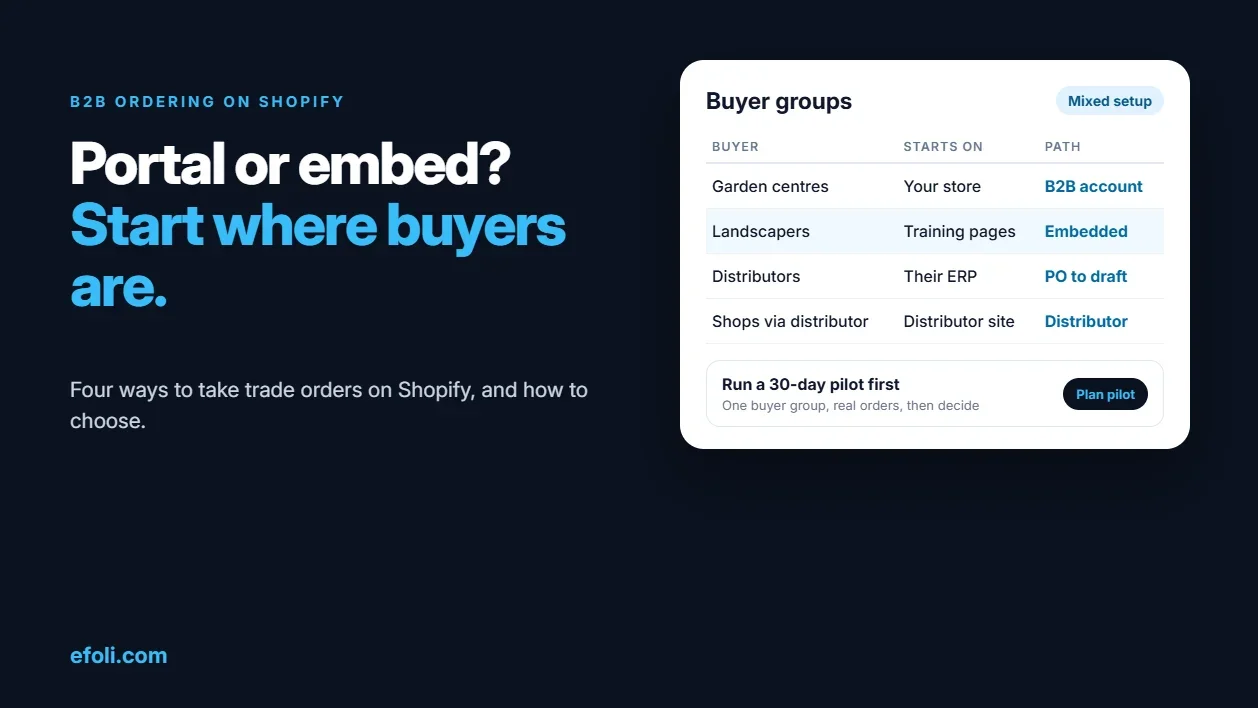
This table already answers half the question. Garden centres want an account with their prices. Landscapers start on content pages. Distributors want to send a PO. Shops supplied by distributors aren't Brindle's customers at all, and a Brindle portal would put Brindle in competition with its own distributors.
The four options on Shopify
Option 1: B2B on your main Shopify store
Shopify's B2B features let you create companies with locations, assign catalogs with specific prices, set quantity rules and volume pricing, offer payment terms and PO numbers, and give buyers a quick order list and easy reorders. These features are available on the Basic, Grow, Advanced and Plus plans, with some limits below Plus. The main one: you can have up to three active catalog assignments across your B2B markets, and direct company-specific catalogs are a Plus feature.
For many brands, this is the portal. Trade buyers sign in to the same store as consumers, but see their own prices, quantities and terms.
Good for: brands with a handful of price groups and buyers who are happy to sign in. Watch out for: the three-catalog limit if you have many price groups below Plus; retail merchandising and trade ordering sharing one theme.
Option 2: A separate wholesale store
Some brands run a second Shopify store just for trade. On Shopify Plus, this is usually done with an expansion store. Below Plus, it's a separate store on its own plan.
The wholesale store behaves like a portal: it can require login for everything, show only trade products and use a theme built for ordering rather than browsing.
Good for: brands where trade and retail are very different (different products, pack sizes and messages), or where the retail store is heavily customised. Watch out for: two sets of products, themes and apps to maintain, and inventory that needs to stay in sync.
Option 3: A custom or third-party portal
This is a portal built specifically for B2B ordering, either custom-built on Shopify's APIs (often headless) or provided by a third-party B2B platform connected to Shopify.
Good for: complex B2B requirements such as deep ERP integration, contract pricing per SKU for hundreds of accounts, approval workflows across large buyer organisations or punch-out to procurement systems. Watch out for: build cost, ongoing development and monthly fees, and the fact that every change to the buying experience needs a developer. Anika's comparison of SparkLayer alternatives on the DiscountRay blog is a useful read if you're weighing a third-party B2B layer against apps.
Option 4: Embedded ordering where buyers already are
Instead of sending buyers to a portal, put Shopify products and a cart on the pages they already use: a training page, a product guide, a partner's intranet, a catalog page on your non-Shopify site, or a distributor's product page if they agree.
EmbedUp, a Shopify embed products app, embeds Shopify products on WordPress, Webflow, Wix, Squarespace, headless sites and other HTML pages, with an on-page cart drawer and checkout through your Shopify store. Its Growth plan ($14.99 a month) adds bundles, "add all to cart" and inventory checks, which matter for trade buyers adding several items at once. Shopify's own Buy Button channel can also embed products, with fewer layout and cart options.

Products and a cart drawer embedded on an external site, with checkout on Shopify. Source: EmbedUp App Store listing.
Good for: buyers who start on content, training or partner pages; reorders of a known set of products; brands with a non-Shopify main website. Watch out for: embedded ordering doesn't replace account management. Before relying on it for trade buyers, test exactly how prices, discounts and checkout behave for a signed-in B2B customer in your setup, and decide which buyers should still order through their account.
Comparing the four options

Four ways to take trade orders on Shopify, compared on where buyers start, pricing, effort and cost.
B2B on main store | Separate wholesale store | Custom or third-party portal | Embedded ordering | |
|---|---|---|---|---|
Where the buyer starts | Your store | Your wholesale store | The portal | Pages they already use |
Account prices and terms | Yes, with catalogs and terms | Yes | Yes, often more flexible | Depends on setup; test it |
Setup effort | Low to medium | Medium | High | Low |
Ongoing maintenance | Low | Medium (two stores) | High | Low |
Typical cost | Your Shopify plan plus apps | Second store or Plus expansion store | Build cost plus fees or developer time | App plan |
Best for | Most small and mid-size brands | Very different trade and retail ranges | Complex enterprise B2B | Content-led or partner-led buying |
Biggest risk | Catalog limits below Plus | Duplicate admin | Cost and lock-in | Treating it as a full portal |
Hybrid setups are normal
The options aren't mutually exclusive, and most brands that do this well combine two. The most common pairings:
B2B on the main store plus embedded ordering. Accounts, prices and terms live in Shopify B2B. Embedded products on content or partner pages start orders where buyers already are, and send them to the account for anything that needs trade pricing.
Separate wholesale store plus a bulk order form. The wholesale store keeps trade apart from retail; a bulk order form makes ordering many sizes or variants fast.
Custom portal for a few large accounts plus B2B for everyone else. The enterprise accounts that need ERP integration get a tailored path; the long tail of smaller accounts uses standard B2B.
The goal is not one perfect system. It's the shortest sensible path for each buyer group.
A scoring method you can use in an hour
Rather than debating options in general, score them against your own buyer groups. Pick five criteria, weight them, and score each option from 1 to 5 for one buyer group at a time.
Brindle scored the options for its landscapers like this:
Criterion (weight) | B2B on main store | Separate store | Custom portal | Embedded |
|---|---|---|---|---|
Fits where buyers start (30%) | 2 | 2 | 2 | 5 |
Pricing and terms needed (25%) | 4 | 4 | 5 | 3 |
Speed of reorder (20%) | 4 | 4 | 4 | 4 |
Effort and cost (15%) | 4 | 3 | 1 | 5 |
Risk to distributor relationships (10%) | 4 | 4 | 3 | 4 |
Weighted score | 3.4 | 3.25 | 3.1 | 4.2 |
For garden centres, the same exercise gave B2B on the main store the highest score, because pricing and terms mattered most and they were already used to signing in. For distributors, none of the web options scored well, because they wanted to send POs from their own system.
That's the typical result: different buyer groups, different answers.

A weighted scorecard for one buyer group. Repeat it for each group.
The decision path
If you'd rather work through questions than a table, here is the path Brindle used for each buyer group:
Does this group buy from you directly, or from a distributor? If from a distributor, don't build them a direct ordering path unless the distributor agrees. Help the distributor sell instead, for example by providing product content or embedded product information on the distributor's site.
Where do they start their order today? If it's on content, training or partner pages you control, start with embedded ordering on those pages.
Do they need their own prices, terms or approvals? If yes, they need an account: B2B on your main store or a separate store.
Are your trade and retail ranges very different? If yes, consider a separate wholesale store. If not, keep it on one store.
Do you need deep ERP integration, punch-out or complex approval chains? Only then look at a custom or third-party portal.

Five questions that point each buyer group to the right ordering option.
What Brindle chose
Brindle ended up with three paths, not one portal:
Garden centres: Shopify B2B on the main store. Two catalogs (standard trade and key accounts), case quantity rules, net 30 terms, a quick order list. A bulk order form on the product pages lets buyers enter quantities for every size of a tool range at once.
Landscapers: embedded ordering on the training and product guide pages, for consumables like replacement blades, line and gloves, using EmbedUp. Landscapers who want trade prices and terms are invited to open a trade account, and their account works on the main store.
Distributors: no change to how they order. Brindle accepts their POs and creates draft orders. It does offer distributors embedded product information for their own websites, without a Brindle checkout, so shops can see accurate specs.
The operations manager got what they really wanted, which was fewer emailed orders. The sales director got reassurance that distributors weren't being bypassed. The marketing lead got shoppable training pages.
For the garden centres' bulk ordering, MultiVariants, a Shopify bulk order form app, shows a product's variants in a list or grid with quantity boxes. The free Starter plan covers the variant list, and Standard ($12.99 a month) adds grid and matrix layouts with B2B catalog pricing.

Individual and bulk add to cart on embedded products, useful for trade reorders. Source: EmbedUp App Store listing.
Distributor relationships: the part that isn't technical
Whatever you build, distributors will ask one question: "Are you going to sell direct to my customers?"
Be clear and consistent:
Decide who you sell to directly, by customer type, size or region, and write it down.
Don't publish direct trade prices to customers you've assigned to distributors.
Offer distributors something useful: product data, images, embedded product information for their sites, or a referral path when one of their customers lands on your site.
Tell distributors before you launch a new ordering path, not after they hear about it from a customer.
If embedding your products on resellers' and distributors' websites is part of the plan, the eFoli guide to selling on reseller websites covers agreements, pricing and attribution in detail, so we won't repeat it here.
A 30-day pilot before you build anything big
Before committing to a portal project, run a pilot with one buyer group. Brindle's ran like this:
Week | What happens | What you measure |
|---|---|---|
1 | Set up the chosen option for 10 to 20 friendly buyers | Setup time; issues found |
2 | Buyers place real orders; sales reps help by phone | Orders placed online vs by email |
3 | Fix the top three problems buyers report | Number of support questions |
4 | Review with buyers and the sales team | Reorder time; buyer feedback; errors |
A pilot usually shows that the problem isn't the platform. It's product data, unclear pack sizes or prices that aren't set up per account. Those need fixing whichever option you choose.
The product data every option needs
Every one of the four options fails in the same way when product data is thin. Before you choose, check that each trade product has:
A trade-friendly title and SKU. Trade buyers search by code as often as by name. A title like "Pro Bypass Secateurs 22 mm, SKU BGS-SEC-22" serves both.
Pack and case sizes. "Sold in cases of 6" belongs on the product, not in a rep's head.
Barcodes for units and cases, if your buyers scan stock in.
Trade descriptions that answer professional questions: blade steel, replacement parts, warranty terms, spares availability.
Images that show what's in the case, not just one hero shot.
Clear availability for seasonal and pre-order stock, so a buyer ordering in January knows what ships in March.
Brindle found that its consumer product descriptions were written for gardeners buying a gift, not landscapers buying a fifth pair of secateurs this year. Rewriting the first 40 trade products took two weeks and made every ordering option work better.
What each option means for your team
The platform choice also changes who does what inside your business. Think about the people as much as the software.
Sales reps. With B2B on your store or a separate store, reps move from taking orders to setting up accounts, helping buyers place their first online orders and handling exceptions. Some reps worry this replaces them. In practice, it usually frees them to spend time on new accounts and bigger conversations. Involve them early; they know which buyers will struggle.
Operations. Every option should reduce manual order entry. Check how orders arrive (as normal Shopify orders, as draft orders for review, or through an integration) and whether the fulfilment team needs new steps, such as checking PO numbers or delivery-to-site addresses.
Finance. Payment terms, credit limits and invoicing need an owner. Shopify B2B handles terms and PO numbers, but someone still has to decide who gets net 30 and chase late payers.
Marketing and content. Embedded ordering makes content part of the sales path. Product guides and training pages start to need the same care as product pages: accurate prices, current stock and up-to-date links.
IT or your agency. A custom portal needs an owner for years, not months. If no one on your team can own it, factor in ongoing agency costs from the start.
Three-year cost questions to ask
Comparing options on first-month cost is misleading. Ask each option the same questions over three years:
What does it cost to set up? Configuration time for B2B and apps; build cost for a custom portal; theme work for a separate store.
What does it cost each month? Shopify plan, app plans, third-party platform fees, hosting for custom builds.
What does a change cost? Adding a price group, a new product line or a new buyer type. In configured options this is usually admin time. In custom builds it's developer time.
What happens when Shopify adds a feature? Configured options often get new B2B features as Shopify releases them. Custom portals may need work to use them.
How hard is it to leave? If the option doesn't work out, can you move buyers to another option without rebuilding accounts and data?
For most small and mid-size brands, these questions push the answer towards configuring Shopify B2B and adding apps where buyers need them, and away from custom builds until there's a clear limit.
When a portal really is the answer
None of this means portals are wrong. A dedicated portal, whether a separate store or a custom build, is the right call when:
Most of your trade buyers already order online from other suppliers and expect a login.
Pricing is account-specific for hundreds of accounts.
You need approvals inside the buyer's organisation, for example a store manager creating orders that head office approves.
Your ERP must be the source of truth for prices, stock and credit in real time.
Your trade range and retail range barely overlap.
If several of these apply, start with Shopify B2B on your current store, then move to a separate store or a custom portal only when you hit a real limit.
Common mistakes
Building a portal for buyers who start somewhere else. If landscapers live on your training pages, a portal is one more place to remember.
Ignoring distributors until launch day. A surprise direct-ordering path can damage relationships that took years to build.
Treating embedded ordering as a portal. Embeds are great for starting orders where buyers are. Account pricing, terms and order history still belong in an account.
Assuming Shopify B2B needs Plus. Many B2B features are now on Basic, Grow and Advanced. Check the current plan features before budgeting for an upgrade.
Skipping product data. Case sizes, SKUs, barcodes and trade descriptions make or break every option.
Launching to every buyer at once. A big-bang launch turns every small problem into hundreds of support calls. Start with a friendly group and expand.
Measuring the wrong thing. "Number of portal logins" says little. Measure the share of trade orders placed without a rep, reorder time and order errors.
Agency notes: scoping the decision, not just the build
If you're an agency asked to "build a B2B portal", the most valuable thing you can do first is a short discovery that maps buyer groups and where they start. Questions worth asking in the first meeting:
Which buyer groups exist, how many accounts are in each, and how do they order today?
How many distinct price lists or discount levels are there, really? (The answer is often fewer than the client thinks once duplicates are removed.)
Which Shopify plan is the store on, and what B2B features are already switched on?
Are there distributors, and what has been promised to them?
Is there an ERP or accounting system that must stay the source of truth?
Where does the client's content live, and does it get trade traffic?
A two-week discovery and pilot often saves months of portal development, and it gives the client a decision they can defend internally.
Further reading
Anika's guide to selling Shopify products outside your store explains the main ways to embed products on other sites, and her seven checks for choosing a Shopify embed app helps you compare tools. For trade buyers who reorder the same items every week, the eFoli post on distributor quick order forms compares MultiVariants with custom quick-order builds. And if your trade buyers mostly need to place orders themselves without calling a rep, Anika's post on B2B self-service ordering on Shopify covers the account side.
Brindle Garden Supply is a fictional brand used for illustration. Scores and buyer numbers are illustrative.
FAQ
Do I need a separate B2B portal for wholesale on Shopify?
What is embedded Shopify ordering?
Can embedded ordering replace a B2B portal?
What are the limits of Shopify B2B below Plus?
How do I avoid conflict with distributors when selling direct?
How do I choose between a portal and embedded ordering?

Anika Anamta Mehnaz
This article is written by Anika Anamta Mehnaz, a Content Writer and Content Marketing Strategist specializing in Shopify, eCommerce, and SaaS. With over four years of content writing experience, she creates SEO and AI search-optimized content that helps Shopify merchants make better business decisions through practical, research-backed insights. Her work covers Shopify apps, product variants, bundles, discounts, B2B commerce, and conversion-focused strategies. Outside of work, Anika enjoys watching anime, reading John Grisham novels, and discovering new ideas in digital marketing and e-commerce. If you enjoy discussing Shopify, content marketing, or online growth, feel free to connect with her. Twitter: https://x.com/mehnaz2201 Medium: https://medium.com/@mehnaz_78932