The Restaurant Orders by the Case. Your Website Sells by the Jar.
A chef wants two litres of chilli oil and a case of pickled chillies by Friday. Your store sells 250 ml jars one at a time. Here is where restaurant wholesale orders break on Shopify.
On this page
- Key takeaways
- Meet the chef at 11:40 pm
- How restaurants actually buy
- Where it breaks: the friction map
- What it costs the producer
- Fix 1: Make catering packs their own products
- Fix 2: Sell in cases, and only in cases
- Fix 3: Show trade prices per case and per unit
- Fix 4: Publish delivery days and cut-offs
- Fix 5: Make spec sheets part of the product page
- Fix 6: Make reordering faster than a text message
- Fix 7: Offer payment terms restaurants can work with
- Samples: how most restaurant accounts start
- Native Shopify B2B or apps: which setup fits a small producer?
- Objections you'll hear from chefs, and what to do about them
- Before and after: Dana's Wednesday night
- The merchant checklist
- What to measure once restaurants order online
- The bigger picture
- FAQ
Short answer: Restaurant wholesale orders go wrong on Shopify when a food producer's store is built for home cooks buying one jar at a time. Chefs and kitchen managers buy in cases and catering packs, on a weekly rhythm, against a delivery cut-off, often late at night after service, and they need a price per case, allergen information and payment terms they can work with. To fix it, sell catering packs as their own products, let trade buyers order whole cases only, show case and unit prices side by side, make reordering a two-minute job, publish delivery days and cut-offs clearly, and give restaurants their own prices and terms through Shopify B2B or a pricing app.
Key takeaways
Retail jars and catering packs are different products for different buyers. Don't force a chef to buy 48 retail jars.
Restaurants order by the case. Your store should only accept case multiples for trade customers.
Show the price per case and the price per unit together, so chefs can compare with their current supplier.
Delivery days and cut-offs drive restaurant ordering. Put them on every trade page, not in the FAQ.
Spec sheets with allergens, shelf life and storage are a buying requirement, not a nice-to-have.
Reordering should take less time than texting your sales rep. Otherwise chefs will keep texting.
Meet the chef at 11:40 pm
Hollis Pantry is a fictional small producer making chilli oil, hot sauces and pickles. Its Shopify store does well with home cooks: 250 ml jars at $12, gift sets at Christmas, a monthly subscription.
A few local restaurants started using the chilli oil. One of them, run by a chef we'll call Dana, now goes through about two litres a week. Dana's restaurant does 60 covers a night. Here's how ordering works today.
On Wednesday at 11:40 pm, after service, Dana checks the stock in the walk-in and realises they're nearly out. Dana opens the Hollis Pantry website on a phone, sees the 250 ml jar at $12, and types "8" into the quantity box. Then stops, because 8 retail jars at $96 makes no sense when Hollis sells to restaurants at a trade price. Dana closes the site and sends a text to the Hollis founder instead: "Can I get 2 litres + a case of the pickled chillies for Friday?"
The founder sees it at 7 am Thursday, checks stock, works out the trade price, writes an invoice by hand and adds it to the van run. Friday delivery happens. Payment arrives three weeks later after a reminder.
It works, until there are 25 restaurants doing the same thing. Then the founder is a full-time text-message order desk.

A chef's ordering week: stock check after service, order before the cut-off, delivery before the weekend.
How restaurants actually buy
Food producers who come from retail often underestimate how different restaurant buying is. A few patterns show up in almost every kitchen:
They buy on a weekly or twice-weekly rhythm. Ordering follows the delivery schedule. If you deliver on Tuesdays and Fridays, the orders arrive Sunday night and Wednesday night.
They order late, on a phone. The stock check happens after service, standing in a walk-in fridge. Anything that needs a laptop, a password reset or scrolling through a retail catalog gets abandoned.
They think in cases and catering packs. A kitchen doesn't want 250 ml jars it has to decant. It wants a 2 litre or 4 litre container, or a case of 12 or 24 retail units if it sells your product at the counter.
They compare price per unit. Chefs and owners track food cost closely. They need to see what a litre or a kilo costs, so they can compare with what they pay now.
They need spec information. Allergens, ingredients, shelf life once opened, storage temperature. Kitchens have to answer customers' allergen questions accurately, so this is a buying requirement.
They expect credit. Most restaurants pay suppliers on account, often weekly or monthly, not by card at the time of ordering.
None of this fits a retail store built around single jars and card payments at checkout.
Where it breaks: the friction map
Here's where Hollis Pantry's retail-first store fails Dana, moment by moment.
Moment | What the chef needs | What the store does | What happens |
|---|---|---|---|
Finding the product | Catering packs and cases | Shows retail jars and gift sets first | Chef assumes there's no trade option |
Choosing a size | 2 L or 4 L containers | Only 250 ml jars | Chef can't build a sensible order |
Checking price | Trade price per case and per litre | Retail price per jar | Price looks 40% too high |
Quantity | Whole cases only | Any number of jars | Odd quantities that don't match packing |
Delivery | Friday delivery if ordered by midnight Wednesday | Generic "ships in 2 to 4 days" | Chef doesn't trust it will arrive in time |
Allergens | Spec sheet before buying | Ingredients on the retail label photo | Kitchen can't sign off a new product |
Paying | On account, net terms | Card at checkout | Owner, not the chef, has the company card |
Next week | Reorder last week's items | Start again from the home page | Chef texts instead |

Eight moments where a retail-first store fails a restaurant buyer.
What it costs the producer
It's tempting to think "restaurants are a small part of the business, the text messages are fine." But restaurant customers are often the most valuable accounts a small food producer has. They buy every week, in volume, and they put your product in front of diners who then look for it in shops.
The costs of handling them by text add up:
Founder or staff time. Every manual order means checking stock, pricing, invoicing and chasing payment. At 25 restaurants ordering weekly, that can easily be a part-time job.
Errors. "2 litres of the hot one" is an easy order to get wrong when you make three hot sauces.
Lost orders. A chef who texts at midnight and hears nothing by noon may buy a substitute from the cash-and-carry instead.
Slow payment. Hand-written invoices get lost. Payment terms that aren't written anywhere get stretched.
No data. Text orders don't show up in Shopify reports. You can't see which restaurants are growing, slowing or about to stop.
Fix 1: Make catering packs their own products
The first fix isn't technical. It's a range decision.
Restaurants want packs that make sense in a kitchen. That usually means one of two things:
Pack type | What it is | When restaurants want it |
|---|---|---|
Catering pack | A larger container of the same product: 2 L jug, 5 kg tub, 1 kg bag | Used in the kitchen as an ingredient |
Retail case | A case of your retail jars: 12 x 250 ml | Sold at the counter or used for table service |
Create catering packs as separate products or variants with their own SKU, barcode, weight and label. A 2 litre jug isn't just eight jars. It has its own packaging cost, shelf life once opened, storage and price.
Keep trade-only products hidden from retail shoppers if you don't want home cooks buying 5 kg tubs. Shopify B2B catalogs can publish specific products only to your trade customers.
Fix 2: Sell in cases, and only in cases
If a retail case holds 12 jars, a restaurant should be able to order 12, 24 or 36. Not 17. Odd quantities mean opened cases, extra packing, broken jars and stock counts that don't match.
Shopify's B2B features, available on the Basic, Grow, Advanced and Plus plans, include quantity rules: a minimum, a maximum and an increment per variant. Set the increment to the case size, and the store will only accept case multiples from trade customers. You can also add volume pricing with up to ten price breaks per variant.
If you're not using Shopify B2B, or you want trade buyers to see every pack size and quantity on one screen, a bulk order form helps. MultiVariants, a Shopify bulk order form app, shows a product's variants in a list with quantity boxes, so a chef can enter "2 cases of 250 ml, 1 x 2 L jug" and add everything to the cart in one tap. Its free Starter plan includes the variant list with quantity inputs. Minimum and maximum quantities and quantity increments are on the Professional plan at $29.99 a month, and cart minimums are on Standard at $12.99.

Quantity increments let trade buyers order only in full cases. Source: MultiVariants App Store listing.
Anika's post on snack brand wholesale ordering covers the same case-pack logic for brands selling into shops, where the buyer is a store owner rather than a chef.
Fix 3: Show trade prices per case and per unit
A chef reading "$96 per case" needs to know what that means per litre or per jar. Show both, every time.
Pack | Trade price | Per unit | Retail equivalent |
|---|---|---|---|
12 x 250 ml jars | $96.00 per case | $8.00 per jar | $12.00 per jar |
2 L catering jug | $58.00 | $29.00 per litre | $48.00 per litre at retail |
4 x 2 L jugs | $216.00 | $27.00 per litre | - |
Illustrative prices for a fictional producer.

Case and per-unit prices side by side, so chefs can compare with their current supplier.
There are two ways to get trade prices in front of the right people:
Shopify B2B catalogs with fixed prices or a percentage adjustment for your restaurant customers. Note that below Shopify Plus you can have up to three active catalog assignments across your B2B markets, so plan your price groups carefully.
A pricing app that shows prices by customer tag, group or company. DiscountRay, a Shopify wholesale pricing app, shows quantity tiers and a discount table on the free Starter plan, prices by customer group or tag on Growth ($14 a month), and prices by company or customer list on Pro ($29 a month).
Keep the number of price groups small. "Restaurant", "Restaurant group (3+ sites)" and "Distributor" covers most small producers. If you sell through foodservice distributors as well as direct, Anika's guide to distributor pricing on Shopify explains how to keep distributor margins intact when you also sell to their customers.
Fix 4: Publish delivery days and cut-offs
For a restaurant, "when will it arrive?" matters as much as price. A chef planning Friday's specials needs certainty.
Put this on every trade product page and in the cart:
Your delivery days by area ("Central and East: Tuesday and Friday").
The order cut-off for each ("Order by midnight Wednesday for Friday delivery").
What happens after the cut-off ("Orders after midnight Wednesday go on Tuesday's run").
Any minimum order for delivery ("Free delivery on trade orders over $150").
A clear cut-off actually increases orders. Chefs who know the rule order on time. Chefs who don't, text you at the last minute or go elsewhere.
If you also sell perishable or freshly made items to retail customers and need to cap production by day, the eFoli post on meal prep order limits covers daily production caps and delivery slots, which work the same way for a kitchen producing to order.
Fix 5: Make spec sheets part of the product page
A kitchen can't add a new ingredient without knowing what's in it. Front-of-house staff will be asked about allergens, and the answer has to be right.
For every trade product, provide a downloadable spec sheet with:
Full ingredients.
Allergens. In the US, the FDA lists nine major food allergens: milk, eggs, fish, crustacean shellfish, tree nuts, peanuts, wheat, soybeans and sesame. Make it obvious if any are present, and say whether the product is made in a facility that handles others.
Shelf life unopened and once opened, and storage instructions (ambient, chilled, frozen).
Pack size, case size, case dimensions and weight.
Barcode for each unit and case, if you use them.
This is general information, not legal advice. Labelling rules depend on where you sell and whether the product is sold to the end consumer. Check the requirements for your market with a food labelling specialist.
Fix 6: Make reordering faster than a text message
The real competitor to your website isn't another producer. It's WhatsApp. If texting you is faster than reordering online, chefs will text.
To win, reordering has to take under two minutes on a phone:
Quick order list. Shopify's B2B features include a quick order list section in recent versions of the free themes, so trade buyers can enter quantities for several variants on one page.
Reorder from past orders. Shopify B2B customer accounts let buyers reorder from previous orders. Make sure your trade customers know where to find it.
One list of "your usual products". A collection published only to restaurant customers, sorted by what they buy most, saves scrolling past gift sets.
Passwordless sign-in. Shopify's new customer accounts use one-time codes sent by email, which is much easier at midnight than remembering a password.
Some producers also offer standing orders for regular items: the same two jugs every Tuesday unless the chef changes it. If you do, decide how chefs pause or change the order, and confirm it in writing each week.
Fix 7: Offer payment terms restaurants can work with
Most restaurants expect to pay on account. Shopify B2B supports payment terms such as net 7, 15, 30, 45, 60 or 90 days, plus PO numbers and saved cards for companies.
Set terms per customer, not as a blanket rule. A new restaurant might start on card payment or net 7, then move to net 30 after a few months of reliable payment. Write the terms into the account setup and show them at checkout, so nobody is surprised by the invoice.
Samples: how most restaurant accounts start
Chefs rarely commit to a case without tasting first. A simple trade sample process, a small free or paid sample sent to verified restaurant accounts, often wins more accounts than any discount. Anika's post on Shopify wholesale samples explains how to run sample requests without giving stock away to anyone who asks.
Native Shopify B2B or apps: which setup fits a small producer?
Not every producer needs the full B2B setup on day one. The right choice depends on how many restaurant accounts you have and how differently they're priced.
Situation | Simplest setup that works | Why |
|---|---|---|
Under 10 restaurants, one trade price | Tag trade customers, a hidden trade collection, a pricing app for the trade price, case-only quantities | Quick to set up; no catalogs to manage |
10 to 50 restaurants, two or three price groups | Shopify B2B companies with catalogs, quantity rules and payment terms | Prices, terms and reordering in one place |
Many restaurants plus distributors, lots of individual prices | Shopify B2B plus a pricing app for company or customer-list prices | Gets around the three-catalog limit below Plus |
Chefs want every pack size on one screen | Add a bulk order form to any of the above | Faster ordering on a phone |
Whatever you start with, set it up so that moving to the next row doesn't mean rebuilding everything. Use consistent customer tags, keep trade products in their own collection, and write your price groups down before you configure them.
Objections you'll hear from chefs, and what to do about them
When you move restaurant customers from texts to online ordering, expect some pushback. These are the common ones.
"Texting is quicker." It is, until the order is wrong. Show them the reorder button and the "usual products" list. Most chefs switch once they see it takes less time than typing a message.
"I don't have the company card." That's what payment terms and PO numbers are for. The chef orders, the owner or bookkeeper pays the invoice.
"I need to change Friday's order." Explain how edits work before the cut-off. If you can't edit orders yourself after a certain time, say so on the order confirmation.
"Your website shows retail prices." Make sure every trade customer is signed in to a trade account before they start shopping, and that the trade price is the first price they see.
"Can I still call you?" Yes. Online ordering isn't about stopping conversations. It's about stopping the routine orders from eating your mornings, so the calls are about new products and menu ideas instead.
Before and after: Dana's Wednesday night
Here's the same order after Hollis Pantry made the changes.
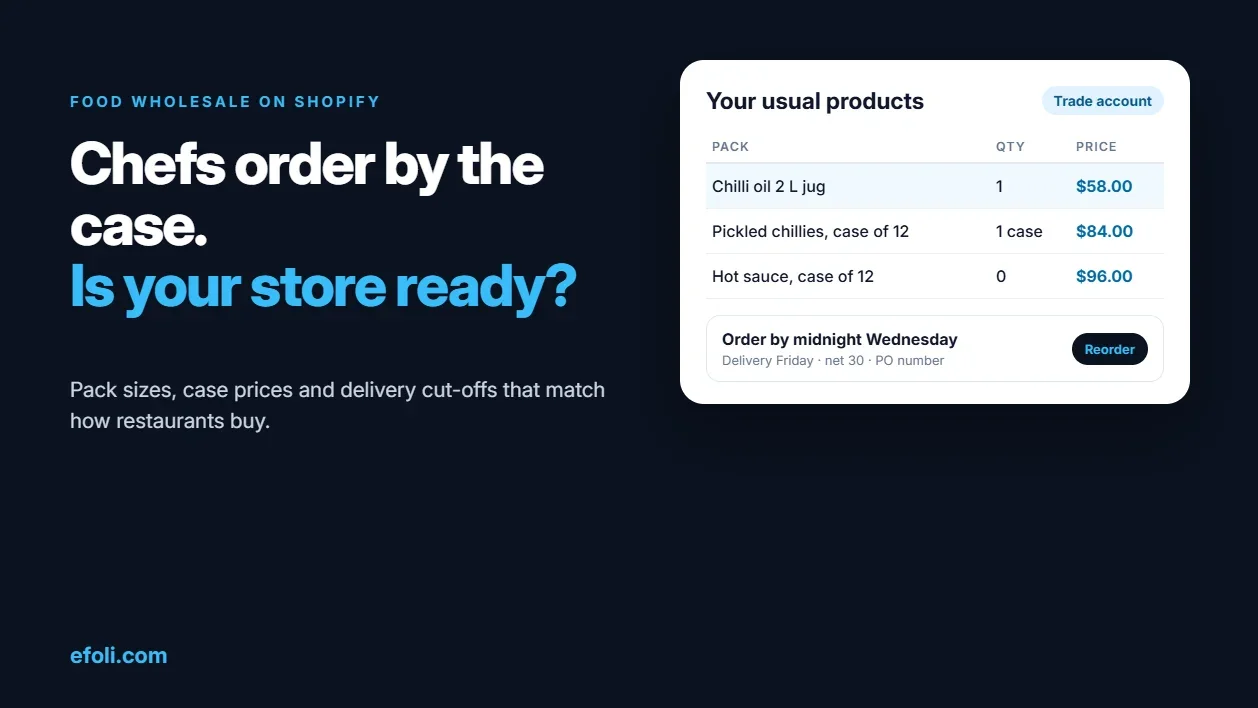
At 11:40 pm, Dana opens the Hollis Pantry trade page on a phone. A one-time code arrives by email and Dana is signed in. The page shows "Your usual products": the 2 L chilli oil jug, the case of pickled chillies and two hot sauces. Each shows the trade price per pack and per litre. A banner says "Order by midnight Wednesday for Friday delivery."
Dana enters 1 jug of chilli oil and 1 case of pickled chillies (the store only allows whole cases), adds a PO number and checks out on the restaurant's net 30 account. The order confirmation shows Friday delivery. Total time: about 90 seconds.
At 7 am, the order is in Shopify with the right products, prices and terms. No texts to interpret, no invoices to write by hand.
The merchant checklist

A 16-point checklist for food producers selling to restaurants on Shopify.
Products and packs
Catering packs are separate products or variants with their own SKU, label and price.
Retail cases are available as a pack size for trade buyers.
Trade-only products are hidden from retail shoppers.
Quantities and prices
Trade buyers can only order whole cases.
Each trade product shows price per pack and price per unit.
Trade prices are set by customer group or company, not by sharing a discount code.
Price groups are few and clearly defined.
Delivery
Delivery days and cut-offs are on every trade product page and in the cart.
The after-cut-off rule is stated.
The minimum order for delivery is clear.
Information
Each trade product has a downloadable spec sheet.
Allergens are clearly stated, including the nine major US allergens where relevant.
Shelf life and storage are on the spec sheet.
Ordering and paying
Trade buyers can reorder from past orders or a "usual products" list in under two minutes on a phone.
Payment terms are set per customer and shown at checkout.
Sample requests have a defined process for new restaurants.
What to measure once restaurants order online
After a month or two, check a few numbers in Shopify to see whether the change is working. You don't need a dashboard, just a filtered order report for trade customers.
Share of restaurant orders placed online versus by text or phone. The goal is most routine orders online within a few months.
Orders placed after the cut-off. If many arrive late, your cut-off may be too early, or it isn't visible enough.
Average order value per restaurant. Case-only ordering and a clear delivery minimum usually raise it.
Days to payment against the terms you set. If restaurants on net 30 pay in 45, tighten reminders before extending credit to more accounts.
Restaurants that haven't ordered in three weeks. In a weekly-ordering business, a gap like this is usually the first sign an account is drifting to another supplier. A quick call often saves it.
These numbers were invisible when orders lived in a text thread. Now they tell you which accounts to look after.
The bigger picture
Restaurants are some of the most loyal customers a small food producer can have, as long as ordering is easy. The changes above aren't complicated. Most are settings and range decisions rather than development work. But they change the relationship from "the founder who answers texts" to "the supplier whose ordering just works".
If you also supply hotels and catering operations that buy non-food supplies alongside food, the eFoli post on hospitality supply ordering compares native Shopify B2B with a bulk order form for mixed supply orders. And if drinks are part of your range, wholesale beverage volume pricing covers why one case can end up costing more per bottle than two.
Hollis Pantry and Dana are fictional, used to illustrate a common situation. Prices are illustrative. Allergen and labelling notes are general information, not legal advice.
FAQ
How do I sell wholesale to restaurants on Shopify?
How do I make restaurant customers order in full cases?
Should catering packs be separate products?
What information do restaurants need before buying a new ingredient?
How can restaurants pay on account through Shopify?
How do I make reordering faster for chefs?

Anika Anamta Mehnaz
This article is written by Anika Anamta Mehnaz, a Content Writer and Content Marketing Strategist specializing in Shopify, eCommerce, and SaaS. With over four years of content writing experience, she creates SEO and AI search-optimized content that helps Shopify merchants make better business decisions through practical, research-backed insights. Her work covers Shopify apps, product variants, bundles, discounts, B2B commerce, and conversion-focused strategies. Outside of work, Anika enjoys watching anime, reading John Grisham novels, and discovering new ideas in digital marketing and e-commerce. If you enjoy discussing Shopify, content marketing, or online growth, feel free to connect with her. Twitter: https://x.com/mehnaz2201 Medium: https://medium.com/@mehnaz_78932
Keep reading
View all articles →
Build Vitamin Kits Around Choices, Not a Wall of Product Variants
November 23, 2026 • 18 min read
How to Build Retail and Wholesale Pricing Without Splitting the Store
November 23, 2026 • 17 min read
They Know the Part Number. Why Are They Searching the Entire Catalogue?
November 23, 2026 • 17 min read