On this page
- Key takeaways
- The buyer's side: what a customer actually experiences
- The friction map: where the store and the kitchen disagree
- Gap 1: One closing time for every day
- Gap 2: Capacity counted on the wrong day
- Gap 3: Dishes that run out on one day but not another
- Gap 4: Delivery windows with physical limits
- Gap 5: Menus that change
- The operational effects: what the friction costs
- What a production-aware store looks like
- A cutoff per delivery day
- Capacity per delivery date and per slot
- Dish limits counted by cooking day
- Blackout dates
- Allergen information before and after ordering
- How to set this up in Shopify
- Cutoffs, delivery dates and slots
- Dish limits counted by delivery date
- Enforcement at checkout
- Meal plans and build-your-own boxes
- Subscriptions: the gap to check first
- Menu rotation
- Worked example: one kitchen's Friday
- Questions to ask before you change anything
- Merchant checklist: decisions that fix the friction
- Scoping a meal-prep project
- Where kitchens usually slip
- In short.....
- FAQ
Short answer: Meal-prep kitchens don't run out of stock the way a shop does. They run out of time. Every delivery day has a prep list that closes at a set hour, a number of portions the kitchen can cook, and a number of drops the drivers can make. A standard Shopify store only knows what's in inventory, so it keeps taking orders after the prep list has closed, sells more of one dish than the kitchen planned, and offers delivery days that can't be met. The fix is to model the kitchen's real production windows in the store: an order cutoff for each delivery day, a cap on orders per delivery date and per slot, limits on each dish counted by the day it will be cooked, and allergen information that's available before ordering and again on delivery. An app such as OrderRules can enforce these rules at checkout, including express checkouts, so the kitchen gets the orders it can actually make.
Thursday, 9:40 PM. The head chef at a small meal-prep kitchen prints Friday's prep list, orders the proteins for the morning and goes home. At 10:15 PM, a customer orders eight meals for Friday delivery. At 11:30 PM, someone else orders six. By morning there are 31 meals the kitchen didn't plan for, two dishes that need more chicken than was delivered, and a driver route with three extra stops in a neighbourhood the van doesn't usually reach on Fridays.
None of these customers did anything wrong. The store told them Friday was available, so they chose Friday.
This article is for meal-prep kitchens, prepared-meal brands and the agencies that build their Shopify stores. It walks through the buyer's experience, maps where the friction comes from, explains what that friction does to the kitchen, and ends with a checklist of decisions to fix it. The examples are illustrative, and the numbers are there to show the shape of the problem, not to predict results for any particular business.
Key takeaways
A meal-prep kitchen's real constraint is the production window: when the prep list closes, how many portions can be cooked, and how many deliveries can be made.
Shopify inventory counts what's on the shelf. It doesn't know that Friday's prep list closed at 9 PM on Thursday.
Each delivery day needs its own cutoff, not one store-wide closing time.
Cap orders per delivery date and per time slot, and count dish limits by the day the meal will be cooked, not the day it was ordered.
Subscriptions and plan renewals can skip the rules a one-off checkout follows. Check how your stack handles them.
Allergen information needs to be available before ordering and again on delivery, especially when menus rotate.
Leave headroom. Two customers can check out for the last slot in the same second.
The buyer's side: what a customer actually experiences
Start with the customer, because that's where the friction shows first. Here's a typical first order from a meal-prep store.
They browse the weekly menu. Twelve dishes, some new this week. They pick five lunches and two dinners.
They choose a delivery day. The store offers Monday to Saturday. They choose Friday because they're going away at the weekend.
They check out. Shop Pay fills in the details, and the order is done in under a minute.
They get a confirmation. Friday delivery, 7 AM to 10 AM.
On Friday, something goes wrong. One of the seven meals has been swapped for a different dish, the delivery arrives at noon, or a message says the order has moved to Saturday.
From the customer's point of view, the store made a promise and then changed it. They don't know that the prep list had already closed, that the kitchen ran short of one ingredient, or that the van was full. They only know the order wasn't what they chose.
The frustrating part for the kitchen is that every one of those problems was predictable at the moment of checkout. The store just didn't have the information to say no.
The friction map: where the store and the kitchen disagree
Most of the friction comes from five gaps between what the store knows and what the kitchen knows.
Gap | What the store assumes | What the kitchen knows |
|---|---|---|
Order cutoff | Orders are fine until the shop "closes" | Friday's prep list closed at 9 PM Thursday |
Daily capacity | Any number of orders is fine if items are in stock | The kitchen can cook about 400 meals a day |
Dish limits | Each dish has plenty of stock | Only 60 portions of the salmon bowl are planned for Friday |
Delivery slots | Any slot is fine | The 7–10 AM van holds 40 stops |
Menu rotation | Products stay the same | Three dishes change next Monday |

Gap 1: One closing time for every day
Many stores use a single store-wide closing time, or none at all. But a meal-prep kitchen usually has a cutoff for each delivery day. Monday's meals might need ordering by Saturday noon, because the kitchen shops on Saturday afternoon and cooks on Sunday. Friday's meals might need ordering by Thursday at 9 PM.
The cutoff isn't really about the shop being open. It's about when the prep list for a given day is printed and the ingredients are ordered.
Gap 2: Capacity counted on the wrong day
A kitchen that can cook 400 meals a day doesn't care how many orders arrive on Tuesday. It cares how many meals are due on each cooking day. An order placed on Tuesday for Friday delivery uses Friday's capacity, not Tuesday's.
This is the gap that catches most stores out. If the store counts limits by order date, a busy Tuesday looks full while Friday quietly overflows.
Gap 3: Dishes that run out on one day but not another
Stock in a meal-prep business isn't a pile of boxes on a shelf. It's a plan: "we'll cook 60 salmon bowls for Friday." If the store tracks one inventory number for the salmon bowl, it can sell 60 for Friday and still show the dish as available for Saturday, or the other way round.
Treating each dish as a portion budget per cooking day is the closest match to how the kitchen works.
Gap 4: Delivery windows with physical limits
Vans hold a certain number of stops, and drivers can only cover so many in a window. A store that offers every slot to everyone will fill the popular morning window long before the afternoon one.
Gap 5: Menus that change
Rotating menus keep customers interested, but they create a product problem. Next week's dishes need to be orderable before they're cooked, last week's dishes need to stop being orderable, and allergen information has to change with the menu.
The operational effects: what the friction costs
The friction map describes the gaps. Here's what they do to a kitchen over a normal week.
Late orders that the kitchen can't plan for. Orders arriving after the prep list closes mean either buying ingredients at short notice, cooking without a plan, or calling the customer. Each option costs time and goodwill.
Substitutions. When a dish sells beyond its planned portions, the kitchen either cooks extra or swaps the meal for something else. Swaps are a common source of complaints, and they're a particular problem for customers who avoid certain allergens.
Delivery overruns. An overloaded morning window pushes drops into the afternoon. Customers who chose morning delivery to have lunch at work don't get lunch.
Waste. Overcorrecting is just as costly. A kitchen that's been burned by late orders often cooks extra "just in case", and prepared meals can't be stored for long. The USDA's food safety guidance describes the Danger Zone as 40°F to 140°F, where bacteria multiply rapidly, and recommends discarding perishable food left out for more than two hours. Extra meals that don't sell don't have much time to find a buyer.
Staff stress. The chef who printed the prep list at 9:40 PM starts Friday with a problem. That's not a sustainable way to run a kitchen.
The OrderRules team's guide to running a ghost kitchen on Shopify covers more of the operational side, and its post on how to start a food delivery business on Shopify is a good primer if you're earlier in the process.
What a production-aware store looks like
Before getting to the checklist, here's what the store needs to do once the gaps are closed. These are the rules the kitchen actually works by, written so a store can enforce them.
A cutoff per delivery day
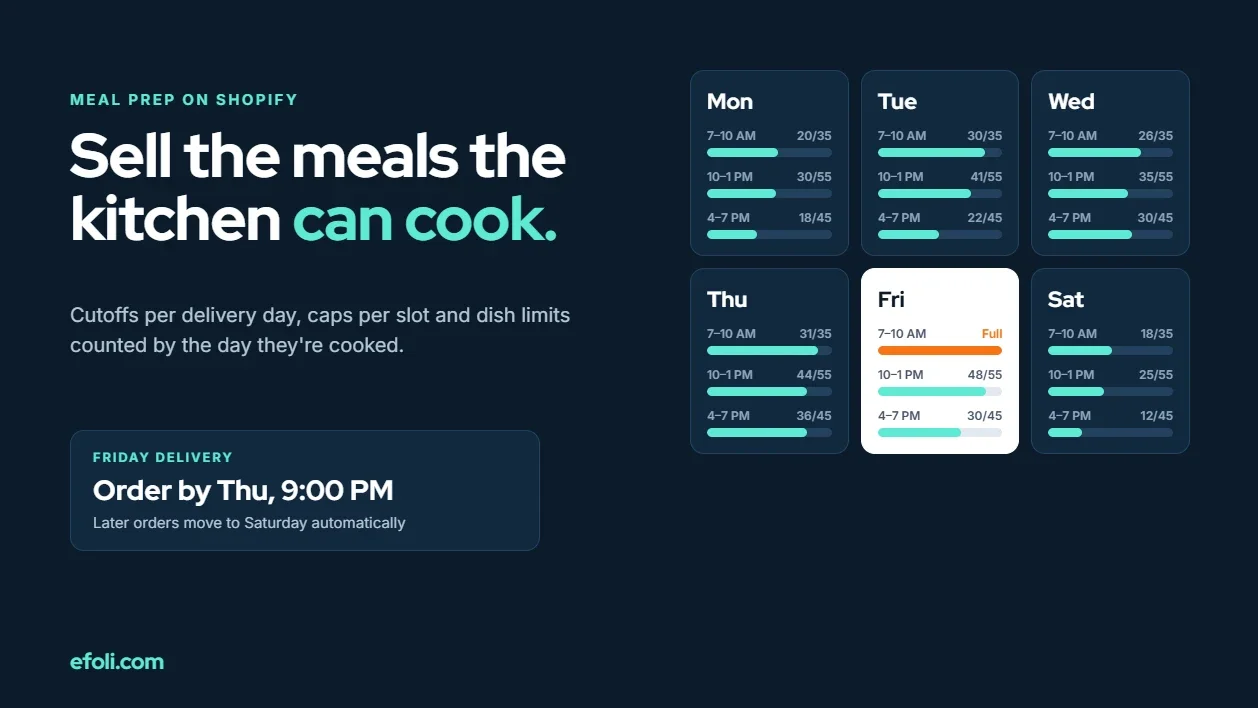
Each delivery day has its own cutoff, tied to when the prep list closes. A customer ordering after Thursday's 9 PM cutoff sees Saturday as the first available delivery day, not Friday.
Capacity per delivery date and per slot
The store caps total orders for each delivery date and for each time slot. When Friday is full, it's greyed out. When the 7–10 AM slot is full, customers can still choose 10 AM to 1 PM.
Dish limits counted by cooking day
Each dish has a limit per delivery date, matching the portions the kitchen plans to cook. When Friday's salmon bowls are gone, the dish is unavailable for Friday but still available for Saturday.
Blackout dates
Bank holidays, staff training days and supplier closures are blocked in advance, so customers can't choose them.
Allergen information before and after ordering
The UK Food Standards Agency's best practice guidance for food sold at a distance says written allergen information should be available before the food is ordered and again on delivery. Online, it should ideally be on the menu, or no more than one click away. The UK has 14 allergens that businesses must tell consumers about. In the US, the FDA recognises nine major food allergens, with sesame added as the ninth from 1 January 2023.
For a rotating menu, that means allergen information is part of the product, not a PDF somewhere on the site, and it changes when the dish changes.

How to set this up in Shopify
You don't need custom code for most of this. Here's how the pieces fit.
Cutoffs, delivery dates and slots
Shopify doesn't have native per-day order cutoffs or per-slot delivery capacity. A delivery and order limits app fills the gap. OrderRules is built for this kind of business. On its Advanced plan, $19.99 a month with a 14-day trial at the time of writing, it adds:
A delivery date picker on product and cart pages.
Time slots, each with its own capacity.
Rules for lead time, a daily cutoff, deliverable weekdays and how many days ahead customers can book.
A cap on orders per delivery date and per slot.
Blackout dates, and scheduled in-store pickup with its own slots and closed days.
Automatic order tags by delivery date and slot, so the kitchen can filter orders by cooking day.
The cutoff works the way a kitchen expects: orders placed after the cutoff move one day later. One thing to plan around: each rule has one lead time and one cutoff, and rules are scoped by product, collection or tag rather than by weekday. If one delivery day needs a different cutoff from the others, as in the Monday example above, ask the app's support how best to model it, or use the longer lead time for the whole menu. The OrderRules team's walkthrough of setting up cutoff times on Shopify shows the setup, and its guide to holiday cutoffs and blackout dates covers the busy weeks.
Dish limits counted by delivery date
OrderRules can count a product's daily limit by delivery date instead of order date, which matches how a kitchen plans portions. With that setting on, a limit of 60 salmon bowls a day means 60 for each delivery date, however many days in advance they were ordered. Variants are counted separately, and delivery and pickup share one cap. Weekly and monthly limits still count by order date, so use daily limits for portion budgets.
Enforcement at checkout
The rules only help if they can't be skipped. OrderRules enforces them at checkout through a Shopify checkout validation function, which covers standard checkout, express wallets such as Shop Pay, Apple Pay and Google Pay, and direct checkout links. A November 2026 update extended delivery date rules to Buy it now, checkout links and AI shopping agents, with a fallback that lets customers pick a date after checkout if they couldn't before.
On Shopify Plus, a delivery date block can also appear on the checkout page itself. On other plans, the product and cart pickers still work, and the rules are still enforced.
Meal plans and build-your-own boxes
Many meal-prep stores sell plans such as "pick 10 meals a week". A mix-and-match bundle builder handles the choice. Push Bundle is a Shopify all-in-one bundle app that offers Build-a-Box and Mix & Match bundles with minimum and maximum quantities and a multi-step builder on its Growth plan, $14 a month with a 14-day trial at the time of writing. The box goes into the cart as one product, with stock synced for each meal inside.
Check one thing carefully: how dish limits behave when meals are inside a bundle. Test a box that includes a dish close to its limit for the chosen delivery date, and confirm the store blocks it the way you expect.
Subscriptions: the gap to check first
Weekly meal plans are often sold as subscriptions. Here's the catch: OrderRules validates the first checkout, but subscription renewals aren't put through checkout validation, so renewals are counted but not blocked. That's a Shopify platform behaviour, not a quirk of one app, and it means a kitchen with many subscribers can still exceed its capacity on renewal day.
The practical fixes are to reserve capacity for subscribers when you set your caps, schedule renewals on predictable days, and review renewal volume before each cooking day. If subscriptions matter, the Push Bundle team's guide to selling a mix-and-match subscription box explains the bundle side, and Anika's post on running a subscription box business on Shopify covers the wider setup.
Menu rotation
For rotating menus, a simple product routine helps:
Create next week's dishes as products in advance, with full allergen information.
Use the delivery date rules to make them orderable only for the right dates.
Remove or archive last week's dishes once their last delivery date has passed.
Keep allergen details in the product description or a product metafield, so they move with the dish, and print them on the label or a menu card in the delivery.
Worked example: one kitchen's Friday
Here's how a fictional kitchen, Greenhouse Meals, set up its store after a few bad Fridays. The numbers are illustrative.
The kitchen's real limits:
About 400 meals a day, with Friday slightly lower at 350 because of a staff rota.
Three delivery slots: 7–10 AM (40 stops), 10 AM–1 PM (60 stops), 4–7 PM (50 stops).
Prep lists close at 9 PM the evening before. There are no Sunday deliveries, so Monday's meals are cooked on Monday morning like every other day.
Twelve dishes a week, each with a planned portion count per day.
The store rules:
Rule | Setting |
|---|---|
Cutoff | 9 PM, with a one-day lead time |
Delivery days | Monday to Saturday |
Orders per delivery date | 90, leaving headroom below the portion limit |
Slot caps | 35 / 55 / 45, a little under the van limits |
Dish limits | Planned portions per day, counted by delivery date |
Blackouts | Bank holidays and the kitchen's annual deep clean |
Order tags | delivery:YYYY-MM-DD and slot tags |

What changed: orders after the cutoff now move to the next available day, the popular morning slot fills and greys out instead of overflowing, and dishes sell out per day rather than across the week. The kitchen filters orders by the delivery: tag to print each prep list.
What still needed attention: subscribers. About a third of Friday's meals came from renewals, which aren't blocked by checkout rules. The kitchen lowered the one-off order cap for Fridays to leave room for subscribers and started reviewing renewals each Thursday afternoon.
Notice the headroom. OrderRules doesn't reserve a place while someone is checking out, so two customers paying at the same second for the last slot can both get through. That's a known platform limit. Setting caps slightly below the real limit absorbs it.
Questions to ask before you change anything
Before choosing settings, the kitchen and the agency should agree on answers to these:
When does the prep list for each delivery day close?
How many meals can the kitchen cook on each day of the week?
How many stops can each van make in each slot?
Which dishes have their own portion limits, and how are those planned?
How many meals come from subscriptions, and on which days?
Which days are closed, and when are they known?
Where does allergen information live, and who updates it when the menu changes?
What happens today when a late order arrives? Who calls the customer?
The last question is useful because the answer shows how much the friction currently costs in staff time.
Merchant checklist: decisions that fix the friction
Use this list to turn the friction map into decisions. Each item is something the kitchen can decide and the store can enforce.
Set a cutoff for each delivery day, tied to when the prep list closes, not to the shop's opening hours.
Cap orders per delivery date, below the kitchen's real limit, to leave headroom.
Cap each delivery slot, below the van's real limit.
Set dish limits by delivery date, matching planned portions.
Block closed days in advance, including holidays and supplier closures.
Decide what happens to late orders. With a cutoff in place, the store moves them to the next available day automatically.
Reserve room for subscriptions, because renewals aren't blocked at checkout.
Make allergen information part of each dish, visible before ordering and included with the delivery.
Tag orders by delivery date and slot, so prep lists can be filtered quickly.
Test every checkout route, including Shop Pay and a direct checkout link, after a cutoff and when a slot is full.
Review the numbers weekly: late orders, substitutions, overrun slots and waste.
Write down who changes the rules when the kitchen's capacity changes, such as a new chef or a second van.
If you also run a bakery or a florist, the same thinking applies with different limits. eFoli's guides to bakery order limits and florist order capacity cover those versions of the problem.
Scoping a meal-prep project
For agencies, meal-prep projects tend to be scoped as "build the menu pages and set up delivery". The friction map suggests a more useful scope:
Kitchen workshop: cutoffs, capacity, slots, portions, subscriptions.
Rules setup: delivery dates, slots, caps, dish limits, blackouts.
Bundle and subscription check: how meal plans and renewals interact with the rules.
Allergen content: where it lives and how it changes with the menu.
Checkout testing: every route, at and just after each cutoff.
Handoff: who changes which rule, and a weekly review.
The OrderRules team's overview of a restaurant and food delivery app stack is a useful reference when you're choosing the rest of the tools.
Where kitchens usually slip
Using shop opening hours as the cutoff. The cutoff belongs to the prep list, and it's different for each delivery day.
Counting capacity on the order date. Count it on the day the meal will be cooked.
Setting caps at the exact limit. Leave headroom for same-second checkouts and staff absences.
Forgetting subscriptions. Renewals use capacity without passing through checkout rules.
Keeping allergen information in one place for the whole menu. It has to move with each dish.
Testing only the normal checkout. Express wallets and direct checkout links need testing too.
In short.....
A meal-prep kitchen sells time, not shelf stock. When the store doesn't know when the prep list closes, how many meals the kitchen can cook, or how full the vans are, it keeps saying yes after the kitchen has said no. Give each delivery day its own cutoff, cap orders by delivery date and slot, count dish limits by cooking day, reserve room for subscribers and keep allergen information with each dish. Then Thursday night's prep list is the one the kitchen actually cooks.
FAQ
How do I stop orders after my meal-prep cutoff on Shopify?
Can I limit how many meals are delivered each day?
Do subscription renewals follow the same order limits?
Where should allergen information go on a meal-prep store?
Why do two customers sometimes get the last delivery slot?
Do I need Shopify Plus for delivery dates?

Anika Anamta Mehnaz
This article is written by Anika Anamta Mehnaz, a Content Writer and Content Marketing Strategist specializing in Shopify, eCommerce, and SaaS. With over four years of content writing experience, she creates SEO and AI search-optimized content that helps Shopify merchants make better business decisions through practical, research-backed insights. Her work covers Shopify apps, product variants, bundles, discounts, B2B commerce, and conversion-focused strategies. Outside of work, Anika enjoys watching anime, reading John Grisham novels, and discovering new ideas in digital marketing and e-commerce. If you enjoy discussing Shopify, content marketing, or online growth, feel free to connect with her. Twitter: https://x.com/mehnaz2201 Medium: https://medium.com/@mehnaz_78932
Keep reading
View all articles →
Six Students, Six Kits, Thirty Missing Brushes: Why Craft Workshop Kits Break on Shopify
November 17, 2026 • 17 min read
The Keepsake Buying Journey on Shopify: From Engraving Choices to Order Accuracy
November 17, 2026 • 18 min read

Shop the Room on Shopify: Native Tools, Push Bundle or Custom Code?
November 17, 2026 • 18 min read