On this page
- Key takeaways
- Why Valentine's Day exposes everything
- Before you change anything: count last year
- The three limits a florist actually runs out of
- Limit 1: stems
- Limit 2: design time
- Limit 3: delivery slots
- What the customer sees when limits are missing
- Where Shopify's defaults fall short
- Fixing the stems problem: shared inventory
- Fixing design time: cap orders by delivery date
- Fixing delivery slots: cap each run
- When something still runs out: substitution
- Sympathy, same-day and event orders need their own rules
- What overselling actually costs
- Peak week: a simple timeline
- A worked example: one shop, one peak
- Florists and bakeries: similar problem, different counter
- The merchant checklist
- FAQ
Short answer: Florists oversell on Shopify because the store counts only one thing, usually product stock, while a flower shop runs out of three: stems, design time and delivery slots. A dozen-rose bouquet can be "in stock" while the cooler is empty, the designers are fully booked and the vans are full. The fix is to give each limit its own control: track key stems as shared inventory, cap orders per delivery date for workshop time, cap each delivery slot for the vans, and publish a substitution policy for the day something still runs out.
It's 11:20 on 13 February. The cooler has 140 red roses left. The website still says "in stock" on every rose arrangement, because each arrangement has its own stock number and nobody connected them to the roses in the cooler. In the last hour, 30 more orders came in for tomorrow. Twenty of them are for a dozen red roses.
That's 240 roses you don't have.
Now someone has to phone twenty customers on the busiest day of the year. Some will accept a substitution. Some will cancel. A few will leave a review.
This post is for florists who sell on Shopify and for the agencies that build their stores. It explains where orders slip through, what it costs, and the corrective decisions to make before the next peak.
Key takeaways
A flower shop runs out of three things: stems, design time and delivery capacity. Shopify's stock count only covers the first, and only if you set it up that way.
Many arrangements share the same flowers. Track the limiting stems as shared inventory, not just the finished bouquets.
Cap orders by delivery date, not by the day they're placed. A busy Monday doesn't mean anything. A full Saturday does.
Give each delivery slot its own cap, so the morning van isn't promised twice.
Write a clear substitution policy before peak season. FTD's policy, for example, puts flower variety ahead of colour for single-variety arrangements and rules out changes to an arrangement's size or shape.
Test with real orders on a phone, including express checkout buttons. Orders that arrive without a delivery date slip past most limits.
Why Valentine's Day exposes everything
Every flower shop has busy days, but Valentine's Day is different. The Society of American Florists calls it the number one holiday for florists and for floral purchases, and estimates that more than 250 million roses are produced for it. In SAF's 2022 consumer survey, conducted by Ipsos, 83% of people who bought Valentine's flowers bought roses.
So a florist's demand doesn't just rise on 14 February. It concentrates. Everyone wants the same flower, in the same colour, delivered on the same day, mostly in the same few hours. Mother's Day and Christmas follow similar patterns, with different flowers.
A store setup that copes on a normal Tuesday can fall apart on that day, and it usually falls apart in the same three places.
Before you change anything: count last year
The numbers you need are probably already in your Shopify orders. Export last year's orders for the week of your biggest peak and answer four questions:
How many orders were delivered on each day, not placed?
How many of those used your top three stems, and how many stems did that add up to?
Which delivery window was busiest?
How many orders were changed, substituted or refunded, and why?
The last question is the most useful. If most problems were substitutions, stems are your weak point. If most were late deliveries, it's slots. If designers were working past midnight, it's design time. You don't have to fix everything at once. Fix the limit that hurt you most last year.
The three limits a florist actually runs out of

Limit 1: stems
Roses, peonies, ranunculus, eucalyptus. Each one arrives in a set quantity, often bought days ahead from a wholesaler, and can't be restocked on the day.
The catch is that one stem goes into many products. Red roses might appear in your dozen-rose bouquet, your two-dozen luxury box, your rose-and-lily mix and your single-stem gift. If each of those products has its own stock count, Shopify sees four separate products with plenty of stock. The cooler sees one bucket of roses running out from four directions at once.

Limit 2: design time
Even with a full cooler, a designer can only make so many arrangements an hour. A simple hand-tied bouquet might take ten minutes. A large funeral piece can take well over an hour. On peak days, design time is often the tightest limit of all.
Design time belongs to a date. Wednesday's capacity doesn't help Thursday's orders. That's why a florist's limit has to count orders by the delivery date, not the date the customer clicked "buy". Our OrderRules team explains this trap in your daily limit is counting the wrong day.
Limit 3: delivery slots
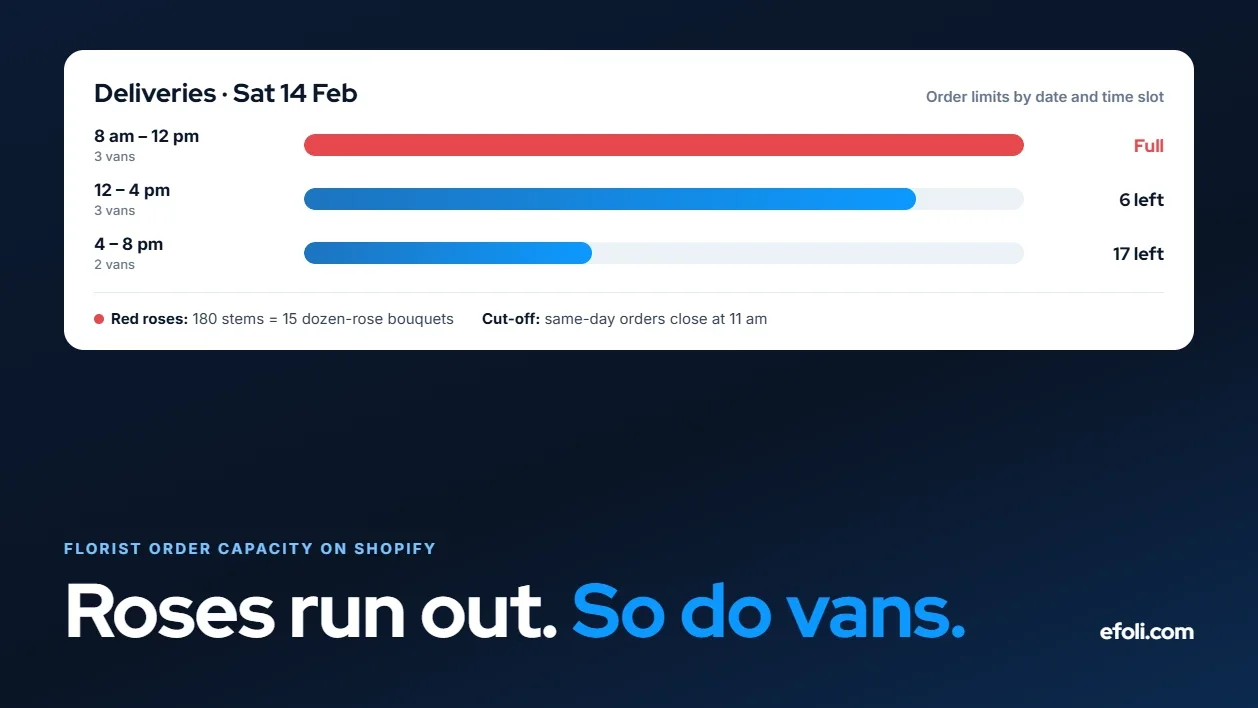
Drivers, vans and routes. A morning run can carry so many arrangements to so many addresses. If 60 people pick "morning delivery" and the van fits 35, someone's flowers arrive in the afternoon, or late at night, or not at all.
Delivery capacity is per slot, not per day. A day with room for 120 deliveries might still have a full morning.
What the customer sees when limits are missing
It helps to look at the same problem from the other side of the screen.
A customer orders at 10pm on 13 February. They pick the dozen red roses, choose "tomorrow, morning" and pay. Everything about the store tells them it's fine. There's no warning, no "only a few left", nothing to suggest the shop is already past what it can make.
The next morning, they get a phone call or, worse, an email: the roses aren't available, would they accept pink, and the morning slot has moved to "by end of day". The flowers were meant to be on a desk before a 9am meeting. Now they're a problem the customer has to explain.
The customer didn't do anything wrong. The store promised something it couldn't check.
Compare that with a store that knows its limits. The same customer sees "Morning delivery on 14 February is fully booked. Afternoon slots are available, or choose morning delivery on 13 February." They might be disappointed for a moment. Then they choose. Nobody phones anybody.
That's the real case for capacity limits. They don't reduce demand. They move the disappointment to the moment the customer can still do something about it.
Where Shopify's defaults fall short
Out of the box, Shopify is good at one of these limits and silent on the other two.
Stock: Shopify tracks inventory per product or variant. That handles the stems problem only if the stems are modelled as stock somewhere. If every bouquet has its own made-up stock number of, say, 50, the store has no idea how many roses are actually left.
Design time: Shopify doesn't have a native "orders per delivery date" cap. It doesn't know which date an order is for unless an app or theme adds a delivery date field.
Delivery slots: The same. Shopify's local delivery settings handle zones and prices, but not "this slot is full".
None of this is a criticism of Shopify. Most stores don't need these limits. Florists do, every single day, and most of all on the days that matter.
Fixing the stems problem: shared inventory
The cleanest way to stop selling roses you don't have is to make every rose product draw on the same rose count.
There are two practical ways to do it.
Option A: bundles built from stem components. Create a product for each key stem, such as "Red rose (stem)", and track its inventory. Then build each arrangement as a fixed bundle that contains, for example, 12 red rose stems plus greenery and a wrap. Shopify's own Bundles app works out how many bundles can be sold from the component with the lowest stock. According to the Shopify Help Center, each component's available stock is divided by the quantity one bundle needs, and the result is rounded down. With 140 roses left, a dozen-rose bouquet can sell 11 more times, and a two-dozen box can sell 5 more times, from the same 140.
Check a few things before you rely on it:
Components that aren't tracked, or are set to continue selling when out of stock, aren't counted.
Shopify Bundles doesn't support mix-and-match, so a "build your own bouquet" product needs an app instead.
Test whether your bundle setup still behaves correctly if the stem products aren't published as products shoppers can buy on their own.
Option B: a bundle app with inventory sync. If you want a build-your-own bouquet, add-ons like vases and chocolates, or mix-and-match choices, a bundle app is the better fit. Push Bundle lists Build-a-Box and Mix & Match bundles with min and max quantity and variant limits on its Growth plan, and says bundles show in the cart as a single product with inventory synced. A "choose 3 to 5 stem types" bouquet builder fits that model well. Our Push Bundle post on Valentine's Day bundles answers the questions merchants ask most about February bundles.
Whichever you choose, you only need to track the stems that actually run out. Greenery and filler usually don't. Roses, peonies and seasonal specials usually do. Three to six tracked stems cover most shops.
Fixing design time: cap orders by delivery date
Design time needs a cap that counts orders against the day they'll be made and delivered.
That requires two things: a delivery date picker, so every order has a date, and a cap per date. OrderRules, an app built by our team, includes both on its Advanced plan ($19.99 a month at the time of writing): a delivery date picker on the product and cart, per-date and per-slot capacity caps, lead time, cutoff and weekday rules, and blackout dates. Its free plan includes a simple daily order limit of up to 100 orders a day and store hours, which is a reasonable start for a small shop with no delivery dates.

A few details matter more than the headline feature:
Require the date. An order without a delivery date can't be counted against any date. OrderRules' own write-up of limiting units per delivery date says plainly that lines with no delivery date aren't counted toward the daily limit, and recommends requiring a date at checkout. Check how Buy It Now and express wallet buttons handle the date in your theme.
Count units for hero products. An order for one bouquet and an order for ten corporate centrepieces both count as one order. If one product is your bottleneck, a per-product daily quantity limit counted by delivery date is the better tool. In OrderRules, a product limit adds up every variant of that product for each date. Two separate products can't share one delivery-date limit, so put sizes of the same arrangement into one product as variants.
Leave headroom. OrderRules notes that the last unit isn't reserved, so two customers paying at the same moment for the final slot can both get through. If 80 is the absolute maximum your designers can make, set 76.
Plan peak numbers in advance. A product's daily limit in OrderRules is one number for every date, so you can't give a single day a lower limit. Set peak-week limits before customers start booking those dates, and use blackout dates to close a day completely.
Fixing delivery slots: cap each run
Time slots solve the van problem. Instead of "deliver on 14 February", the customer picks "14 February, 8am to 12pm" and each slot has its own cap.
How to set slot caps sensibly:
Start from the run, not the day. If a van does 30 stops in a morning, the morning cap is 30 per van.
Make same-day slots stricter. Same-day orders arrive after routes are planned.
Close slots before the van leaves. A cutoff two to three hours before the last run gives designers time to make the arrangement and dispatch time to load it.
Our OrderRules guides on offering delivery time slots and setting cutoff times for same-day and next-day orders cover the setup in detail.
When something still runs out: substitution
Even with perfect limits, flowers are a natural product. A shipment arrives damaged. A grower's crop comes in short. Something will run out, and the only question is whether the customer knew what would happen.
Big networks have clear rules. FTD's substitution policy says that in arrangements made of one type of flower, such as all roses, the variety comes first, ahead of colour. It also says there should be no change in the arrangement's size or shape. Independent florists often publish similar wording: a second choice of similar flowers and container of equal value, keeping size, shape and colour scheme where possible.
Write yours down and put it in three places:
On every product page, in one short line: "If a flower is unavailable, we'll replace it with one of equal or greater value in the same style."
In the cart or checkout, near the delivery date.
In your order confirmation email.
Then decide the rule for hero products. Some customers ordering red roses for Valentine's Day would rather cancel than receive pink ones. Say what happens in that case before it happens, so it's a policy and not an argument.
Sympathy, same-day and event orders need their own rules
Not every order is a Valentine's bouquet. Three other order types behave differently, and they're where many florist setups get caught out.
Sympathy orders. Funeral flowers are often ordered at short notice for a fixed time and place. The customer can't move the date. Give sympathy products a clear same-day cutoff, show it on the product page, and keep a small amount of design capacity back on busy days so you're never in the position of turning away a funeral order because the day filled with gifts.
Same-day gifts. Same-day orders arrive after the morning plan is set. Keep their cutoff earlier than you think, and limit same-day delivery to the zones your vans can still reach.
Weddings and events. These aren't cart orders. They're consultations, often booked months ahead, with deposits and a final flower count. Keep them out of your daily web caps and block the capacity they need by hand, or close the date completely with a blackout date when a large wedding takes over the workshop. If you want to take event enquiries online, a quote request fits better than a product page.
What overselling actually costs
It's tempting to see a few oversold orders as the price of a busy day. The costs are bigger than they look.
Staff time on the worst possible day. Every oversold order is a phone call when your team is already stretched.
Refunds and lost repeat business. A customer whose anniversary flowers didn't arrive is unlikely to order again in May.
Reviews. Florist reviews are often written on the day, emotionally, and they stay for years.
Designer burnout. Squeezing ten extra arrangements into a full day doesn't just cost money. It costs the people you need next year.
Closing a date early feels like turning money away. In practice, a clearly sold-out date usually converts to orders for the day before, the day after, or a pickup slot. A customer who sees "14 February is fully booked, 13 February is available" makes a decision. A customer who's told on the morning of the 14th that their order can't be delivered just gets angry.
Peak week: a simple timeline

Four weeks out. Confirm your stem orders with your wholesaler. Set the tracked stem quantities in Shopify to match. Decide slot caps for 12 to 14 February. Publish your substitution policy and delivery cutoffs.
Two weeks out. Open booking for peak dates. Run a full test order on a phone for each date and slot, including express checkout.
Peak week. Check stem stock against the cooler every morning and adjust Shopify to match. Watch which slots fill first. If the 14th fills, promote the 13th.
After the peak. Compare what you sold with what you could actually make and deliver. Adjust next year's caps and stem orders from real numbers, not memory.
Our eFoli post on managing holiday delivery expectations on Shopify covers the customer-facing side of delivery promises in more depth, and the OrderRules guide to holiday cutoffs and blackout dates covers peak-season settings.
A worked example: one shop, one peak
This is a made-up but typical setup. A two-van florist sells online and from one shop. For Valentine's Day, it orders 600 red roses, 200 pink roses and 150 tulip bunches.
Stems. "Red rose (stem)", "Pink rose (stem)" and "Tulip bunch" are tracked products. Each rose arrangement is a fixed bundle that uses a set number of stems. A dozen red roses uses 12 red rose stems; the luxury box uses 24.
Design time. Five designers, about 40 arrangements each across a long day. With some headroom, the shop caps 14 February at 180 orders.
Hero product. The dozen red roses gets its own daily limit of 30 counted by delivery date, so it can't use up the whole rose supply on its own. Because it's also a bundle, the shop runs a test order first to confirm the limit and the stem count both apply in the cart.
Slots. Morning, midday and afternoon, with caps of 50, 60 and 60. Same-day orders for the 14th close at 10am.
Policy. A substitution line on every product page, and a rule that single-variety rose orders are cancelled and refunded rather than substituted if the customer prefers.
On the day, the morning slot fills first, three days early. The site starts pointing morning shoppers to the 13th. Red roses run low around midday on the 13th, and the bundles stop selling on their own as the stem count reaches zero. Pink rose arrangements keep selling. Nobody has to phone a customer to say their roses don't exist.
Florists and bakeries: similar problem, different counter
If this sounds like a bakery problem, it is, partly. Both sell things made for a specific day with limited hands. Our post on bakery order limits on Shopify covers that side.
The difference is the stems. A bakery's flour doesn't sell out on the morning of a peak day. A florist's roses do, and every rose product draws on the same few buckets. That's why florists need shared stem inventory as well as date and slot caps.
The merchant checklist

Do your top three to six limiting stems have their own tracked inventory?
Does every arrangement that uses those stems draw on that shared count?
Does every order require a delivery date, including express checkout and Buy It Now?
Is there a cap on orders per delivery date that matches your design capacity?
Do your hero products have a per-date quantity limit?
Does each delivery slot have its own cap?
Are same-day cutoffs set to leave time for design and loading?
Are peak-date caps set before customers can book those dates?
Is your substitution policy on product pages, in checkout and in the confirmation email?
Have you run a full test order for each peak date and slot, on a phone?
Does the order show the delivery date and slot clearly for your team?
After each peak, do you compare sold against made to set next year's numbers?
If you're answering "no" to the first three, start there. Those are the gaps that turn a busy morning into a bad day.
FAQ
Why does my Shopify flower shop keep overselling?
How do I limit orders per day on a Shopify florist store?
Can different bouquets share the same rose stock on Shopify?
Should I count orders by order date or delivery date?
How do I stop the morning delivery slot from overbooking?
What should a florist substitution policy say?
Can I set a higher capacity just for Valentine's Day?
What about pickup orders?

Anika Anamta Mehnaz
This article is written by Anika Anamta Mehnaz, a Content Writer and Content Marketing Strategist specializing in Shopify, eCommerce, and SaaS. With over four years of content writing experience, she creates SEO and AI search-optimized content that helps Shopify merchants make better business decisions through practical, research-backed insights. Her work covers Shopify apps, product variants, bundles, discounts, B2B commerce, and conversion-focused strategies. Outside of work, Anika enjoys watching anime, reading John Grisham novels, and discovering new ideas in digital marketing and e-commerce. If you enjoy discussing Shopify, content marketing, or online growth, feel free to connect with her. Twitter: https://x.com/mehnaz2201 Medium: https://medium.com/@mehnaz_78932
Keep reading
View all articles →
The Customer Bought the Tent. Who Remembered the Sleeping Bag?
November 13, 2026 • 18 min read
The Embedded Commerce Playbook for Brands With Reseller Websites
November 13, 2026 • 17 min read
"Send Us a Drawing" Shouldn't Be the Whole RFQ: Where Industrial Parts Quotes Break on Shopify
November 13, 2026 • 18 min read