On this page
- Key takeaways
- Requirements: what hospitality buyers actually need
- Who places the order
- What a par level means for the store
- Native Shopify B2B: what you get
- Where native stops
- Where MultiVariants fits
- Pricing across a family
- When custom code is worth it
- Supply packs: three ways to set them up
- What each route costs to run
- Questions to ask in a demo
- Decision rules
- Worked example: Harbourline Supply
- What Harbourline needed
- What Harbourline chose
- What happened
- Checklist: before you decide
- Mistakes that slow buyers down
- Final Thoughts
- FAQ
Short answer: Native Shopify B2B is a good fit for hospitality supply ordering when each site orders a modest list of items, case quantities are set per item, and contract prices live in catalogs. It covers companies with several locations, catalogs, payment terms, per-variant quantity rules, volume pricing and a quick order list on supported themes. MultiVariants is worth adding when buyers need to order many sizes or pack variants from one form, when minimums must apply to a total across variants rather than to each one, or when increments need more control than native rules give. Custom code makes sense only for things neither offers, such as automatic par-level ordering from a property's own stock system.
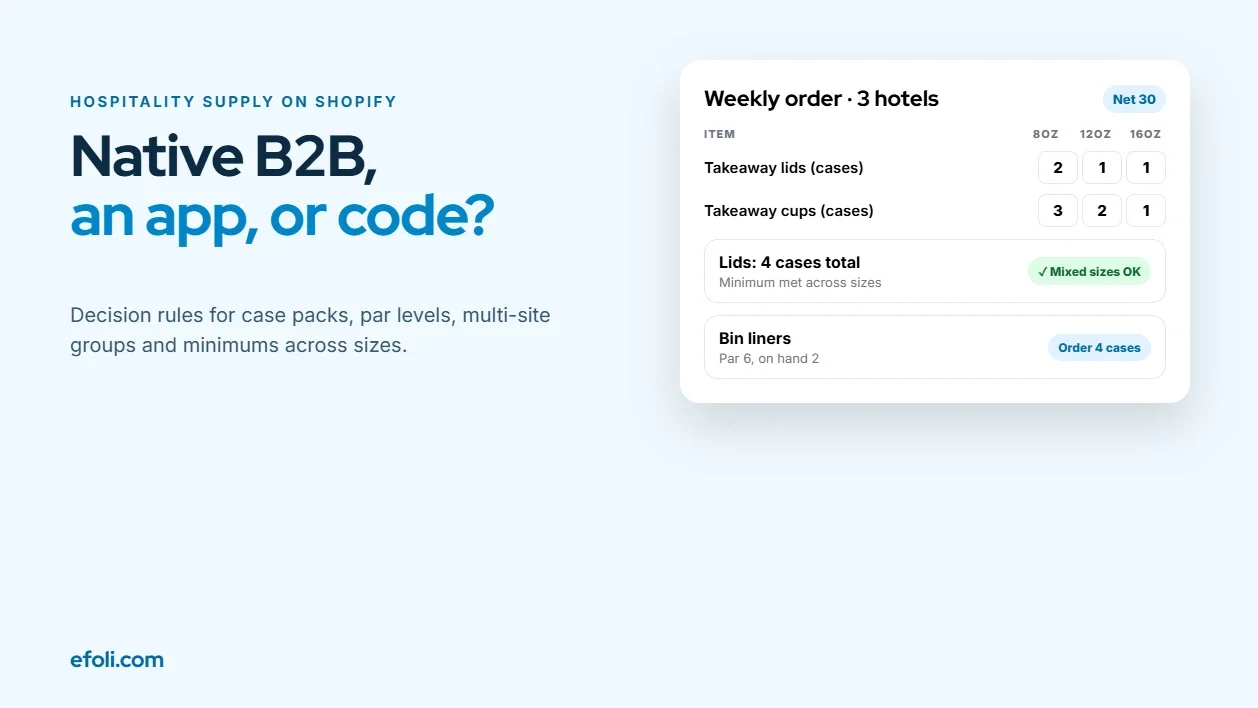
A purchasing manager at a group of three seaside hotels orders housekeeping and food-and-beverage supplies every Monday. Her list hasn't changed much in a year: guest amenity kits, toilet rolls, bin liners, cleaning chemicals, napkins, takeaway cups and lids, coffee and sugar sticks. Each hotel has its own par levels, the amount it likes to have on the shelf at the start of the week. Each item comes in a case pack. Each hotel has its own delivery address, and the group pays on 30-day terms.
Her supplier has just moved its trade ordering to Shopify. She logs in and sees the right contract prices. But to place the week's order, she needs to open 38 product pages for one hotel, then do it again for the other two. Takeaway lids come in three sizes, and the supplier's minimum is "4 cases of lids," which she's been mixing across sizes for years. The store won't let her: each size needs 4 cases on its own.
The supplier's agency now has a decision to make: stay native, add an app or build something custom. This article walks through that decision for hospitality supply ordering on Shopify. It starts with the requirements, then looks at native options, where an app such as MultiVariants fits, when custom code is worth it, and a set of decision rules.
Key takeaways
Write down the buyer's requirements before comparing tools. Hospitality ordering is mostly about repeat lists, case packs, locations and terms.
Native Shopify B2B handles companies, locations, catalogs, payment terms, per-variant quantity rules and volume pricing.
Native quantity rules apply to each variant. They can't combine several variants to meet one minimum.
MultiVariants adds order forms for many variants at once, minimums on totals and more control over increments.
Custom code is for integrations and automation, such as par-level ordering from a property's stock system.
Most suppliers end up with native B2B as the base and an app on top for the gaps.
Requirements: what hospitality buyers actually need
Hospitality supply ordering looks like wholesale, but it has its own shape. Before comparing tools, list what your buyers do every week.
Requirement | What it means in practice |
|---|---|
Repeat lists | Most of the order is the same items every week or fortnight |
Par levels | Each site orders up to a target stock level, so quantities change a little each time |
Case packs | Items are sold in cases or inner packs, not singles |
Mixed minimums | Suppliers often set minimums across a product family, not per size |
Multiple locations | Each hotel, restaurant or outlet has its own address, contact and sometimes budget |
Contract pricing | Prices agreed per group, often with volume tiers |
Payment terms | Net 30 or similar, paid by invoice |
Approvals | Some groups want a central buyer to approve site orders |
Delivery days | Orders need to arrive before a fixed delivery run |
Packs for openings | A new outlet needs a standard opening pack of everything |
Rank these for your top ten customers. The ones they mention first are the ones your setup has to get right. The rest can be handled with process.
Who places the order
Hospitality orders are often placed by different people in the same customer, and each has different needs from the store.
The independent owner. A café or restaurant owner orders between services, often on a phone, and wants the same order as last week with a couple of changes. Speed matters most.
The group purchasing manager. Orders for several sites, or approves orders each site places. Needs to see every location, the contract prices and the terms in one account.
The site lead. A head housekeeper, head chef or bar manager knows what's on the shelf. They may enter the order and pass it to the purchasing manager for approval.
If you can only optimise for one, pick the person who places most of your order volume. For most suppliers selling to groups, that's the site lead entering quantities and the purchasing manager approving them. Both need the order to be quick to build and easy to check.
What a par level means for the store
A par level is the amount of an item a site wants on hand at the start of a period. If the par for bin liners is 6 cases and there are 2 on the shelf, the order is 4. The buyer usually works this out on a sheet or in a stock system, then places the order.
Shopify doesn't know what's on a hotel's shelf, so it can't calculate par orders by itself. The store's job is to make entering the result fast and accurate. Only custom work can automate the calculation, which we'll come to.
Native Shopify B2B: what you get
Shopify B2B is now available on Basic, Grow, Advanced and Plus plans, with some features and limits varying by plan. Shopify's B2B plan features page lists them, and Syeda's post on Shopify B2B by plan explains what changes at each level.
For hospitality supply ordering, the relevant native features are:
Companies and locations. A hotel group can be a company, with each hotel as a location, each with its own shipping address, contacts and settings. See companies and customers.
Catalogs. Price lists and product availability per location, so each group sees its contract prices and only the products it buys. Plan limits apply on lower plans.
Payment terms. Net terms, such as net 30, set per location.
Quantity rules. A minimum, maximum and increment per variant in a catalog. You can require cases of 6 by setting an increment of 6. See quantity rules and volume pricing.
Volume pricing. Up to 10 price breaks per product, applied per variant. A volume price is fixed, so a percentage catalog adjustment doesn't apply to it.
Quick order list. A theme section that lists a product's variants with quantity boxes, so a buyer can order several variants at once. It's available in Shopify's free themes from version 11.0.0. See B2B store customization.
Draft orders and approvals. Staff can create B2B draft orders that apply company prices and terms. A company location can also be set so orders are submitted for review as drafts, rather than placed straight away. See B2B checkout and orders.
That's a strong base. A supplier with a few dozen products, one or two case sizes per item and per-item minimums may need nothing else.
Where native stops
The gaps show up in three places for hospitality suppliers.
Minimums across variants. Quantity rules apply to each variant on its own. If your minimum is "4 cases of lids, any sizes," native rules can't express it. You'd have to set 4 cases on every size, which is what blocked the purchasing manager in our example.
Ordering many variants of many products. The quick order list lists the variants of one product on its product page. For a 38-line weekly order across many products, the buyer still visits a page per product. That's workable if most products have several variants. It's slow if most have one.
Volume pricing across a family. Volume pricing also applies per variant, so buying 2 cases each of three sizes of cups doesn't count as 6 cases of cups for pricing.
None of these are bugs. They're design choices that suit many wholesale stores. They just don't match how many hospitality buyers order.
Where MultiVariants fits
A Shopify hospitality order form app like MultiVariants adds bulk order forms and quantity rules on top of a Shopify store. According to its App Store listing:
Order forms. List, grid and matrix layouts let a buyer enter quantities for many variants at once and add them to the cart together. Available from the Standard plan ($12.99 a month at the time of writing).
B2B catalog pricing. Order forms show B2B catalog prices, so contract prices still apply.
Cart minimums. A minimum on the cart, from the Standard plan.
Minimums and maximums on totals. Rules can apply per variant or to the total across variants, on the Professional plan ($29.99 a month).
Interval and increment quantities. Quantities can be set to move in steps, such as cases of 4 or 6.

The total rule is the one that matters most for hospitality. "At least 4 cases of lids, across any sizes" becomes a single rule. The buyer can order 2 cases of small, 1 of medium and 1 of large, and the store accepts it.
One thing to check in a demo: how the form handles your own catalog. If most of your products have one variant, and buyers want one page with 40 different products, confirm which form type covers that before committing. For products with several sizes or pack options, the order forms fit well.
Syeda's post on Shopify quantity rules vs apps compares native rules and app rules in more detail. Anika made the same native-versus-app comparison for apparel in native Shopify B2B vs MultiVariants for size runs. The trade-offs are similar. The products and buyers are different.
Pricing across a family
If you want volume pricing to count across sizes in a product family, a discount app can help where native volume pricing can't. A Shopify contract pricing app like DiscountRay offers quantity tiers on its free Starter plan, customer group and tag-based pricing on Growth ($14 a month) and company and customer list pricing on Pro ($29 a month), according to its listing.
Before adding a second pricing tool, decide which rules belong where. Anika's guide to Shopify B2B catalog pricing rules walks through sorting your price rules into native catalogs, an app or custom code, so they don't fight each other.
When custom code is worth it
Some hospitality requirements aren't covered by native B2B or by an order form app. Custom work, usually a private app or Shopify Functions, makes sense when:
Par levels should drive the order. If each hotel tracks stock in its own system, a custom integration could read on-hand counts, compare them to par levels and pre-fill the order. That's a real build, with ongoing maintenance.
The buyer orders from a procurement system. Large groups sometimes want to order from their own purchasing platform, using punchout catalogs or an EDI feed. That's an integration project.
Budgets per location need enforcing. If each site has a weekly budget that must block orders above it, you'll likely need custom validation.
Your rules are unusual. For example, minimums that change by delivery zone and day of week.
A simple test: if the requirement is about how the buyer enters an order, an app is probably enough. If it's about connecting to another system or calculating the order for them, it's custom.
If you do build, keep the custom part as small as possible. Let native B2B handle companies, prices and terms, let an app handle the order form, and limit the custom work to the connection or calculation that nothing else covers. That way, a change in one piece doesn't force you to rebuild the others.
Custom code also comes with ownership. Someone has to update it when Shopify's APIs change, which they do on a regular schedule. Budget for that, not just the build.
Supply packs: three ways to set them up
"Supply packs," such as an opening pack for a new outlet or a weekly housekeeping pack, come up in almost every hospitality store. There are three common ways to sell them.

Option | How it works | Good for | Watch out for |
|---|---|---|---|
Kitted SKU | The pack is one product, packed together in the warehouse | Opening packs that never change | Stock of components needs managing |
Reorder from a past order | The buyer repeats a previous order and adjusts | Weekly lists that change a little | Depends on what your customer accounts offer |
Pre-set order form | An order form with the usual items and suggested quantities | Par-based ordering across many items | Suggested quantities need updating |
For opening packs, a kitted SKU is usually simplest. For weekly ordering, a form or a reorder flow that the buyer adjusts is better, because par orders change a little every week.
What each route costs to run
Price isn't the deciding factor, but it helps to see the three routes side by side over a year.
Native B2B | Native plus MultiVariants | Custom build | |
|---|---|---|---|
Software cost | Included in your Shopify plan | Plus $12.99 or $29.99 a month at the time of writing | Build cost plus hosting |
Setup | Your team or agency, days | Your team or agency, days | A developer, weeks or more |
Maintenance | Shopify | Shopify and the app developer | Your developer, ongoing |
Changing a rule | Admin settings | Admin and app settings | A code change |
Risk when Shopify changes | Low | Low to moderate | Higher, needs testing on each API update |
The middle column is often the cheapest way to close a real gap, because you aren't paying someone to maintain code. The right-hand column only pays off when the requirement is truly unique to your business.
Questions to ask in a demo
Before you add any app, take one real customer's weekly order into a demo or development store and ask:
Can the buyer enter this whole order in fewer page visits than today?
Do contract prices from the customer's catalog show on the order form?
Does a mixed-size minimum work the way your sales team describes it to customers?
What happens at checkout if the buyer edits quantities in the cart and breaks a rule?
Does the form work on a tablet, which many hotel and kitchen buyers use?
How do rules behave with express checkout and draft orders?
Who do you contact if a rule stops working on a busy Monday?
If the answers are good for your most demanding customer, they'll be good for the rest.
Decision rules
Use these to decide, based on your requirements list.

If your buyers… | Start with | Add |
|---|---|---|
Order a short list, with per-item case sizes and minimums | Native B2B | Nothing yet |
Order many sizes or pack variants of the same products | Native B2B | An order form app |
Need minimums across sizes or variants | Native B2B | An app with total rules, such as MultiVariants Professional |
Need volume pricing across a family of products | Native B2B | A discount app, after sorting your price rules |
Have several sites with their own addresses and terms | Native B2B companies and locations | Nothing extra |
Want orders approved centrally | Native B2B draft submission | A clear review routine |
Want par levels to pre-fill orders from their own system | Native B2B | Custom integration |
Order from their own procurement platform | Native B2B | Custom integration or a specialist connector |
Three rules of thumb sit behind the table:
Start native. It's maintained by Shopify, works with your theme and checkout, and it's included in your plan.
Add an app for how buyers enter orders. Order forms, total minimums and increments are app territory.
Build custom only for connections and calculations. And budget for maintenance.
Worked example: Harbourline Supply
Harbourline Supply is a fictional hospitality supplier we've made up for this example. It sells housekeeping consumables, food packaging and coffee to independent hotels, cafés and restaurant groups on Shopify.
What Harbourline needed
The team ranked their requirements with their ten biggest customers. The top four were: repeat weekly lists, case packs, minimums across sizes for cups and lids, and several sites per customer. Payment terms and contract pricing were already working on Shopify B2B. One group asked about ordering from its procurement system, but it was a single customer.
What Harbourline chose
Native B2B as the base. Each customer became a company, with each site as a location, its own catalog and net 30 terms.
Native quantity rules for most items. Cases of 6 or 12 set as increments, and per-item minimums where they made sense.
MultiVariants for families with several sizes. Cups, lids, bin liners and amenity kits got a grid order form. Cups and lids got a rule of at least 4 cases in total across sizes.
Kitted opening packs. Two standard opening packs, each as one SKU packed in the warehouse.
No custom build yet. The procurement integration was parked until more customers asked for it.
What happened
These are illustrative outcomes, not measured results. The purchasing manager at the hotel group could enter her lids as a mix of sizes again, and her weekly order took fewer page visits. Harbourline's customer service team stopped manually editing orders to merge lid sizes. The team revisited the custom par-level idea six months later and decided the order forms were fast enough for now.
Checklist: before you decide
List your buyers' top requirements, ranked by your biggest customers.
Check which Shopify plan you're on and what B2B features it includes.
Set up one real customer as a company with locations, catalogs and terms.
Test your case sizes with native increments.
Test a mixed-size minimum. If native rules can't express it, note it.
Try an order form app on the products where buyers order many variants.
Sort your pricing rules before adding a discount app.
Write down any requirement that needs another system. That's your custom list.
Decide who maintains each piece after launch.
For a wider setup checklist, Anika's guide to Shopify wholesale setup covers the steps around B2B ordering, from customer approval to shipping.
Mistakes that slow buyers down
Choosing the tool before the requirements. A list of features tells you what's possible, not what your buyers need.
Per-size minimums that don't match the sales promise. If reps say "4 cases, any sizes," the store must say the same.
Building custom for a single customer. One group's procurement request isn't a platform decision. Wait until it's a pattern.
Forgetting delivery days. If orders must be in by Thursday noon for Monday delivery, show that cutoff on the order page and in the confirmation email.
Final Thoughts
Write down what your hospitality buyers do every week before choosing tools. Native Shopify B2B covers companies, locations, contract pricing, terms, case increments and volume pricing. Add MultiVariants when buyers order many variants at once or need minimums across sizes. Save custom code for par-level automation and procurement integrations. Start native, add an app for how orders are entered, and build only what connects to other systems. Then the purchasing manager can order her lids the way she always has.
FAQ
Can Shopify B2B handle hospitality supply ordering?
Can Shopify set a minimum order across different sizes of a product?
How do I sell items in case packs on Shopify B2B?
What is a par level, and can Shopify order to par automatically?
How do I set up a hotel group with several properties on Shopify?
When should a hospitality supplier build a custom ordering solution?

Anika Anamta Mehnaz
This article is written by Anika Anamta Mehnaz, a Content Writer and Content Marketing Strategist specializing in Shopify, eCommerce, and SaaS. With over four years of content writing experience, she creates SEO and AI search-optimized content that helps Shopify merchants make better business decisions through practical, research-backed insights. Her work covers Shopify apps, product variants, bundles, discounts, B2B commerce, and conversion-focused strategies. Outside of work, Anika enjoys watching anime, reading John Grisham novels, and discovering new ideas in digital marketing and e-commerce. If you enjoy discussing Shopify, content marketing, or online growth, feel free to connect with her. Twitter: https://x.com/mehnaz2201 Medium: https://medium.com/@mehnaz_78932
Keep reading
View all articles →
The Perfect Gift Set Is Sold Out. Three Ingredients Are Still in Stock.
November 19, 2026 • 17 min read
The Coach Needs 42 Jerseys. Your Store Only Sells One Size at a Time.
November 19, 2026 • 17 min read
One Case Costs More per Bottle Than Two. Why Is the Cart Hiding That?
November 19, 2026 • 17 min read