Shopify B2B by Plan: What Basic, Grow, Advanced, and Plus Actually Include in 2026
Shopify B2B is no longer limited to Plus. See what Basic, Grow, Advanced, and Plus now include, from catalogs and quantity rules to payments and storefront features. Compare the real limits of each plan, including catalog caps and Plus-only features, so you can choose the right setup for your wholesale business.
On this page
A lot of merchants still assume Shopify B2B eCommerce requires Shopify Plus. That stopped being true on April 2, 2026. The Shopify B2B features by plan now include core wholesale features on Basic, Grow, Advanced, and Plus. Merchants on lower plans can set up companies, catalogs, volume pricing, quantity rules, payment terms, vaulted cards, reorders, and more without moving to Plus first, although B2B catalog features on Basic, Grow, and Advanced require the new Shopify Markets.
That change matters because old guides can make merchants think they need a much more expensive plan before they have even tested wholesale demand. The opposite problem is also real: a merchant may start building B2B on Basic, Grow, or Advanced without noticing the three-catalog ceiling or the payment features that still require Plus.
This guide gives you the exact plan breakdown, the limits that matter most, and a simple way to decide whether Shopify B2B without Plus is enough for your store.
TL;DR
Since April 2, 2026, Shopify B2B is available on Basic, Grow, Advanced, and Plus. Core features such as companies, catalogs, quantity rules, volume pricing, payment terms, vaulted cards, reorders, and B2B-aware Shopify Flow are no longer Plus-only.
Basic, Grow, and Advanced can use up to three active B2B market catalogs in total when the store is using the new Shopify Markets. Plus removes the three-catalog B2B market limit and can assign catalogs directly to specific companies and company locations.
Deposits, partial payments, and payment requests per fulfillment are still Plus-only. Contextual checkout and contextual storefront features start on Advanced.
The three-catalog limit is the real ceiling for many growing wholesale stores. If you only need two or three broad pricing groups, it may never be a problem.
Native quantity rules are useful, but they work inside B2B catalogs and are evaluated per variant. That matters if you need one combined minimum across several variants or need the same rule for regular retail shoppers.
What Changed on April 2, 2026
On April 2, 2026, Shopify announced that foundational B2B features were expanding to Basic, Grow, and Advanced plans. Before that rollout, Shopify's native B2B offer was closely tied to Plus. The 2026 change brought a large part of that B2B foundation to merchants on lower plans.
Shopify now says merchants on non-Plus plans can use company profiles, up to three custom catalogs, tailored pricing, volume discounts, quantity rules, vaulted credit cards, and payment terms. That is enough to cover many common wholesale setups without starting on Plus.
The change is important because wholesale is not only about giving a buyer a lower price. Buyers often need their own pricing, repeat ordering, payment terms, and a way to order without emailing a sales rep every time.
Shopify also shared performance data from merchants already using its B2B system. Shopify reports that merchants using Shopify B2B see up to a 4.1x increase in reorder frequency compared with DTC orders. Shopify also reported that Snyder Performance Engineering saw a 25% reduction in back-office time and a 40% increase in average customer spend after moving its B2B work into Shopify. Across the platform, Shopify says merchants adopting B2B have seen up to a 33% increase in self-serve orders within six months and up to a 20% increase in reorder frequency.
Those numbers should not be treated as a promise for every store. They do show why the plan change matters. A merchant can now test native B2B workflows much earlier, instead of treating Plus as the starting line.
Shopify B2B Features by Plan: The Full Breakdown
The easiest way to understand the new setup is to separate the features that are now common across every main Shopify plan from the features that still create a real gap between non-Plus and Plus.
Shopify's current B2B plan matrix covers Basic, Grow, Advanced, and Plus. For catalog features on Basic, Grow, and Advanced, Shopify also says the store must be using new Shopify Markets.
Companies and customers
Feature | Basic | Grow | Advanced | Plus |
Companies | Yes | Yes | Yes | Yes |
Company locations | Yes | Yes | Yes | Yes |
Location-level permissions | Yes | Yes | Yes | Yes |
Catalogs and products
Feature | Basic | Grow | Advanced | Plus |
Active B2B market catalogs | Up to 3 | Up to 3 | Up to 3 | Unlimited |
Direct company catalogs | No | No | No | Yes |
Quantity rules: minimum, maximum, increment | Yes | Yes | Yes | Yes |
Quantity price breaks | Yes | Yes | Yes | Yes |
Payments
Feature | Basic | Grow | Advanced | Plus |
Net terms | Yes | Yes | Yes | Yes |
Payment reminders | Yes | Yes | Yes | Yes |
ACH, United States only | Yes | Yes | Yes | Yes |
Vaulted credit cards | Yes | Yes | Yes | Yes |
Deposit requirements | No | No | No | Yes |
Partial payments | No | No | No | Yes |
Payment requests per fulfillment | No | No | No | Yes |

Checkout and orders
Feature | Basic | Grow | Advanced | Plus |
Draft order to invoice | Yes | Yes | Yes | Yes |
Checkout to draft | Yes | Yes | Yes | Yes |
Easy reorders | Yes | Yes | Yes | Yes |
PO numbers | Yes | Yes | Yes | Yes |
Contextual checkout through Shopify Markets | No | No | Yes | Yes |
Companies and locations are the base of Shopify's B2B model. A company can have one or more company locations, and each location can carry details such as its own tax ID, tax exemptions, shipping and billing addresses, pricing, and payment terms. That structure is available before you reach Plus, so even a smaller merchant can organize buyers by real business accounts rather than treating every wholesale buyer like a normal retail customer.
Catalogs control which products and prices B2B customers can access. On the lower three plans, the main restriction is how many active catalogs you can assign across B2B markets. Plus changes the model further by allowing direct catalog assignment to a company or company location.
Payments and ordering are also broader than many older plan comparisons suggest. Net terms, payment reminders, vaulted cards, draft-order invoicing, checkout-to-draft, easy reorders, and PO numbers appear across all four plans. That covers many day-to-day wholesale needs where a buyer places repeat orders and pays under agreed terms instead of using a normal consumer checkout flow every time.
Storefront and automation features are not locked entirely behind Plus either. Shopify lists the Trade theme, quick order list, sales staff permissions, and Shopify Flow with B2B objects across all four plans. Advanced and Plus add the contextual storefront and checkout layer through Shopify Markets, which is where the plan difference becomes more visible to buyers.
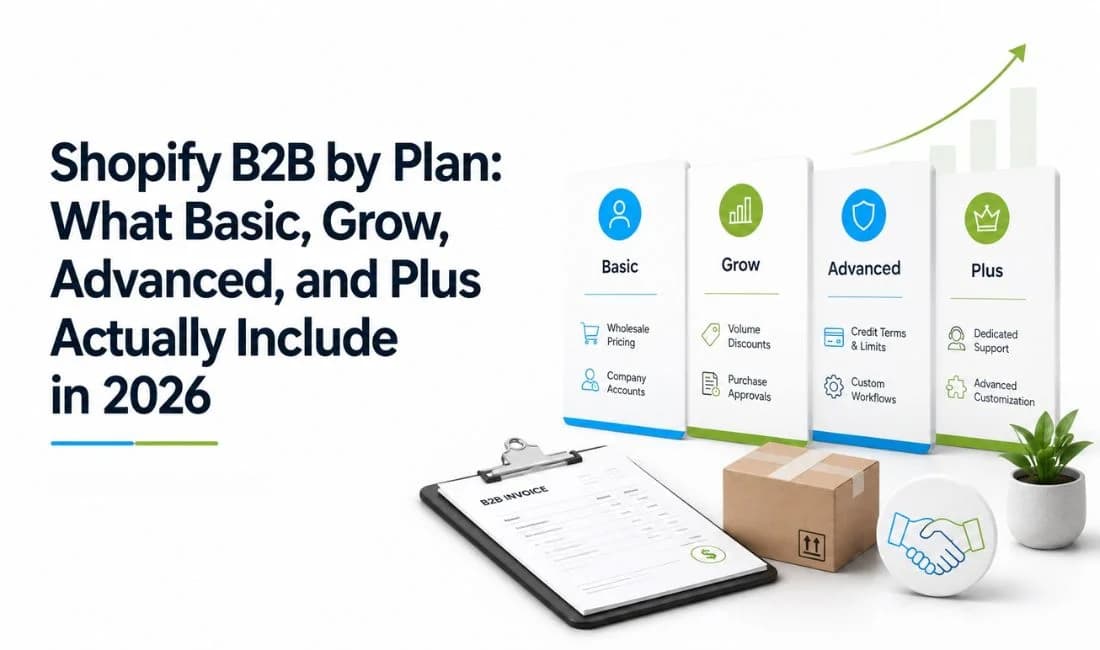
Plus still pulls ahead in three important areas. It removes the three-catalog B2B market limit, supports direct catalog assignment to companies and company locations, and adds advanced payments such as deposits, partial payments, and payment requests per fulfillment.
That means the plan question is no longer, "Can my plan do B2B at all?" The better question is, "How complex is my pricing, customer setup, and payment process likely to become?"
Where the Real Ceiling Is (Not Where You'd Guess)
The most important limit for many merchants is not a missing B2B feature. It is the number of catalogs they can actively assign.
Catalog cap: Basic, Grow, and Advanced can assign up to three active catalogs across all B2B markets combined. This is a total limit, not three catalogs for each market. Shopify gives a clear example in its Help Center: assigning three catalogs to one B2B market uses the full allowance, so another catalog cannot be assigned elsewhere until an existing assignment is removed or drafted.
This is where a simple wholesale setup can become a planning problem. Imagine a distributor with Bronze, Silver, Gold, and International pricing groups. There are already four pricing structures. On Basic, Grow, or Advanced, the merchant reaches the catalog ceiling before adding separate regional pricing for different countries.
For another merchant, the same limit may barely matter. If you have one standard wholesale price list, one VIP wholesale tier, and one regional catalog, three active catalogs may be enough for years. The cap matters when your pricing model becomes more segmented, not simply when your B2B sales become larger.
This is why the Shopify B2B catalog limit deserves more attention than the broad message that B2B is now available everywhere. The features are available, but how you group customers into catalogs becomes more important as your wholesale business grows. Before setting up several small pricing groups, it is worth asking whether some buyers can share one catalog by region, customer type, or discount structure. Shopify itself describes Markets as an efficient way to assign the same products and pricing to groups of B2B customers.
That does not mean merchants should avoid the lower plans. It means they should know what will force a future change. If your wholesale model is built around broad groups, three catalogs can be practical. If your sales team negotiates a different price list for many individual accounts, the catalog cap and the lack of direct company assignment can become limiting much sooner.
Direct company catalogs: On Plus, Shopify lets merchants assign catalogs directly to specific companies and company locations for customer-level pricing. That direct assignment is not available on Basic, Grow, or Advanced. On those plans, B2B catalogs are assigned through B2B markets.
This difference becomes important when two buyers in the same market need different negotiated pricing. A market-level setup works well when groups of buyers share the same products and prices. It becomes less flexible when individual accounts need their own deal.
Advanced payments: Basic, Grow, and Advanced include net terms, payment reminders, ACH in the United States, and vaulted credit cards. However, deposit requirements, partial payments, and payment requests per fulfillment are Plus-only.
For a simple wholesale operation, that may not matter. If customers pay in full or use standard net terms, the lower plans already cover the core workflow. For made-to-order goods, large projects, or split fulfillment where money is collected in stages, Plus starts to solve a much more specific business need.
Quantity rules: Shopify's native B2B quantity rules and volume pricing can set minimum, maximum, and increment requirements, while volume pricing can add price breaks for larger quantities. These rules are set through B2B catalogs and apply to B2B orders. Shopify also states that the rules are evaluated per variant, which means five blue hats and five gray hats do not combine to satisfy a minimum of ten. If you need one combined minimum across a product's variants, or need the same kind of restriction outside that native B2B catalog flow, an app like MultiVariants can set that combined minimum across a product's variants.
That last gap is narrow, but it matters for products sold by size, color, flavor, pack, or other variant combinations. It does not mean Shopify lacks quantity rules. It means the native rule is built around B2B catalog ordering and variant-level evaluation.
Blended Stores: B2B and DTC on One Storefront
Shopify calls a store that handles both business buyers and regular shoppers a blended B2B store. In this setup, one Shopify store can be used for both B2B and DTC customers and orders.
The key difference is the customer identity. Shopify says B2B customers use customer accounts to authenticate before they can access B2B-specific pricing, products, and account information. Retail customers can keep shopping through the normal DTC experience, while logged-in company buyers see the B2B setup connected to their company and market.
A blended store can be simpler than running a separate wholesale site because the same store handles both customer types. Shopify also notes that the theme remains the same for B2B and DTC customers, although merchants can customize content for the two audiences.
There is still a plan difference inside this shared storefront. Contextual checkout and storefront customization through Shopify Markets are available on Advanced and Plus, not Basic or Grow. Shopify also says theme editor customizations by customer type, meaning B2B versus DTC, are Plus-only.
For many merchants, the main value is simple: you can test wholesale without building a second store first.
Basic vs. Grow vs. Advanced vs. Plus: Which Actually Fits Your Business
Shopify's current US pricing lists Basic at $39 per month, or $29 per month when billed yearly; Grow at $105 per month, or $79 per month when billed yearly; Advanced at $399 per month, or $299 per month when billed yearly; and Plus starting at $2,300 per month. The right B2B plan depends less on whether you sell wholesale and more on how many pricing groups, payment workflows, and storefront differences you need.
Choose Basic when wholesale is still simple. Shopify B2B on Basic plan can be a real starting point if you are testing wholesale demand, working with a small number of company buyers, and can fit your pricing into three active B2B market catalogs. The core B2B features, including companies, quantity rules, volume pricing, net terms, vaulted cards, PO numbers, and reorders, are available on Basic.
Choose Grow when your wider Shopify needs justify Grow, not because B2B itself becomes much stronger. Grow has the same three-catalog B2B limit and the same core B2B feature availability as Basic. If you are comparing Basic and Grow only for wholesale features, the B2B matrix does not create a major reason to upgrade.
Choose Advanced when market-level storefront and checkout differences matter. Advanced still has the three-catalog cap, but it adds contextual checkout and contextual storefront support through Shopify Markets. That can matter when your B2B setup is more international or when different markets need a more tailored buying experience.
Choose Plus when pricing becomes account-specific or payment handling becomes complex. Plus gives you unlimited B2B catalogs, direct company and company-location catalog assignments, deposits, partial payments, and payment requests per fulfillment. If negotiated pricing changes from customer to customer, or your sales process often needs staged payments, those features can justify Plus in a way that a simple "we sell wholesale" argument cannot.
The three-catalog limit should be part of your decision before you build. A merchant with two broad wholesale tiers can stay comfortable on a lower plan. A merchant with many negotiated customer groups can hit the wall quickly, even if order volume is still modest.
FAQ
Does Shopify B2B Still Require Shopify Plus?
How Many B2B Catalogs Do I Get on Basic, Grow, or Advanced?
What's the Difference Between Quantity Rules and Volume Pricing on Shopify B2B?
Can I Run B2B and DTC From the Same Shopify Store?
When Do I Actually Need to Upgrade to Plus for B2B?
Conclusion
The biggest change in Shopify B2B features by plan is that Basic, Grow, and Advanced are now valid B2B starting points, not plans that need to be replaced before wholesale can begin. They can support company accounts, B2B catalogs, quantity rules, volume pricing, payment terms, vaulted cards, reorders, PO numbers, and other core B2B workflows.
Basic is a sensible fit for a merchant testing wholesale or running a few simple pricing groups. Grow offers the same core B2B access, so the upgrade should be based on your broader Shopify needs rather than a major B2B feature jump. Advanced makes more sense when contextual storefront and checkout behavior by market matters. Plus becomes the stronger fit when you need more than three active catalogs, customer-specific catalog assignment, or more flexible payment collection.
The real question in Shopify B2B plans 2026 is not whether you can start without Plus. You can. The question is whether your pricing and payment structure will stay simple enough to remain inside the lower-plan limits.

Syeda Rehnoma Tanzom
This article is written by Syeda Rehnoma Tanzom, an SEO content writer with 3+ years of experience specializing in eCommerce content. What makes the work here a little different? A close collaboration with support teams to understand what merchants are actually going through, their frustrations, their questions, and their wins. The goal is simple: write content that speaks to real problems, not just search engines. When not buried in keywords and content briefs, you'll find her nose-deep in a good book, binge-watching true crime documentaries or psychological thrillers, and occasionally switching gears with a feel-good rom-com.
Keep reading
View all articles →
How to Optimize Your Shopify Store for ChatGPT, Gemini, and AI Shopping
October 2, 2026 • 17 min read
When Should You Replatform Your eCommerce Store? 10 Warning Signs
September 9, 2026 • 10 min read
How to Build Shopify BFCM Wholesale Strategy: Survive Bulk Order Spike
October 19, 2026 • 14 min read