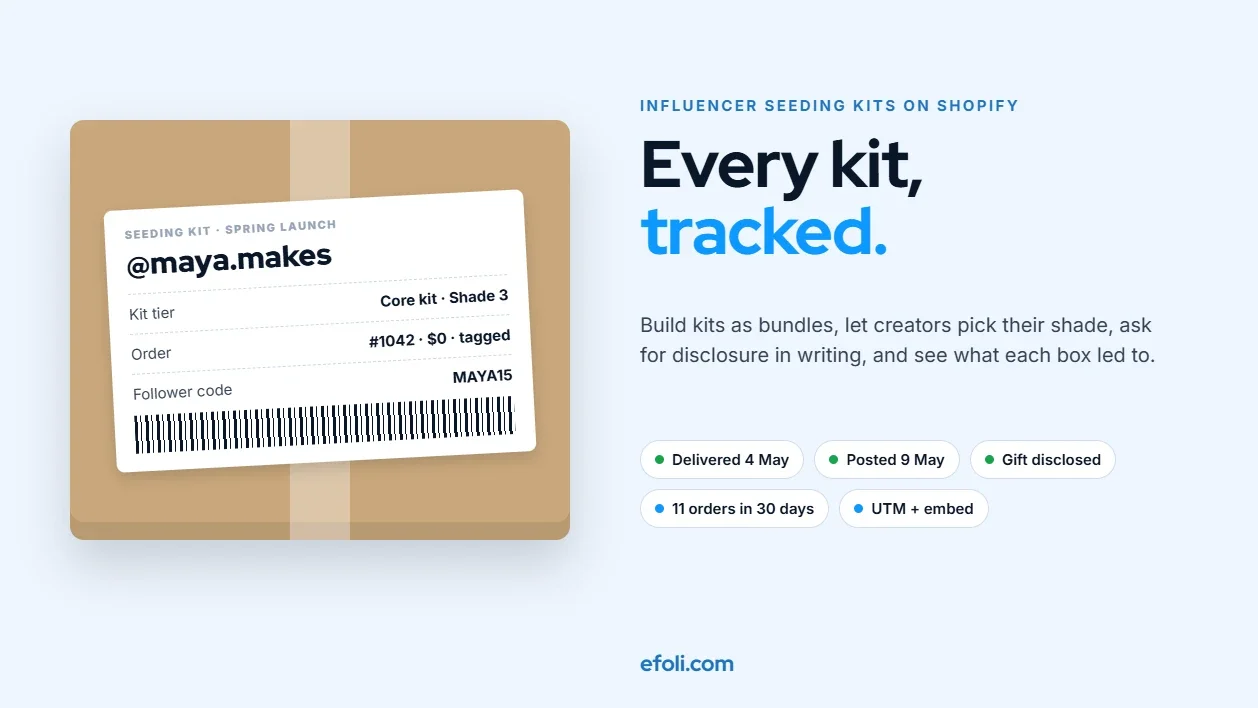
On this page
- Key takeaways
- What a seeding program has to do
- Step 1: Plan your kit tiers
- Step 2: Build the kits as bundles in Shopify
- Step 3: Let creators choose through a private kit page
- Step 4: Ship with a plan, not a pile
- Step 5: Handle disclosure clearly
- Write a one-page creator brief
- Step 6: Track what each kit leads to
- Give each creator a way to be tracked
- Build a simple campaign sheet
- Measure over weeks, not days
- Budget per kit, not per campaign
- Worked example: a spring launch for a hot sauce brand
- Step 7: Hand the system to the marketing team
- Pre-launch checklist
- Common mistakes to avoid
- FAQ
- The short version
Short answer: Treat influencer seeding kits as products, not as favors packed by hand. Build each kit as a bundle in Shopify so stock, contents and costs are tracked, let creators choose shades, sizes or flavors through a private kit page, and process each kit as a zero-cost order tagged to the campaign. Give every creator their own tracked link or code, ask them in writing to disclose the gift, and record which kits led to posts, clicks and sales. With a bundle app such as Push Bundle for the kits, tracked links or embedded buy buttons such as EmbedUp for attribution, and a simple campaign sheet, a marketing team can run seeding without asking a developer for every launch.
A seeding campaign usually starts with excitement and a spreadsheet. Forty creators, a launch date, a beautiful box. Someone in marketing collects addresses by DM. Someone in the warehouse packs boxes from a printed list. A few weeks later, the reports come in: a creator posted the wrong shade because that's what they were sent, two boxes went to old addresses, and nobody can say which posts drove sales.
The box looked great. The creator's name on the card was spelled right. The products inside were wrong, and the results were invisible.
This playbook is for Shopify agencies and in-house teams who run creator seeding, also called influencer gifting or PR boxes. It covers how to plan kits, build them in Shopify, ship them, handle disclosure, and track what happens next, in an order a real project can follow.
Key takeaways
A seeding kit is a product with a cost, stock and an expected outcome. Build it in Shopify so all three are visible.
Plan two or three kit tiers rather than a custom box for every creator.
Let creators pick their own shade, size or flavor through a private page. It cuts wrong-product posts and makes the gift feel personal.
Process kits as zero-cost orders tagged to the campaign, so you can report on cost and stock.
The FTC's guidance says creators who receive free products should disclose the connection, and its Endorsement Guides expect brands to train and monitor creators.
Give every creator a unique link or code. Without it, you can measure posts but not sales.
Gifting doesn't guarantee a post. Set expectations clearly and measure over several weeks.
What a seeding program has to do
Before building anything, agree on what the program needs to handle. Most seeding problems come from skipping one of these five jobs:
Job | What it means | What goes wrong without it |
|---|---|---|
Configure | Decide what goes in each kit and who gets which | Every box is improvised |
Personalize | Match shade, size or flavor to each creator | Creators post products that don't suit them |
Ship | Get the right box to the right address on time | Wrong addresses, late arrivals, lost boxes |
Disclose | Make sure creators tell followers it was a gift | Compliance risk for creator and brand |
Track | Record what each kit led to | No way to tell what worked |

Shopify's own guide to influencer gifting covers the relationship side well: research creators, personalize the note, track delivery and be clear that a gift isn't a paid partnership. It notes that gifting "may not necessarily lead to a post". What it doesn't cover is the operational setup: how to build the kits, process the orders and connect results back to each box. That's what the rest of this playbook is about.
Step 1: Plan your kit tiers
Custom boxes for every creator sound personal, but they're slow to pack and impossible to compare. Two or three tiers work better.
Tier | Who it's for | What's inside | Personalization |
|---|---|---|---|
Core kit | Most creators in the campaign | Hero product plus one or two supporting items | Creator picks shade or flavor |
Creator's choice kit | Creators with a clear niche | Hero product plus a choice of three items from a list | Creator builds the box |
Launch box | A small group of key partners | Full range, special packaging, printed note | Team curates, creator confirms sizes |
For each tier, write down:
The cost. Product cost, packaging, inserts and shipping. This is the number you'll compare results against.
The goal. Awareness, content for your own channels, or direct sales.
The ask. What you'd like the creator to do, if anything, and the fact that there's no obligation.
The timing. When kits ship and when the launch goes public.
Keep the tiers stable through a campaign. If the team adds a fourth "special" tier halfway through, reporting gets messy.
Step 2: Build the kits as bundles in Shopify
The simplest way to keep stock and contents right is to build each kit as a bundle product.
Fixed kits. A core kit with the same items every time can be a fixed bundle. Shopify's free Bundles app handles fixed bundles, and availability follows the lowest-stock item inside. That's useful: if the hero product runs low, the kit shows as unavailable instead of being packed without it.
Kits with choices. If creators choose a shade, size or set of items, you need a bundle builder. Push Bundle supports Build-a-Box and Mix & Match bundles with minimum and maximum limits and a multi-step builder on its Growth plan, at $14 a month with a 14-day trial at the time of writing. The kit goes into the cart as one product, with stock synced for each item inside.
A few rules that help with seeding kits:
Fixed step counts. "Choose exactly one shade" and "Choose two of these three" stop half-built kits.
Sold-out items hidden. A creator shouldn't be able to choose a shade you can't send. The Push Bundle team's guide to out-of-stock bundle items covers the options.
A note field. Let the creator add anything the packer should know, such as "allergic to nuts" for a food brand.
If you already sell gift boxes, the setup will feel familiar. The Push Bundle team's guide to building customizable gift boxes uses the same building blocks.
Step 3: Let creators choose through a private kit page
Asking creators for their shade by DM and typing it into a spreadsheet is where most wrong-product boxes come from. A private kit page fixes that.
Here's how it works:
Create the kit product and keep it off your public store. Shopify introduced an Unlisted product status in October 2025. Unlisted products are hidden from store search, collections, recommendations, sales channels and internet search, but can still be opened by direct link.
Share the link with each creator. They open it, build their kit, and enter their address at checkout.
Make it free for them. Give each creator a single-use code for 100% off the kit, and pair it with free shipping, either through a free shipping discount that combines with the code or a free shipping rate for kit orders. Single-use codes stop the link from becoming a free product for anyone who finds it. Apps such as DiscountRay can generate bulk and personalized codes on paid plans, and Shopify's own discounts can create unique codes too.
Tag the order. Use an order tag such as "seeding-spring-launch" so every kit order can be filtered and reported.
This approach has three benefits. The creator picks the right product. The address comes straight from them, so it's current. And every kit is a real order in Shopify, with stock deducted and a cost you can report.
If you use Shopify Collabs, it has a gifting feature where creators redeem gifts using the address saved in their Collabs account, and Shopify's article notes that this keeps creators' address details private. That's a good option for creators already on Collabs. The private kit page works for everyone else.
Privacy note: creators' addresses are personal data. Collect only what you need to ship, limit who can see seeding orders, and don't reuse addresses for other marketing without permission.
Step 4: Ship with a plan, not a pile
Seeding shipments often go out in one rush the week before launch. A little planning makes the rush manageable.
Ship to arrive, not to leave. Work back from the date you want boxes in hands, and allow for slower delivery in some regions.
Pack from the order, not from a list. Packing slips from the kit orders show exactly what each creator chose.
Add the note inside, not only on the outside. A printed card with the creator's name, what's inside, how to use it and your disclosure ask.
Track every parcel. Shopify's guide recommends tracking packages and confirming delivery. A delivered status gives you the date to start measuring.
Check international rules early. Liquids, foods, cosmetics and batteries can have carrier or customs restrictions, and a parcel stuck at the border misses the launch. Declare contents and values accurately on customs forms, even for gifts, and tell creators abroad if they might have to pay import charges.
Plan for problems. Decide in advance who handles a damaged or lost box and how fast a replacement goes out.
Step 5: Handle disclosure clearly
Disclosure isn't optional, and it isn't only the creator's problem.
The FTC's Disclosures 101 for Social Media Influencers says that free or discounted products are a connection that should be disclosed. It advises placing the disclosure so it's hard to miss, with the post itself, not hidden in a group of hashtags or only on a profile page. Simple wording such as "Thanks to [brand] for the free product" is often enough, and terms like "ad" and "sponsored" work too. Vague terms such as "collab" or "sp" don't.
The responsibility doesn't stop with the creator. The FTC's updated Endorsement Guides, issued in June 2023, expect advertisers to have reasonable programs to train and monitor the people who endorse them. In practice, that means:
Put the ask in writing. The kit card and your outreach message should both ask creators to disclose that the product was a gift if they post.
Tell creators what not to say. If your product can't make certain claims, for example health claims, say so in the brief.
Check posts. Look at what creators publish, and follow up politely if a disclosure is missing.
Keep a record. Note who was sent what and when, and whether posts were disclosed.
Selling in the UK as well? The ASA and CMA publish their own influencer guidance, and expectations for gifts can differ, so check the rules for each market you target.
Write a one-page creator brief
A short written brief does three jobs at once: it sets expectations, it supports disclosure, and it gives creators something useful to work from. Keep it to one page and send it with the kit link, before anything ships.
A good brief covers:
What you're sending and why. "Our new smoked chili sauce launches on 20 May. We'd love you to try it."
No obligation. Say plainly that the gift isn't payment and there's no requirement to post. Shopify's own gifting guide recommends being clear about this.
The disclosure ask. "If you do post, please make clear the product was a gift, for example 'Thanks to Ember & Salt for the free sauce', in the post itself."
What not to say. Any claims the product can't make, and any topics you'd rather avoid.
Useful facts. Ingredients, allergens, how to use it, launch date, and where followers can buy.
Their link and code. The creator's own tracked link, code or embed, and how long the code works.
Who to contact. One named person for questions, delivery problems or a broken product.
Briefs also help internally. When the next campaign starts, the team copies the brief, updates the product details and keeps the disclosure and claims sections exactly as they are, so nothing important gets dropped in a rush.
Step 6: Track what each kit leads to
Without tracking, a seeding campaign gets judged on the posts people remember. With tracking, you can see which tiers, creators and kits actually worked.
Give each creator a way to be tracked
A unique discount code. A code per creator, such as "MAYA15", lets you count orders that used it. Codes are easy to share, though, and get passed around, so treat them as a guide rather than an exact count. DiscountRay's team has a walkthrough of influencer discounts if you're setting these up.
A tagged link. A link with UTM parameters shows visits and sales from each creator in your analytics.
Embedded buy buttons. If creators have blogs, newsletters or websites, an embedded product block lets their readers buy without leaving the page. EmbedUp adds embeddable products and buy buttons for blogs, WordPress, Webflow, Wix and partner sites. Its Pro plan, $29.99 a month at the time of writing, adds affiliate partners, components assigned to each partner, commission tracking, UTM campaign analytics and order-level attribution.
The EmbedUp team explains the difference between affiliate links and embedded selling, and Anika's guide shows how to embed Shopify products in WordPress, which is a common case for creators with blogs.
Build a simple campaign sheet
You don't need a dashboard tool to start. One row per creator is enough:
Column | Example |
|---|---|
Creator | @maya.makes |
Kit tier | Core kit, shade 3 |
Kit order number | #1042, tagged seeding-spring-launch |
Kit cost | $38 including shipping |
Delivered | 4 May |
Posted | 9 May, Instagram Reel |
Disclosure | Yes, "gifted by" in caption |
Code or link | MAYA15 / UTM link |
Orders attributed | 11 in 30 days |
Revenue attributed | $462 |
Notes | Asked about the new shade, follow up in June |

Because every kit is a tagged Shopify order, the cost and delivery columns fill in from your order data. Codes and UTM links fill in the sales columns. The only manual parts are the post and disclosure checks.
Measure over weeks, not days
Shopify's guide suggests giving a creator group around six weeks before deciding it hasn't worked, and notes that smaller creators often see higher engagement rates. Posts can arrive weeks after delivery. Judge the campaign on a fixed window, such as 30 or 60 days after delivery, and compare tiers rather than single creators.
Budget per kit, not per campaign
A campaign budget of "$2,000 for seeding" hides the numbers that matter. Work out the cost of each kit tier instead:
Cost line | Core kit example |
|---|---|
Product cost (not retail price) | $18 |
Packaging and inserts | $6 |
Shipping and tracking | $10 |
Team time to manage (share of hours) | $4 |
Total per kit | $38 |
With a cost per kit, you can compare tiers fairly, see what a post or an attributed order actually cost, and decide how many kits the budget allows. Because every kit is a Shopify order, the product and shipping lines can come straight from your order data. The figures above are illustrative, so replace them with your own.
Worked example: a spring launch for a hot sauce brand
Here's how a fictional brand, Ember & Salt, might run a 40-creator seeding campaign with this setup. The numbers are illustrative.
Plan:
30 core kits: the new sauce plus two existing favorites, creator picks heat level.
8 creator's choice kits: new sauce plus any two from a list of five, for food creators with recipe content.
2 launch boxes: the full range in a wooden crate for two chefs the brand already works with.
Build:
Three kit products, all Unlisted. The core kit and creator's choice kit use a Push Bundle builder with fixed steps. The launch box is a fixed bundle.
Each creator gets a link and a single-use 100% code with free shipping.
All kit orders are tagged "seeding-spring-launch".
Each creator gets a personal discount code for followers and a UTM link. The eight recipe creators also get an embedded buy block for their blogs.
Ship and disclose:
Kits ship two weeks before the public launch. Each card says what's inside, suggests a recipe and asks creators to disclose the gift if they post.
The team checks posts weekly and follows up on two missing disclosures.
Results after 30 days (illustrative):
Tier | Kits | Total cost | Posts | Attributed orders |
|---|---|---|---|---|
Core kit | 30 | $1,020 | 17 | 96 |
Creator's choice | 8 | $392 | 7 | 61 |
Launch box | 2 | $210 | 2 | 14 |
The creator's choice kits cost more each, but more of those creators posted and their recipe content sold more per kit. Next season, the brand moves budget from core kits to creator's choice kits. That's the kind of decision you can only make when kits are built and tracked as products.
Step 7: Hand the system to the marketing team
The goal of this setup is that marketing can run the next campaign without a developer. A short handoff covers it:
How to create a new kit: duplicate an existing kit product, change items and steps in the bundle app, keep it Unlisted.
How to issue creator codes: single-use kit codes and personal follower codes, with naming rules.
How to tag orders: one tag per campaign, written the same way every time.
How to fill the campaign sheet: which columns come from Shopify and which are checked by hand.
The disclosure brief: the standard wording for the kit card and outreach message.
Who to ask: for stock levels, shipping problems and anything that needs a theme change.
The EmbedUp team's guide to updating external product placements is also worth sharing, because creators' embedded products need updating when prices or products change.
Pre-launch checklist
Open each kit link in a private browser window. Is it hidden from search and collections but reachable directly?
Build a kit with a sold-out shade. The builder should stop you.
Use a creator code twice. The second use should fail.
Check the kit order shows $0, is tagged, and deducts stock for every item inside.
Print a packing slip. Does it show the creator's choices clearly?
Read the kit card. Does it ask for disclosure in plain words?
Click a creator's UTM link and place a test order. Does it show in your reports?
Test an embedded buy block on a sample blog page, on a phone.
Check who on your team can see seeding orders and creator addresses.
Agree the reporting window and the date the first review will happen.
Common mistakes to avoid
Collecting shades and sizes by DM. It's the fastest route to wrong-product posts.
Packing from a spreadsheet. If the packing list isn't an order, stock and costs drift.
Using one shared discount code for all creators. It ends up on coupon sites and tells you nothing about who drove sales.
Skipping the disclosure ask because "it's only a gift". Free products are exactly what the FTC's guidance says should be disclosed.
Judging the campaign after a week. Posts arrive late. Use a fixed window.
Letting embedded products go stale. When a price or product changes, creators' embeds and links need updating too.
FAQ
What is an influencer seeding kit?
How do I send free products to influencers through Shopify?
Do influencers have to disclose gifted products?
How do I track sales from seeding kits?
Should every creator get the same kit?
How long should I wait before judging a seeding campaign?
The short version
Seeding works best when kits are treated as products. Build them as bundles, let creators choose through a private page, process each one as a tagged zero-cost order, ask for disclosure in writing, and give every creator a way to be tracked. Then compare tiers over a fixed window. The box can still be beautiful. It just stops being a mystery once it leaves the warehouse.

Anika Anamta Mehnaz
This article is written by Anika Anamta Mehnaz, a Content Writer and Content Marketing Strategist specializing in Shopify, eCommerce, and SaaS. With over four years of content writing experience, she creates SEO and AI search-optimized content that helps Shopify merchants make better business decisions through practical, research-backed insights. Her work covers Shopify apps, product variants, bundles, discounts, B2B commerce, and conversion-focused strategies. Outside of work, Anika enjoys watching anime, reading John Grisham novels, and discovering new ideas in digital marketing and e-commerce. If you enjoy discussing Shopify, content marketing, or online growth, feel free to connect with her. Twitter: https://x.com/mehnaz2201 Medium: https://medium.com/@mehnaz_78932
Keep reading
View all articles →
How to Build Sports Nutrition Bundles on Shopify Without Making Unsupported Claims
November 16, 2026 • 18 min read
QuotWay vs a Custom RFQ Build: What Shopify Distributors Really Need
November 16, 2026 • 17 min read
A Shelter Needs 200 Bowls, Not 200 Clicks: Selling Bulk Pet Supplies to Shelters on Shopify
November 16, 2026 • 18 min read