On this page
- Key takeaways
- A favor order is not a normal order
- Where the spreadsheet meets the cart: five breaks
- Break 1: Every choice becomes a variant
- Break 2: Quantities go in one variant at a time
- Break 3: Price tiers that don't see the whole order
- Break 4: The wording ends up in the wrong place
- Break 5: The wedding date is a note, not a rule
- Variant, property or bundle? Sort the 93 choices
- The wedding party box is a different product
- What about Shopify's own tools?
- Worked example: Rowan & Co. Favors
- How much should a favor shop invest here?
- What the product page should say
- Pre-season checklist: 12 checks before wedding season
- For agencies: the questions to ask in discovery
- The short version
- FAQ
Short answer: Wedding favor orders go wrong on Shopify when every choice a couple makes, such as flavor, ribbon color, tag wording, and quantity, is forced into a separate variant or a separate cart line. The fix is to sort each choice into the right place: real variants for things you stock, line item properties for names and wording, a quantity grid for splitting one order across variants, and a bundle for wedding party gift boxes. Then price the whole order with quantity tiers and give every order a production date it can actually meet.
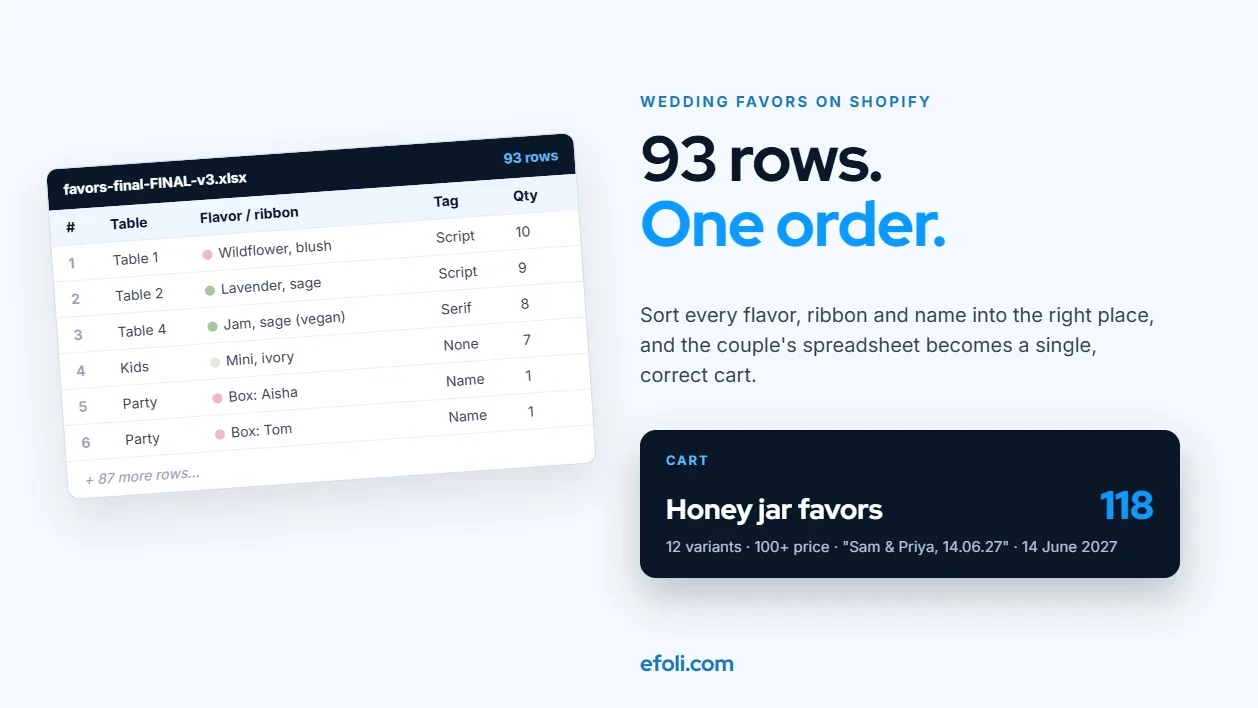
Picture the email. A couple has found your honey jar favors and they love them. They want 118, one for every guest. Then the details arrive, attached as a spreadsheet.
Wildflower honey for most tables, but the vegan guests at table 4 need the jam. Blush ribbon for the family tables, sage for the friends. The kids get a smaller jar. The eight people in the wedding party get named tags and a slightly bigger gift. And could the tags say "Sam & Priya, 14.06.27" in that script font from the sample?
By the time the couple has listed it all, the spreadsheet has 93 rows. About 70 of them are guest favors split by table, flavor, and ribbon. Fifteen are dietary swaps and children's favors. Eight are the wedding party, each with a different name.
The couple sees one order. Your store sees 93 decisions, and probably asks the buyer to make them one dropdown and one Add to cart click at a time.
This post is for Shopify merchants who sell wedding favors and wedding party gifts, and for the agencies who build their stores. It walks through where a favor order breaks, what each break costs, and how to set up the store so the spreadsheet becomes a single, correct order.
Key takeaways
A wedding favor order is a group order. It has a total quantity, a mix inside that total, some personalization, and a hard date. Most product pages are built for none of those.
Don't turn every choice into a variant. Stocked differences (flavor, color, size) are variants. Words (names, dates, initials) are line item properties. Gift boxes for the wedding party are bundles.
Let buyers enter quantities across several variants on one screen. A couple ordering 118 favors should not need 12 trips to the cart.
Price on the total order. A couple buying 118 favors in four flavors should get the 100+ price, not four smaller tiers.
Treat the wedding date as a requirement, not a note. If the order can't be made and delivered in time, the store should say so before checkout.
Write down who checks the tag wording and when. Most favor complaints are about words, not products.
A favor order is not a normal order
On paper, favors look like an easy product. They're small, they're cheap per unit, and they sell in large numbers. In practice, a favor order behaves very differently from the orders most Shopify themes are designed for.
Here's what a typical order contains:
Part of the order | What the couple decides | What usually goes wrong |
|---|---|---|
Total quantity | One per guest, plus a few spares | Buyer guesses, then emails to change it |
Mix | Flavors, colors, sizes across tables | Every combination becomes a separate cart line |
Personalization | Names, initials, date, short message | Wording typed in a note field and missed |
Wedding party gifts | Bigger boxes with named items | Built as separate products and packed wrong |
Deadline | The wedding date, and the day it must arrive | Order accepted that can't be made in time |
Extras | Spares for breakage or late guests | Not planned, then rushed as a second order |
Guest counts make the quantity side real. The Knot's 2025 Real Weddings Study, which surveyed more than 10,000 US couples, puts the average guest count at 117, up slightly from 116 in 2024. The Knot's own etiquette advice is to give one favor per guest and to include the wedding party, with shared items such as a candle or a bottle of wine as the main exception.
Zola's planning advice adds that extra favors are worth considering if items are fragile, if RSVPs might still change, or if the wedding is far away and a replacement shipment won't arrive in time.
So the normal case isn't "one buyer, one item". It's "one buyer, around 120 items, split several ways, with names on some of them, needed by a fixed date, plus a few spares". That's the order your store needs to handle.
Where the spreadsheet meets the cart: five breaks
Each of these shows up as a support email, a correction, or a reprint. None of them needs custom code to fix. They need the store to be set up for group orders.

Break 1: Every choice becomes a variant
The first instinct is to model everything as a variant. Flavor is an option, ribbon is an option, tag style is an option. Before long, one favor has dozens of variants, and some merchants try to add "name on tag" as an option too, which can't work because names aren't a list you can stock.
Shopify now supports up to 2,048 variants per product, so the hard limit is less of a problem than it used to be. The same Help Center page notes that each product can still have only three options, so a favor with flavor, ribbon, tag style and jar size won't fit, however many variants you're allowed. And even when it fits, a long list of variants is hard to shop. A couple scrolling through 48 combinations to find "Wildflower, Sage, Script" is likely to pick the wrong one.
What it costs: wrong picks, confused buyers, and a product catalog that's painful to update when you add a new flavor.
The fix: sort every choice before you build anything. The table in the next section shows how.
Break 2: Quantities go in one variant at a time
Even with sensible variants, most product pages let you choose one variant, type one quantity and click Add to cart. Then do it again. For our couple, that's at least 12 round trips: four flavors in three ribbon colors, plus the kids' jars and the vegan swap.
Every round trip is a chance to choose the wrong ribbon or type 18 instead of 81. It's also tiring, and a tired buyer is more likely to email you the spreadsheet and ask you to "just sort it out", which moves the work onto your team.
What it costs: abandoned carts, manual orders, and order lines that don't add up to the guest count.
The fix: a quantity grid that shows every variant of the favor with its own quantity box, so the couple fills in the split once and adds it all to the cart in one click. Bulk variants apps on Shopify, such as MultiVariants, do this on the product page, with a free plan for the basic grid. A running total helps a lot here. When the grid shows "118 favors selected", the couple can see straight away whether it matches their guest list.
Break 3: Price tiers that don't see the whole order
Most favor shops offer a lower unit price at higher quantities. That's fair, because setup, proofing and packing cost the same whether the order is 30 jars or 130.
The trouble starts when the tier only counts one variant. If the 100+ price applies per variant, our couple's 118 jars, split into four flavors, might never reach it. They see the unit price on the product page, add 118 favors, and get charged at the 25 to 49 rate. That feels like a broken promise, even though the discount technically works as configured.
What it costs: price complaints, manual refunds of the difference, and lost trust right before a big day.
The fix: decide whether a tier should count the whole product (all flavors and colors together) or each variant on its own. For favors, the whole product is almost always the right answer. Then check that your discount setup does the same thing in a real test cart. A pricing app such as DiscountRay can show a tier table on the product page, so the couple knows the unit price before they start filling in the grid. If you're choosing between pricing models, our sister team's guide on quantity breaks, volume discounts and tiered pricing explains the differences in plain terms.
Break 4: The wording ends up in the wrong place
Names, initials and dates are where favor orders get personal, and where most complaints come from. A missing accent, a swapped name order, the wrong date format. The product was perfect. The words were wrong.
These errors usually come from where the wording was captured. If the only place to type it is the order note at checkout, it's easy to miss when the order is packed. If it's in an email thread, it might not reach the person printing the tags.
What it costs: reprints, rush shipping, and the kind of review that mentions the wedding by name.
The fix: capture wording on the product as a line item property. Line item properties are custom fields, such as a text box on the product page, whose answers travel with that item in the cart, in the order, and on the packing slip. Many themes and personalization apps support them. Make the field required where wording is required, show a character limit, and repeat the wording back before checkout, for example: "Your tags will read: Sam & Priya, 14.06.27". Then decide whether you send a digital proof before printing, and say so on the product page.
Break 5: The wedding date is a note, not a rule
A wedding is the only date that matters, and it can't move. A favor that arrives two days late is worth nothing to the couple.
Yet in many favor shops, the date is typed into an order note. Nobody checks it against production time until the order is already paid for. When a couple orders 118 personalized jars eight days before the wedding, the shop finds out after checkout that it can't make them in time.
What it costs: refunds, rushed production that costs more than it earns, and stressed couples.
The fix: ask for the event date on the product page, and set a minimum lead time for personalized items. Show the latest order date for each delivery option. If you sell made-to-order items, the OrderRules team's guide to made-to-order lead times and production caps covers how to stop the store from accepting orders you can't fulfill on time.
Variant, property or bundle? Sort the 93 choices
The single most useful thing you can do is put each of the couple's choices in the right bucket before building anything. Here's how the honey jar example sorts out:
Choice | Where it belongs | Why |
|---|---|---|
Flavor (wildflower, lavender, jam, chili) | Variant | You stock it and track it as inventory |
Ribbon color (blush, sage, ivory) | Variant | Stocked material, affects packing |
Jar size (standard, kids' mini) | Separate product or variant | Different price and cost |
Tag style (script, serif) | Line item property (dropdown) | No stock difference, only printing |
Names, initials, date | Line item property (text) | Free text, can't be a list |
Wedding party gift box | Bundle | Several products packed together |
Quantity per table | Quantity grid | A split of one order, not a new item |
Event date | Line item property or cart attribute, checked against lead time | Drives production, not stock |

With the choices sorted, the honey jar favor has 12 variants (four flavors by three ribbons) instead of the dozens it would need if tag style were an option too. Tag style and wording become fields. The kids' jar is its own product. The wedding party box is a bundle. The 93-row spreadsheet turns into one product page with a grid, two fields and a date.
A quick rule helps when a new choice comes up: if you'd count it on a shelf, it's a variant. If you'd type it into a printer, it's a property. If you'd put several things in one box, it's a bundle.
The wedding party box is a different product
Favors for guests are about volume. Gifts for the wedding party are about choice. A bridesmaid might get a candle, a robe in her size, a mini honey jar and a named card. The best man might get a flask instead of a candle.
If these gifts are sold as separate products, the couple has to rebuild the same box eight times, and your packing team has to work out which items belong together. If they're sold as one fixed product, the couple can't swap the candle for a flask.
A build-a-box bundle solves both problems. The couple chooses a box, picks a set number of items from approved lists ("choose 1 candle or flask, 1 robe size, 1 mini jar"), and the box goes into the cart as a single bundle. Push Bundle supports Build-a-Box and Mix & Match bundles with minimum and maximum quantity limits and a multi-step builder on its Growth plan, which is $14 a month with a 14-day trial at the time of writing. Bundles show as one product in the cart, and stock syncs for each item inside.

Three settings matter most for wedding party boxes:
Fixed item count per step. "Choose exactly one" stops a half-empty box from reaching checkout.
Out-of-stock handling. If the blush robe in size M sells out, the step should hide or disable it, not let the couple build a box you can't pack. Push Bundle's guide on what happens when a bundle item is out of stock walks through the options.
Names on each box. Add a name field to the box itself, not to each item, so the packer knows "Box 3 is for Aisha".
If you're unsure whether the wedding party box should be fixed or flexible, the Push Bundle team's comparison of fixed and mix-and-match bundles is a good place to decide. A useful middle ground is to offer two or three ready-made boxes plus a "build your own" option for couples who want control.
What about Shopify's own tools?
Shopify's free Bundles app can create fixed bundles, and it's a sensible starting point for a single ready-made wedding party box. The Shopify Help Center lists its limits clearly: it doesn't support mix-and-match bundles, and a bundle's availability is set by its lowest-stock component. For a build-your-own box with steps and choices, you'll need a bundle app.
For quantity tiers, Shopify's built-in discounts can do "buy X, get Y% off", and stores on Shopify's B2B features can use volume pricing for business customers. Couples aren't business accounts, though, so most favor shops use an app that shows tier pricing to every shopper on the product page.
For personalization, Shopify supports line item properties, but adding the fields depends on your theme. Some themes include a "custom text" block in the theme editor. Others need a small code change or a personalization app.
Worked example: Rowan & Co. Favors
To make this concrete, here's how a fictional favor shop might rebuild its store. The numbers are illustrative, not data from a real shop.
Before: Rowan & Co. sold one honey jar favor with 48 variants (four flavors, three ribbons, two tag styles, two jar sizes). Names were typed in the order note. Quantity discounts applied per variant. Wedding party boxes were a contact form.
In a typical wedding season month, the team spent most Monday mornings answering the same questions: "Did my names come through?", "Why didn't I get the 100+ price?", "Can I swap the candle for a flask?".
After:
The jar favor was cut to 12 variants: four flavors by three ribbons. The kids' mini jar became a separate product.
Tag style became a dropdown property, and the tag wording became a required text field with a 30-character limit and a preview line.
A quantity grid showed all 12 variants with a running total.
Tiers were set to count the whole product: 25 to 49, 50 to 99, and 100+ jars.
The wedding party box became a three-step Build-a-Box: one candle or flask, one robe, one mini jar.
An event date field was added, with a 21-day minimum lead time for personalized orders.
Here's what our couple's order looks like after the change:
Line | Detail | Quantity |
|---|---|---|
Honey jar favor | 12-variant grid, tiers counted together | 103 |
Kids' mini jar | Separate product | 7 |
Vegan jam swap | Jam variant in grid (counted in 103) | 8 of the 103 |
Wedding party box | Build-a-Box, name per box | 8 |
Tag wording | "Sam & Priya, 14.06.27", script | One field |
Event date | 14 June 2027, checked against lead time | One field |
Two cart lines for favors, one bundle line repeated for the wedding party, and every detail attached to the right item. The spreadsheet still exists, but it's now the couple's planning tool, not your order form.
How much should a favor shop invest here?
Not every favor shop needs every fix. A rough guide:
If you... | Start with |
|---|---|
Sell one or two favor types, little personalization | Fewer variants and a tier table |
Sell favors in many flavors or colors | A quantity grid and product-wide tiers |
Print names, dates or initials | Required text fields with a preview and a proof policy |
Sell wedding party gifts | A build-a-box bundle with fixed steps |
Make to order | Event date field and a minimum lead time |
The cost of each fix is mostly setup time. The apps mentioned here all have free plans or trials, and our quantity and pricing examples can be built without a developer. The bigger investment is deciding your rules: minimum quantities, lead times, proof policy and how many spares you recommend.
What the product page should say
Even a perfectly built product page fails if the couple doesn't know the rules. Five lines of copy remove most of the questions:
Pricing: "Prices drop at 25, 50 and 100 favors. All flavors and colors count together."
Personalization: "Your tag wording is printed exactly as typed. We'll email a proof within 2 working days."
Timing: "Order at least 3 weeks before your wedding for personalized favors."
Spares: "Most couples add 3 to 5 spares for late guests or breakage."
Changes: "Need to change quantities after ordering? Reply to your confirmation email before your proof is approved."

Notice that every line answers a question that would otherwise become an email. If you keep a list of your most common pre-purchase questions, you'll probably find these five near the top.
Pre-season checklist: 12 checks before wedding season
Run these on a test order before spring bookings start. Each one takes a few minutes.
Count your favor variants. If a choice is wording or style, move it to a property.
Check the three-option limit isn't forcing awkward combined options like "Sage + Script".
Add 118 favors across at least six variants using the grid. Does the total match?
Check that the cart shows the 100+ price for that mixed order.
Leave the name field blank. Does the store stop you from adding to cart?
Type a name with an accent, such as "Zoë". Does it show correctly on the order and packing slip?
Enter a wedding date one week away. Does the store warn you or block the order?
Build a wedding party box with one sold-out item. Can you still check out? You shouldn't be able to.
Build eight wedding party boxes with eight names. Can the packer tell which is which?
Check the order confirmation email repeats tag wording and the event date.
Place the test order on a phone. Grids and long forms are hardest on small screens.
Ask someone outside your team to place the order without help, and time it.
If any of these fail, fix them before the busy season, not during it. A favor complaint in June costs far more than a setup change in February.
For agencies: the questions to ask in discovery
If you build stores for favor and gift merchants, these questions surface the hard parts early:
What share of orders include personalization, and who checks the wording?
Do tiers count per variant or across the product today? Do customers complain about it?
How do wedding party gifts reach the store now? Contact form, separate products or something else?
What's the shortest lead time the workshop can meet for 100+ personalized items?
Where does the event date live today, and who checks it?
How are spares and late changes handled?
The answers decide which apps you'll need and which rules you'll have to write. They also give you a baseline for measuring the rebuild: fewer pre-purchase emails, fewer reprints, and more orders placed without help.
The short version
A couple's 93-row spreadsheet isn't a sign that they're difficult. It's a sign that a wedding favor order is a group order with details, and most stores are built for single items without details. Sort each choice into the right place, let the couple enter quantities in one go, price the whole order, capture wording where the packer will see it, and treat the wedding date as a rule. The couple still gets to love the favors. Your team just stops having to rebuild the order by hand.
FAQ
How many wedding favors should a couple order?
Should wedding favor flavors and colors be variants on Shopify?
Can Shopify apply a bulk discount across several favor variants?
How do I sell wedding party gift boxes on Shopify?
How do I stop customers ordering personalized favors too late?
Where should customers type names for wedding favors?

Anika Anamta Mehnaz
This article is written by Anika Anamta Mehnaz, a Content Writer and Content Marketing Strategist specializing in Shopify, eCommerce, and SaaS. With over four years of content writing experience, she creates SEO and AI search-optimized content that helps Shopify merchants make better business decisions through practical, research-backed insights. Her work covers Shopify apps, product variants, bundles, discounts, B2B commerce, and conversion-focused strategies. Outside of work, Anika enjoys watching anime, reading John Grisham novels, and discovering new ideas in digital marketing and e-commerce. If you enjoy discussing Shopify, content marketing, or online growth, feel free to connect with her. Twitter: https://x.com/mehnaz2201 Medium: https://medium.com/@mehnaz_78932
Keep reading
View all articles →
The Customer Bought the Tent. Who Remembered the Sleeping Bag?
November 13, 2026 • 18 min read
The Embedded Commerce Playbook for Brands With Reseller Websites
November 13, 2026 • 17 min read
The Roses Are Gone. The Orders Keep Coming. Why Florists Oversell on Shopify
November 13, 2026 • 18 min read