On this page
- Key takeaways
- The order that started this
- Why one wrong price costs more than one order
- Seven checks, in the order to run them
- Checks 1 to 3: is the store sure this buyer is a pro?
- Not logged in
- Not approved yet
- Approved, but not linked to the price
- Check 4: price breaks that count differently from the salon
- Checks 5 to 7: conflicts, display and checkout
- Two discounts fighting
- Pro price on the product page only
- Checkout
- What your pro sign-up page should answer
- How salon wholesale pricing should be set up
- Native Shopify B2B or an app?
- Pro-only products: backbar sizes and colour
- Make the second order easier than the first
- What to send a salon when the price looks wrong
- A worked example: one brand, two kinds of pro
- How to stop it happening again
- FAQ
When a salon sees retail prices on your Shopify store, it's almost always because the store doesn't know the buyer is a professional at that moment: they aren't logged in, their account isn't approved or linked to a price list, or the price break counts each shade separately. Fix it by giving approved pros an account that carries their price, scoping that price by customer, tag or company, and testing the exact order a salon places.
This post is about salon wholesale pricing on Shopify. It is for professional beauty brands that sell to salons, spas, lash artists and estheticians as well as to the public. It walks through the seven checks that find the cause, how pro pricing should work, and when native Shopify B2B or an app such as DiscountRay is the better fit. We make DiscountRay, so we've said when you don't need it.
Last checked: 12 November 2026, against the sources linked in this post.
Who this is for: Professional beauty brands on Shopify that sell to salons, spas, lash artists and estheticians as well as to the public.
Disclosure: eFoli makes DiscountRay and MultiVariants, which are mentioned in this post.
Key takeaways
A salon seeing retail prices is a recognition problem, not a pricing problem. Shopify only shows a pro price when it knows who's buying.
Check in this order: logged in, approved, linked to the right price list, price break rules, discount conflicts, where the price shows, and checkout.
Shopify's native B2B (on Basic and above) prices by company and catalog, with 3 active catalog assignments per B2B market on non-Plus plans. Its volume pricing counts each variant on its own (Shopify Help Center).
DiscountRay prices by customer tag or group on Growth ($14 a month) and by company or customer list on Pro ($29 a month), and its Growth plan can show offers on collection pages, not just the product page.
Write down how a pro keeps their price. Real pro beauty stores set rules such as a minimum spend every 90 days.

The order that started this
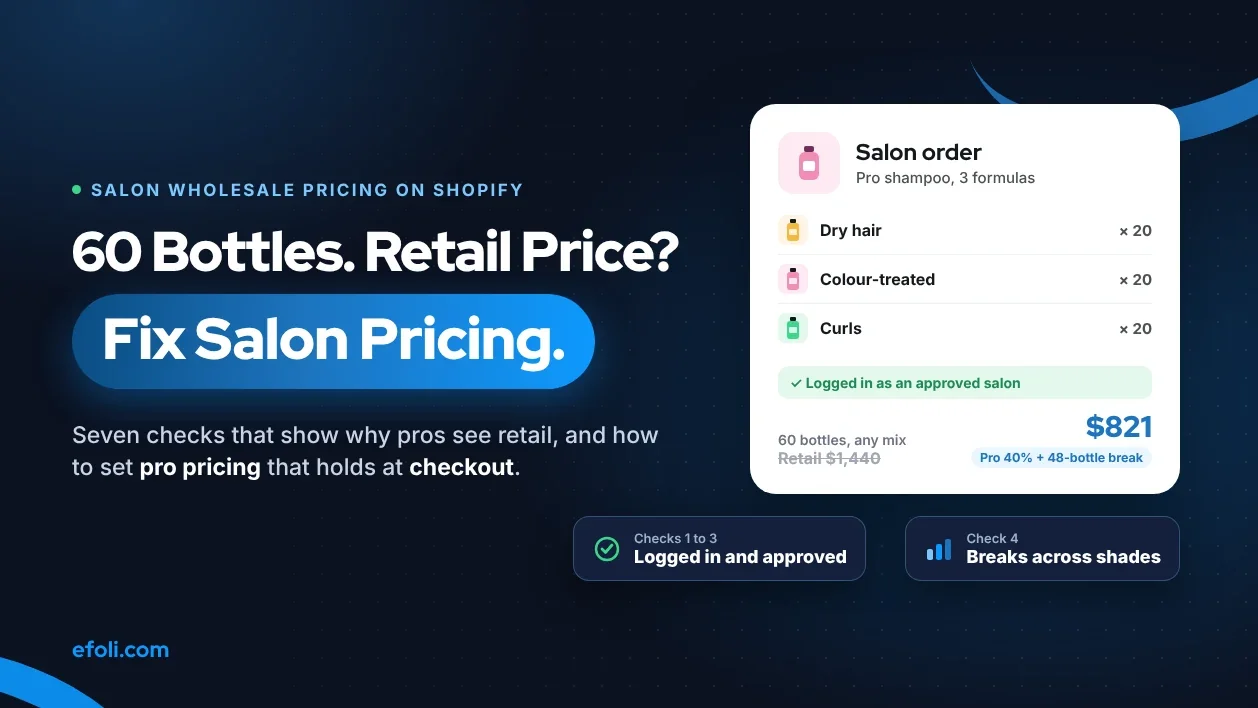
Picture a typical case. A salon owner logs in on her phone between clients and orders 60 bottles of your professional shampoo: 20 for dry hair, 20 for colour-treated and 20 for curls. Your wholesale terms say salons get 40% off, and 48 bottles or more gets a further 5%.
She sees the full retail price. She closes the tab and emails your sales rep: "Is the website broken?"
The website usually isn't broken. It's doing exactly what it was told, and what it was told doesn't match how salons buy. Here's how to find the cause.
Why one wrong price costs more than one order
It's tempting to treat this as a small bug. One salon, one email, one rep who fixes it by phone. But a salon that sees retail prices doesn't just lose that order:
They stop trusting the site. The next time she needs stock, she phones or emails the rep instead. Your self-service channel becomes a slower version of the old one.
They compare you with a distributor. Many pro beauty products are also sold through beauty supply distributors. If your site looks more expensive than the distributor's, she'll order there, and you'll lose the direct relationship and the margin.
Your rep becomes a price checker. Every "is the site broken?" email costs time that should go to new salon accounts.
You lose the reorder. The first online order teaches a salon whether your site is worth using. If it goes badly, the next ten orders go somewhere else.
Business buyers increasingly expect to order without a rep, which our post on self-service B2B ecommerce covers in more detail. A wrong price is the fastest way to push a buyer back to the phone.
Seven checks, in the order to run them
Run these as the salon. Log in with a test pro account on a phone, add the same 60 bottles and watch where the price goes wrong.
# | Check | What you'll see if this is the cause | Fix |
|---|---|---|---|
1 | Is the buyer logged in? | Retail prices for everyone not logged in | Ask pros to log in before browsing, and say so on the site |
2 | Is the account approved? | Login works but prices stay retail | Approve the account and send a welcome email |
3 | Is the account linked to the pro price? | Approved account still sees retail | Assign the company and catalog, or add the customer tag your pricing uses |
4 | Do price breaks count each shade or scent on its own? | Pro price shows, but the 48-bottle break doesn't apply | Count the break across variants, or set it per variant on purpose |
5 | Is another discount getting in the way? | Price jumps around in the cart | Check how automatic discounts and codes combine |
6 | Where does the pro price show? | Retail on collection pages, pro price only on the product page | Show pro prices on collections and quick-add too |
7 | Does checkout keep the price? | Pro price in cart, retail at checkout | Test express checkout and the full checkout as the pro account |
Most stores find the cause in the first three rows. Rows 4 and 6 catch the ones that look like "the discount is wrong" but are really "the rule counts differently than the salon does".
Checks 1 to 3: is the store sure this buyer is a pro?
Not logged in
Shopify shows the default price to anyone it doesn't recognise. If a salon owner browses on a new phone, or her session expired, she's a stranger to your store.
Two small changes help a lot:
A line in the header for logged-out visitors: "Salon or spa? Log in to see professional prices."
A login prompt on product pages that are sold mainly to pros, such as backbar sizes.
Not approved yet
Most pro beauty brands check a licence before giving pro prices, and that's good practice. Look at how two Shopify-based pro stores handle it:
Bioelements Pro opens professional access to licensed estheticians, skin care businesses, instructors and students in esthetics training. It asks for a current licence or proof of status, says that expired licences aren't accepted, and reviews applications "typically within 1 business day".
Lash Affair opens wholesale accounts to licensed lash artists, salons, spas, schools and distributors. Approval usually takes 1 to 2 business days, and wholesale pricing applies automatically when the buyer logs in.
The weak point is the gap between "applied" and "approved". A salon that applies on Monday and tries to order on Monday afternoon sees retail. Tell applicants how long approval takes, and email them the moment it's done.
Approved, but not linked to the price
This is the most common cause we see. The account exists and is approved, but the thing that triggers the pro price is missing:
With native Shopify B2B, the customer must be a contact at a company location that has the pro catalog assigned. A customer account on its own isn't enough.
With tag-based pricing in an app, the customer needs the exact tag the rule looks for. "Salon" and "salon" can be different tags, and "Pro-Salon" won't match a rule for "Salon".
Fix it at the source: make approval and linking one step. Whoever approves the licence also assigns the company or adds the tag, in the same session. Keep a short, fixed list of the tags or catalogs your team is allowed to use, and pin it where approvals happen. A typo in a tag is invisible to the person who made it and very visible to the salon that pays retail because of it.
Check 4: price breaks that count differently from the salon
Back to the 60 bottles. The salon thinks in totals: "60 bottles of shampoo". Shopify's native volume pricing thinks in variants. According to the Shopify Help Center, quantity rules and volume pricing are on every plan that has B2B, and they apply to each variant. So 20 + 20 + 20 is three separate orders of 20 as far as the break is concerned, and none of them reaches 48.
How the salon orders | Native volume pricing sees | Break at 48 applies? |
|---|---|---|
60 bottles, all one formula | 60 of one variant | Yes |
20 dry, 20 colour, 20 curl | Three variants of 20 | No |
48 bottles across 6 scents | Six variants of 8 | No |
There's nothing wrong with per-variant breaks if that's your policy. Some brands want 48 of one formula for the break. Most pro beauty brands don't. They mean "48 bottles of this product line, any mix". If that's your rule, you need pricing that counts across variants or across the product.
DiscountRay's free plan includes quantity discounts and tiered pricing, and its paid plans add variant-specific discounts and B2B targeting, so you can choose whether a break counts per variant or across the product. Our DiscountRay team has a full troubleshooting guide for tiered discounts that don't trigger, so we won't repeat every case here.


Checks 5 to 7: conflicts, display and checkout
Two discounts fighting
If a salon has a 40% pro price and your store runs a 20% sitewide promotion, what should happen? Many brands never decide, so the answer is whatever the discount settings happen to allow. Decide it on purpose. A common rule is "pro prices don't stack with retail promotions", with a separate pro-only promotion when you want to reward salons.
Pro price on the product page only
A salon owner often orders from the collection page, adding 10 products in two minutes. If the collection grid shows retail prices, she assumes the pro price is missing, even when the cart would correct it. DiscountRay's Growth plan can show offers on collection pages and product cards, so the saving is visible while she browses, not only once she reaches the cart.
Checkout
Always finish the test order. A price that holds in the cart but changes at checkout is the most damaging version of this problem, because it happens after the salon has committed. Test the normal checkout and any express buttons you show to pros.
What your pro sign-up page should answer
A lot of "why am I seeing retail?" emails start before the salon ever applies. The sign-up page didn't say what happens next, so the salon assumed the price would appear right away. A good pro page answers the salon owner's real objections, which are rarely about the discount itself:
The salon thinks | Answer it on the page with |
|---|---|
"I already buy from my distributor" | What ordering direct adds: full range, new launches first, education, free shipping threshold |
"I don't want another account to manage" | How long sign-up takes, and that prices apply automatically once approved |
"Will I have to hit a minimum?" | Your opening order and any minimum to keep pro pricing, in plain numbers |
"How long until I can order?" | Your approval time, such as "within 1 working day", and how you'll tell them |
"Can I pay on terms?" | Whether you offer net terms, and to whom |
"What if a product doesn't suit my clients?" | Your returns or exchange policy for pro orders |
Keep it to one screen on a phone. Salon owners read this between appointments, not at a desk.
The best line on a pro sign-up page is usually the most boring one: "Once you're approved, log in and you'll see your professional prices on every product." It sets the expectation that prevents the email this post started with.
How salon wholesale pricing should be set up
Once you've fixed today's problem, set up pro pricing so it doesn't come back.
Decision | Options | What most pro beauty brands choose |
|---|---|---|
Who qualifies | Licensed individuals, salons, spas, schools, distributors | Licensed individuals and businesses, with proof |
How pros are identified | Company and catalog, customer tag, customer list | Company for big accounts, tags for individual pros |
What pros pay | Fixed pro price, percentage off, tiers by quantity | A pro price list, plus tiers on backbar sizes |
What they can buy | Everything, or pro-only products too | Retail sizes for everyone, backbar and colour for pros only |
How they keep the price | Forever, or with a minimum activity rule | A minimum spend or order count in a set period |
What the public sees | Retail prices, hidden pro products | Retail prices, with a "Pro? Log in" prompt |
The "how they keep the price" row is often skipped. Lash Affair's published rule is a good example of making it clear: an account stays active with at least $200 in purchases over each rolling 90-day period, or 50 lifetime orders with one in the last 6 months. Accounts that lapse go back to retail pricing, with 30 days' notice first. Whatever your rule is, publish it, so a salon never finds out at checkout.
Native Shopify B2B or an app?
Both can give salons the right price. They suit different setups.
Need | Native Shopify B2B | DiscountRay |
|---|---|---|
Company accounts with locations, payment terms, PO numbers | Yes, all plans with B2B | Uses Shopify's companies on Pro |
Separate price lists | Catalogs, 3 active per B2B market on non-Plus | Pricing rules by tag, group, company or list |
Price breaks across variants | No, per variant | Yes, quantity and tiered pricing |
Individual pros without a company profile | Possible, but each needs a company | Tag the customer, no company needed |
Pro offers visible on collection pages | Yes, catalog prices for B2B buyers | Offers and badges on collections, Growth plan |
Scheduled pro promotions | Limited | Yes, Growth plan |
Free gifts at a spend threshold | No | Yes, Pro plan |
Cost | Included in your Shopify plan | Free, $14 or $29 a month |
Choose native B2B if most of your pro buyers are salons and spas you'd set up as companies anyway, you need payment terms and PO numbers, and per-variant breaks match your policy.
Add DiscountRay if you sell to many individual licensed pros who don't need a company profile, if your breaks should count across shades and scents, or if you need more price lists than your catalogs allow. You can use both: companies and terms in Shopify, pricing rules in the app. If you're working through which Shopify B2B features your plan includes, see Shopify B2B by plan.
For the wider picture of why wholesale pricing gets messy as you grow, our DiscountRay post on Shopify wholesale pricing problems covers spreadsheets, manual quotes and one-size-fits-all discounts.

Pro-only products: backbar sizes and colour
Pro beauty catalogs usually have products the public shouldn't buy: litre-size backbar shampoos, professional colour, developers and treatments meant for trained hands. Showing them to everyone creates two problems. Retail customers buy products they can't use safely, and salons see their professional range sold next to the retail one.
Practical options:
Separate the products. Keep backbar and colour in their own collection, and only link it from pages pros see.
Hide the price or the buy button for non-pros. A request button can replace "Add to cart" for guests.
Limit who can buy. Native B2B catalogs can include products only for assigned companies. Apps can restrict eligibility by tag.
Do this before you launch the pro program, not after a retail customer complains that their hair turned orange.
One more thing helps here: say why a product is pro-only. "Professional colour: for licensed stylists, because it needs a patch test and the right developer" reads as care, not as gatekeeping. Retail customers who land on the page understand why they can't buy it, and many go on to buy the retail version instead. Salons see that you protect the professional range, which is often a reason they choose a brand in the first place.
Make the second order easier than the first
Getting the price right is step one. What keeps a salon ordering online is how easy the reorder is. Salons tend to buy the same products every few weeks, often in the same shades and sizes, so a few features matter more than any promotion:
Reorder from past orders. Shopify's customer accounts include easy reorder for B2B buyers on every plan that has B2B, so a salon can repeat last month's order in a few taps.
One page for all shades. A salon ordering colour or styling products in eight shades doesn't want eight product pages. A quick order list, or a variant table from an app such as MultiVariants, lets her enter quantities for every shade at once.
Case quantities shown up front. If backbar comes in cases of 6, say so on the page, and set the quantity steps so she can't order 7 by mistake.
A clear reorder reminder. A short email when a salon usually reorders is more useful to her than a discount code.
Our MultiVariants team covers the rest of this in Shopify wholesale replenishment, including how buyers reorder without calling a rep.
What to send a salon when the price looks wrong
Even with a clean setup, a salon will sometimes see the wrong price, usually because they're logged out. Give your sales and support team a short reply they can send:
Thanks for flagging this. Professional prices show when you're logged in to your approved account. Could you log in at [link] and refresh the page? If you still see retail prices, reply with the products you're ordering and we'll check your account straight away.
Then check rows 1 to 3 of the table above. Nine times out of ten, that's where the answer is.
A worked example: one brand, two kinds of pro
This is a made-up but typical case. A haircare brand on Shopify sells retail online and supplies about 300 salons and 1,200 individual stylists.
The salons are set up as companies in Shopify B2B. Each has a location, net 30 terms and the "Salon" catalog with pro prices. Their buyers log in through customer accounts. Because the salons order backbar litres in one formula at a time, the brand's per-variant breaks work for them.
The stylists don't need company profiles. They apply with a licence, and on approval they get the tag "Stylist". DiscountRay gives tagged customers 35% off retail sizes, and a quantity tier that counts across all shades of the styling range. Collection pages show the stylist offer, so a stylist browsing on her phone sees the saving before the cart.
The public sees retail prices, plus a header line: "Hair professional? Log in for pro prices." Backbar and colour aren't visible to guests.
When the brand ran the seven checks as a test stylist, it found one problem: the approval team had tagged some accounts "Stylists" instead of "Stylist", so the pricing rule never matched them. A fixed tag list in the approval checklist ended the "retail price" complaints.

How to stop it happening again
Test monthly as each type of pro. Log in as a test salon and a test stylist, add a real basket and go to checkout.
Make approval one step. Approve the licence, assign the company or tag, and send the welcome email together.
Publish the rules. Who qualifies, what they pay, how they keep the price.
Watch support messages. Count "why am I seeing retail?" emails each month. If the number rises, check what changed.
Review after every theme or app change. New themes and new discount apps are the usual reasons a working setup breaks.
If the salon side of your business is growing, Shopify apps for beauty retailers are covered in our MultiVariants post on Shopify apps for makeup stores, including bulk ordering for shade ranges.
FAQ
Why does a salon see retail prices on my Shopify store?
Can Shopify show different prices to salons and the public?
Why doesn't my volume discount apply to mixed shades?
Should I check a licence before giving pro prices?
How do I keep professional products away from retail customers?
Can I use native B2B and DiscountRay together?
How do professionals keep their pro pricing?
Do I need Shopify Plus to sell to salons?

Anika Anamta Mehnaz
This article is written by Anika Anamta Mehnaz, a Content Writer and Content Marketing Strategist specializing in Shopify, eCommerce, and SaaS. With over four years of content writing experience, she creates SEO and AI search-optimized content that helps Shopify merchants make better business decisions through practical, research-backed insights. Her work covers Shopify apps, product variants, bundles, discounts, B2B commerce, and conversion-focused strategies. Outside of work, Anika enjoys watching anime, reading John Grisham novels, and discovering new ideas in digital marketing and e-commerce. If you enjoy discussing Shopify, content marketing, or online growth, feel free to connect with her. Twitter: https://x.com/mehnaz2201 Medium: https://medium.com/@mehnaz_78932
Keep reading
View all articles →
Garages Order by Part Number, Not Lifestyle Photo: Shopify Agencies for Auto Parts
November 12, 2026 • 17 min read

Build Accessory Bundles That Help Buyers, Not Just Order Values
November 12, 2026 • 17 min read
OrderRules or Native Shopify Inventory: What Actually Limits Bakery Orders?
November 12, 2026 • 17 min read