On this page
- Key takeaways
- Why "in stock" is the wrong question
- The four doors orders come through
- Where the buyer gets stuck
- The lead time is a sentence, not a calculation
- Capacity is rarely one number
- Approvals delay the moment an order counts
- Quotes live outside the cap
- Staff orders use the side door
- Shutdowns and holidays
- Who pays for the friction
- What a capacity-aware store looks like
- Step 1: Decide what you're protecting
- Step 2: Put hard limits at checkout
- Step 3: Send the big and custom jobs to a quote
- Step 4: Make the lead time honest
- Step 5: Decide when a B2B order holds capacity
- Step 6: Put a check on the side door
- What a capacity app won't do
- Worked example: Corvane Fabrication
- The problem, as the team saw it
- What Corvane changed
- What happened
- Merchant checklist: before your next busy month
- Finally...
- FAQ
Short answer: Manufacturers on Shopify run into trouble when the store accepts orders the shop floor can't produce in time. The product page shows a fixed lead time, checkout takes every order that arrives, and quotes, B2B approvals and orders keyed in by sales reps all come in through different routes that no one totals up. The fix is to treat manufacturing order capacity on Shopify as a rule the store enforces, not a number someone keeps in their head. Cap what the line can actually take (orders, units or delivery dates) at checkout. Send large and custom jobs to a quote, where someone checks the schedule before saying yes. And decide which order routes count against capacity, and when.
It was a Tuesday when Priya, a maintenance buyer at a food processing plant, needed 40 stainless steel machine guards cut to a custom length. The supplier's Shopify store had a clean product page: choose a length, choose a finish, add to cart. Under the price it said "Ships in 5 to 7 business days." Priya's plant had a line shutdown booked for the following Friday week, so the timing worked. She placed the order, her manager approved it, and she put the install on the shutdown plan.
On the supplier's side, Tuesday was busy. Two other online orders for the same guard came in that morning. A sales rep had promised a distributor 120 units on a phone call and created a draft order that afternoon. The press brake was already booked for most of the week with a contract job nobody had entered in Shopify, because it never went through the store.
On Thursday, the production planner looked at the week and saw what had happened. Priya got an email on Friday saying her order would ship "in approximately three weeks."
Nobody in that story did anything wrong. The store and the production line simply never talked to each other. This article is for industrial suppliers, contract manufacturers and their agencies. It follows the problem from the buyer's side, maps the friction, looks at what it costs, and ends with a checklist.
Key takeaways
For a manufacturer, "is it in stock?" is the wrong question. The right one is "can we make it by the date we promised?"
Orders reach production through several doors: online checkout, B2B checkout with approvals, quotes that become draft orders, and orders staff create in the admin. Most stores only control one of them.
A fixed "ships in X days" line is a promise the store makes without checking anything.
Hard caps at checkout (per day, per week, per product or per delivery date) stop the store from accepting more than the line can make.
Large, custom or rush jobs should go to a quote, so a person checks the schedule before anyone commits to a date.
A capacity app is not an ERP or MRP system. It enforces the limits you set. It doesn't work them out for you.
Why "in stock" is the wrong question
Most Shopify stores are built around inventory. A product has a stock count, the count goes down when someone buys, and the store stops selling at zero. That works when goods sit on a shelf.
Many industrial products don't. Cut-to-length parts, fabricated guards, machined fittings and configured enclosures are made after the order arrives. The limit isn't how many you have. It's how many you can make this week, given what's already in the queue.
Planners have a name for this: available to promise, often shortened to ATP. In plain words, it means "what we can commit to, by which date, given everything we've already committed to." A Shopify store doesn't calculate ATP. If you set inventory to a high number or allow overselling (common for made-to-order products), the store will happily accept any quantity, on any day, for the lead time printed on the page.
That gap is where Priya's order fell through. The store had no idea the press brake was booked. It didn't count the distributor's draft order. And it didn't know that three orders for the same guard on one day would be more than the line could cut that week.
For how lead time differs from processing and transit time, see lead time vs processing time vs transit time. This article is about the step before that: whether the order should have been accepted at all.
The four doors orders come through
Before you set any rule, map how orders reach your production team. Most industrial stores have at least four routes.

Door | Who uses it | How it becomes an order | Does a checkout rule see it? |
|---|---|---|---|
Online checkout | Repeat buyers, small orders, card payments | Buyer pays at checkout | Yes |
B2B checkout with approval | Company buyers whose orders need sign-off | Order is submitted as a draft, then completed after review | Partly, depending on how the draft is completed |
Quote to draft order | Custom, large or price-negotiated jobs | Merchant turns the accepted quote into a draft order and sends an invoice | Only if the buyer pays through the invoice checkout |
Staff-created order | Sales reps, phone and email orders, EDI or ERP imports | Staff create and complete an order in the admin, or an integration does | No |
This table matters more than any setting. If most of your volume comes through the last two rows, a checkout rule protects only part of your schedule, so it needs a process for the other doors.
On Shopify B2B, a company location can be set so that orders are submitted for review instead of being placed straight away. Shopify's help docs explain how B2B checkout and orders work, and there is a Shopify Flow action to submit all orders as drafts for review for chosen company locations. Those submitted orders land in Drafts with their prices locked and become real orders when you create the order or when the buyer pays the invoice. The detail is worth knowing because it changes when an order "counts." We'll come back to it.
Where the buyer gets stuck

Moment | What the buyer expects | What the store does | What happens |
|---|---|---|---|
Product page | A lead time based on the current schedule | Shows a fixed "ships in 5 to 7 days" line | The buyer plans around a date nobody checked |
Add to cart | A warning if the quantity is unusual | Accepts 40 custom-length units like 4 | A large job enters the queue with no review |
Approval | Approval means the order is confirmed | The buyer's own approval step adds a day or two | Capacity is used up by other orders in the meantime |
Checkout | The order is accepted only if it can be made | Accepts every order, every day | The day's real capacity is passed |
After the order | A confirmed ship date | A generic confirmation email | The planner finds the problem days later |
The late notice | Early warning and options | "Approximately three weeks" | The buyer's shutdown plan breaks |
The lead time is a sentence, not a calculation
"Ships in 5 to 7 business days" is usually typed into a product description, a metafield or a theme block once and then left alone. It's true on a quiet week. On a busy week it isn't, and the page doesn't know the difference.
Maintenance buyers work to shutdown windows and project milestones, so they read your lead time as a commitment. If it's wrong, they rebook contractors or push back a shutdown.
Capacity is rarely one number
When people say "the line can do 50 a day," they usually mean something more complicated. One machine might be the bottleneck. One product might take four times as long as another. A finishing step might be shared across several product families. A shift pattern might change on Fridays.
You don't need to model all of that in Shopify, but you do need to pick the number that best protects the schedule:
Orders per day or week. Good when jobs are similar in size and the bottleneck is setup or paperwork.
Units per product per day or week. Good when one product (or a family of products) shares a bottleneck machine.
Units per delivery date. Good when you dispatch on fixed days or deliver with your own vehicles.
Minimum and step quantities. Good when material comes in fixed lengths or sheets and odd quantities waste stock.
Approvals delay the moment an order counts
Industrial buyers often can't just buy. A purchase over a set amount needs a manager's approval, sometimes two. On Shopify B2B, that can be built into checkout by submitting orders for review. In the buyer's own procurement system, it happens before they even reach your store.
Either way, there is a gap between "the buyer decided" and "the order exists." During that gap, other orders can use up the capacity the buyer thought they had. If your capacity rule only counts completed orders, a B2B order waiting in Drafts doesn't hold a slot. When it's finally completed, the slot may be gone.
Quotes live outside the cap
Custom work usually goes through a quote that becomes a draft order. That's the right tool, but if the person writing the quote can't see the week's commitments, they'll quote your standard lead time, and the quote becomes another unchecked promise.
Staff orders use the side door
Sales reps and customer service staff often create orders in the admin for phone or email customers. Orders that staff create and mark as paid in the admin don't go through the online checkout, so checkout rules don't run on them. The same goes for most orders imported from an ERP or EDI feed, and for Shopify POS orders if you sell from a trade counter.
Shutdowns and holidays
Planned shutdowns, stocktakes and public holidays cut capacity. If the store doesn't know about them, it keeps quoting the same lead time.
Who pays for the friction
When the store over-promises, the cost spreads across the business, which is why it often goes unnoticed until a big customer complains.
Where it shows up | What it looks like |
|---|---|
Production | Overtime, rushed changeovers, jobs reshuffled to meet the loudest customer |
Sales | Reps calling buyers to reset dates, discounts offered to keep the account |
Customer service | "Where is my order?" emails and calls, manual date updates |
Logistics | Split shipments, expedited freight, part deliveries |
Finance | Cancelled orders, refunds, delayed invoices, disputed payment terms |
The buyer | Rebooked contractors, pushed-back shutdowns, safety workarounds |
The relationship | The buyer stops trusting your website and goes back to email, or to a competitor |
The last row hurts most. A buyer who stops trusting your online lead time stops ordering online, and your reps go back to keying in orders by hand.
What a capacity-aware store looks like
You can't turn Shopify into a production planning system. You can stop the store accepting orders it shouldn't, route the right jobs to a person, and make promised dates more honest.
Step 1: Decide what you're protecting
Start with your production team, not your app list. Ask them three questions:
What runs out first in a busy week? A machine, a person, a material or dispatch slots?
Which products share that constraint?
What's the most they can comfortably take on per day or per week, leaving room for contract work and rush jobs that don't come through the store?
The answer to the third question is your cap. Keep it below the true maximum. Work that doesn't come through Shopify still needs room.
Step 2: Put hard limits at checkout
A checkout rule is the only part of this that actually stops an order. Shopify's own B2B quantity rules and volume pricing set minimums, maximums and increments per order on B2B catalogs. They don't track how much has been ordered today or this week, so they can't act as a capacity cap.
That's the gap an app like OrderRules is built for. In its current docs, the Shopify order limit app lets you:
Cap the total number of orders the store accepts per day, and on paid plans per week or month.
Cap how many units of a product, variant or collection can be sold per day, week or month, shared across all buyers.
Set a minimum order quantity and a step quantity, so lengths and sheets are ordered in usable multiples.
Close checkout outside store hours and on special dates, such as a planned shutdown.
On its Advanced plan, offer delivery dates and set a capacity for each date.
The rules run as a Shopify checkout validation, so they apply to standard checkout, express wallets, B2B company checkout and draft order invoices paid through checkout. The storefront banners only warn. The block happens at checkout. At the time of writing, OrderRules has a free Starter plan, Pro at $9.99 a month and Advanced at $19.99 a month. Check the listing for current pricing before you decide.

A few counting details are worth knowing before you set your first limit:
An order counts toward the limit from the moment it's created.
Cancelling an order frees the slot. A refund without cancelling doesn't.
Daily limits reset at midnight in the store's time zone, not the buyer's.
Open draft orders and abandoned checkouts don't count.
For the consumer version, see made-to-order lead times and production caps.
Step 3: Send the big and custom jobs to a quote
Not every order should be self-serve. A good rule of thumb: if a job could take a meaningful share of a week's capacity, or needs a drawing, a material check or a special finish, it should go to a person first.
A Shopify quote request app like QuotWay gives you that route without leaving Shopify. According to its App Store listing, you can:
Add a request-a-quote button to chosen products, and hide add-to-cart where self-serve doesn't make sense.
Collect the details you need through custom form fields and file attachments, such as drawings and specs (on paid plans).
Counter-offer and message the buyer, so the agreed date is part of the negotiation, not an afterthought.
Require internal approval before a quote goes out, on the Professional plan, so the planner can sign off on the date.
Accept part of a quote and split it into several orders, also on Professional, which helps when one part can ship now and the rest later.
Turn an accepted quote into a draft order in one click.

The quote approval step is the important one for capacity. It puts a planner between the buyer's request and your commitment. Anika's guide to industrial parts quotes on Shopify covers what to collect on the form and how to structure the quote itself. If you're weighing an app against a custom RFQ build, see her comparison of QuotWay vs a custom RFQ.
Step 4: Make the lead time honest
Once orders are capped, the lead time line can do its job. A few practical changes:
Show a date range, not a single number of days, and say what it depends on ("for orders placed today, up to 20 units").
On a busy week, update the line. If that's too manual, use delivery date selection so the buyer picks from dates that still have room.
Add planned shutdowns and holidays to your store calendar so checkout closes, or dates aren't offered, on days you can't produce or dispatch.
Step 5: Decide when a B2B order holds capacity
This is the step most stores skip. If B2B orders are submitted for review, decide whether they should hold capacity while they wait. You have two broad options:
Hold it in the plan, not in the store. The planner reviews new drafts each morning and reserves time on the schedule manually. The checkout cap is set lower to leave room for them.
Complete quickly. Review and create orders from drafts within a set time (for example, same working day), so they count toward the cap soon after submission.
Don't leave drafts sitting for days, or a buyer who submitted on Monday ends up with a worse date than one who paid by card on Wednesday.
There's also a test worth running. If a buyer pays a B2B draft order through its invoice checkout, a checkout rule may run at that point. If the day's cap has been reached by then, the buyer could be blocked from paying for an order you've already approved. Test this in a development store with your own setup before you go live, and adjust your caps or process if it happens.
Step 6: Put a check on the side door
Orders created by staff in the admin don't pass through checkout rules. You don't need to stop staff creating orders. You need a habit:
Before creating a large order, staff check the capacity dashboard or the planner's board.
Large orders from reps go through the same quote approval as online quotes.
What a capacity app won't do
Be clear with your team about the limits:
It doesn't know your machine hours, materials or labour. You set the numbers.
It isn't MRP or ERP. It won't schedule jobs, order materials or plan shifts.
It can't see work that never enters Shopify.
Two orders placed in the same second can both get through when only one slot is left. That's rare, but plan for small overruns.
POS orders, subscription renewals and order edits aren't checked at checkout.
So set caps with headroom and keep a person in the loop for large jobs.
Worked example: Corvane Fabrication
Corvane Fabrication is a fictional business we've made up to show how this fits together. It's a small UK maker of stainless steel guards, brackets and enclosures for food and packaging plants, selling on Shopify to maintenance buyers and distributors.
The problem, as the team saw it
Corvane's store had a fixed "dispatched in 5 working days" line on every product. Around a third of revenue came through online checkout, a third through quotes and a third through reps creating draft orders. The press brake was the bottleneck. In busy months, the production manager spent Monday mornings phoning buyers to move dates.
What Corvane changed
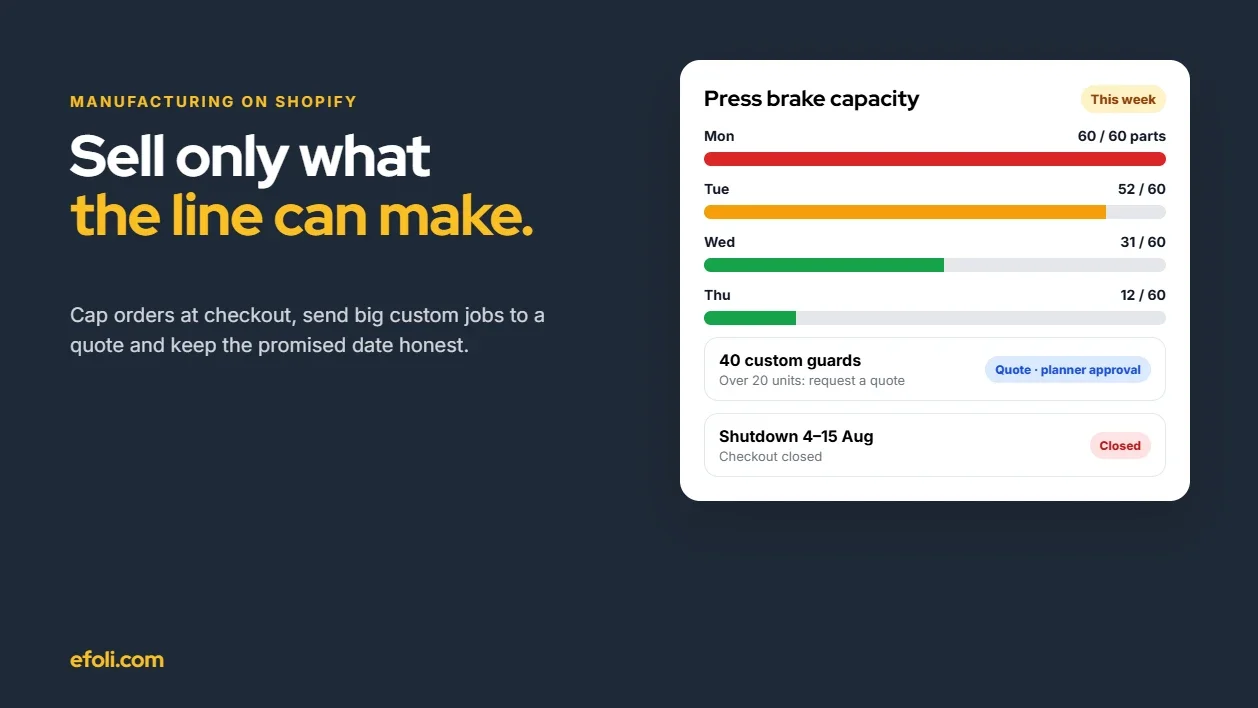
Capacity set with the planner. The team agreed that the press brake could comfortably take around 60 bent parts a day from the store, leaving room for contract work.
Product caps on the bottleneck family. Formed guards and brackets went into one collection, with a daily unit cap of 60 across all buyers and a weekly cap to smooth out busy days.
Self-serve limit per order. Orders above 20 units of any formed part were routed to a quote. Add-to-cart was hidden on fully custom parts, which went straight to a quote with a drawing upload.
Planner approval on quotes. Quotes over a set value needed the production manager's approval before they went out, so the promised date was checked.
Shutdown days in the calendar. The two-week August shutdown and the Christmas closure were added as closed dates, so checkout stopped taking orders that couldn't be dispatched.
B2B drafts reviewed by noon. B2B orders submitted for review were checked and created the same working day.
What happened
These are illustrative outcomes, not measured results. In the first busy month, the store closed to new formed-part orders twice when the daily cap was reached, with a message pointing buyers to quotes. The Monday calls stopped, and buyers with a shutdown date said so on the quote form, so Corvane could warn them early.
The main lesson for the team was simple. The cap didn't increase capacity. It stopped them from selling capacity they didn't have.
Merchant checklist: before your next busy month

Map the doors
List every route an order takes into production: checkout, B2B approval, quotes, staff orders, POS, imports.
Estimate the share of volume through each route.
Set the numbers
Agree on the constraint that runs out first (machine, labour, material or dispatch).
Agree on a self-serve cap per day or week, with headroom for work outside the store.
Group the products that share a bottleneck into one collection.
Set minimum and step quantities where material comes in fixed sizes.
Enforce at checkout
Turn on the store or product caps and test them at, below and above the limit.
Test express checkout, B2B checkout and a draft order invoice paid through checkout.
Write the "limit reached" message so it points buyers to a quote or the next open date.
Add shutdowns and holidays as closed dates.
Route large and custom jobs
Set a self-serve quantity above which buyers request a quote.
Hide add-to-cart on fully custom products.
Collect required date, drawings and specs on the quote form.
Add planner approval for quotes over a set size or value.
Close the gaps
Decide how quickly B2B drafts are reviewed and created.
Test what happens when a B2B buyer pays an approved draft after the cap is reached.
Agree on a habit for reps and customer service before they create large orders.
Make the promise honest
Replace fixed lead time text with a range and the conditions it depends on.
Consider delivery date selection if you dispatch on fixed days.
Finally...
A manufacturer's store shouldn't accept orders the line can't make. Map every route orders take into production, agree on a realistic cap with your planner, enforce it at checkout, send large and custom work to a quote with planner approval, and give your reps a habit for the orders they create by hand. Then the date on your product page means something again, and Priya gets her guards before the shutdown.
FAQ
How do I limit orders to my production capacity on Shopify?
Can Shopify show a real lead time based on my production schedule?
Do Shopify B2B orders submitted for approval count toward a capacity limit?
Do checkout limits apply to orders my sales team creates?
When should a manufacturer use a quote instead of checkout?
Is a Shopify capacity app the same as MRP or ERP?

Anika Anamta Mehnaz
This article is written by Anika Anamta Mehnaz, a Content Writer and Content Marketing Strategist specializing in Shopify, eCommerce, and SaaS. With over four years of content writing experience, she creates SEO and AI search-optimized content that helps Shopify merchants make better business decisions through practical, research-backed insights. Her work covers Shopify apps, product variants, bundles, discounts, B2B commerce, and conversion-focused strategies. Outside of work, Anika enjoys watching anime, reading John Grisham novels, and discovering new ideas in digital marketing and e-commerce. If you enjoy discussing Shopify, content marketing, or online growth, feel free to connect with her. Twitter: https://x.com/mehnaz2201 Medium: https://medium.com/@mehnaz_78932
Keep reading
View all articles →
"Can You Make It in Oak?" Shouldn't End the Shopping Journey
November 23, 2026 • 17 min read
Same Headphones, Three Reseller Tiers: Why One Price Makes No Sense
November 20, 2026 • 17 min read
Shopify Subscriptions, Bundle Apps and Custom Code: Check Compatibility First
November 20, 2026 • 17 min read